
The Social Media Content Trap: Why 15 Weekly Hours of Caption Writing and Platform Logging Is Costing More Than It Produces
Consistent social media presence is a well-established driver of brand awareness, audience growth, and inbound lead generation — but the operational cost of maintaining that presence manually is chronically underestimated by small and mid-sized marketing teams. The full time cost of manual social media management is not just the minutes it takes to publish a post. It encompasses the entire content production chain: deciding what to post (strategic), writing a caption that's appropriate for the platform's audience and tone conventions (creative), sourcing or creating a visual that complements the caption (design), formatting the post for each platform's character limits and image specifications (technical), and scheduling or manually logging in to publish across Instagram, LinkedIn, and Facebook separately (mechanical). At 45–60 minutes per post across all platforms, a business targeting daily posting across three platforms is committing 5–7 hours per day to a workflow that is largely mechanical once the initial post idea is defined.
The inconsistency problem compounds the time cost. When manual posting depends on a team member's daily availability and memory, posting schedules break down during travel, illness, peak workload periods, or simply whenever the task falls low enough in the priority stack. Social platform algorithms respond to posting frequency signals — channels that post consistently are distributed more broadly than channels that post erratically. Every gap in the posting schedule is not just a missed content opportunity; it is an algorithmic signal that reduces the distribution of the posts that do get published. Teams that manually manage social media are caught in a trap: the consistent posting that would generate the most algorithmic benefit is the exact posting cadence that is hardest to maintain through manual processes.
Building the AI Content Pipeline: From Google Sheets Post Idea to Published Multi-Platform Post in Minutes
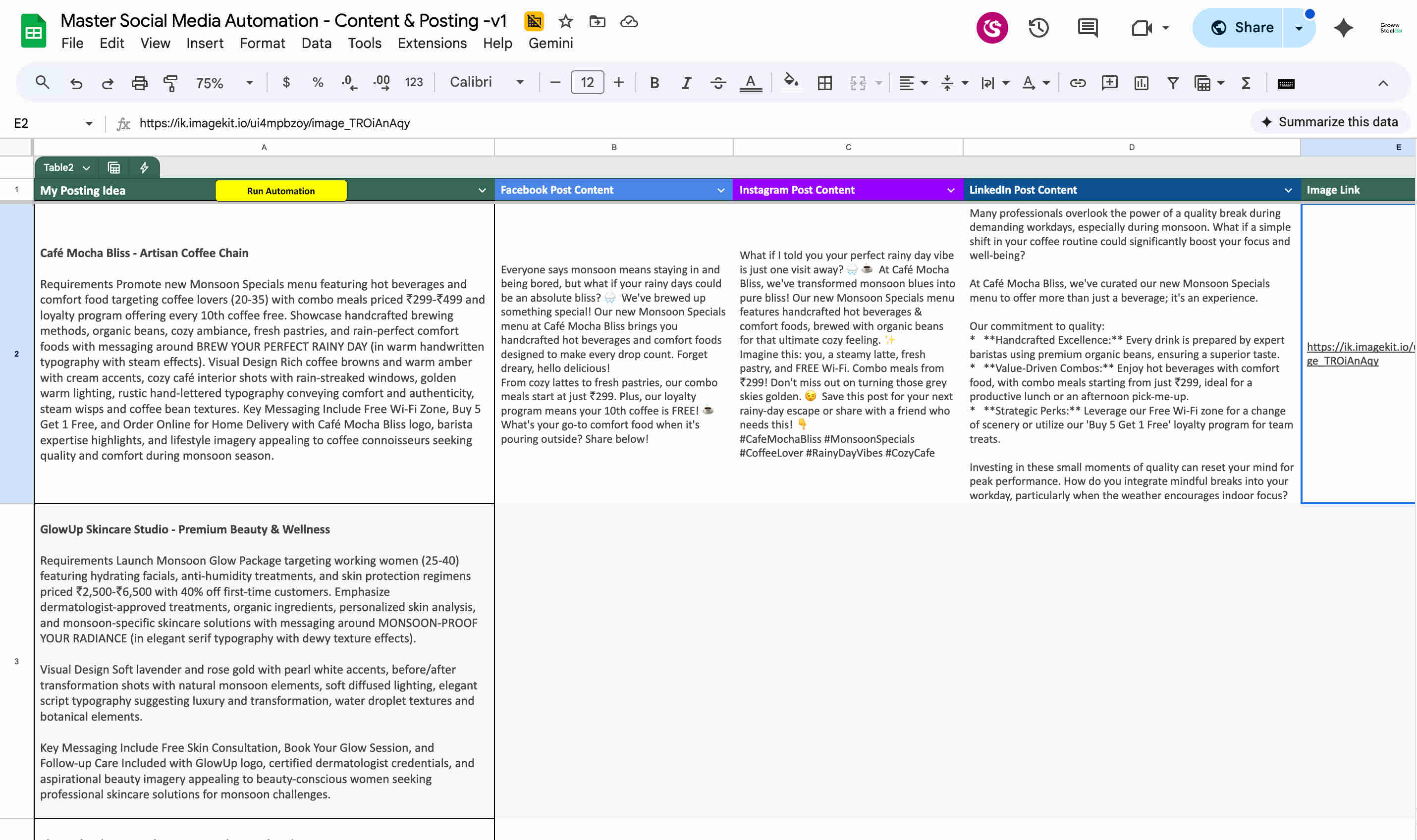
GrowwStacks built a social media automation that compresses the entire content production and publishing workflow — caption writing, image creation, platform formatting, and multi-platform publishing — into a single automated pipeline triggered by a scheduler checking a Google Sheets content calendar. The marketing team's role reduces to its highest-value component: deciding what to post. Everything from that decision forward is handled automatically.
The architecture is intentionally simple on the user-facing side. Google Sheets is the content calendar — a tool every marketing team already uses, requiring zero new software or interface to learn. The team enters a post idea, selects a date and time, selects the target platforms, and the pipeline does the rest. ChatGPT-4 brings genuine platform intelligence to caption generation — understanding that Instagram audiences respond to casual, conversational copy with relevant hashtag clusters, that LinkedIn audiences engage with insight-led professional content that demonstrates expertise, and that Facebook posts perform best with a conversational hook that invites comment engagement. DALL-E 3 eliminates the stock photo search and designer dependency that consumes hours weekly — generating a custom, contextually relevant image for every post idea automatically. And Make.com's three-route publishing architecture ensures that all selected platforms receive their respective content simultaneously, with platform-specific formatting handled per route.
From Post Idea to Live Multi-Platform Post: The Complete Five-Step Automated Pipeline
The system executes five automated steps for each scheduled content calendar entry — from ChatGPT caption generation through simultaneous multi-platform publishing and status update — without any manual action between the initial Sheets entry and the published post. Here's how each step operates:
- Google Sheets content calendar monitoring and triggering: Make.com runs a scheduled check of the Google Sheets content calendar — scanning the spreadsheet for rows where the publication date and time match the current datetime and the Status column is not yet marked as "Done." The filter is precise: a row scheduled for Tuesday at 10:00 AM triggers only when the Make.com scheduler checks at or after 10:00 AM on Tuesday. Multiple rows scheduled for different times on the same day each trigger independently at their respective scheduled times. The content calendar schema is straightforward: Post Idea (the brief description of what to post — one sentence to one paragraph), Publication Date (date field), Publication Time (time field), Platforms (dropdown or text field indicating Instagram, LinkedIn, Facebook, or any combination), and Status (updated to "Done" after successful publication). This minimal input requirement means the team's content planning effort is limited to the strategic and creative decision — what idea to communicate — with no time invested in execution mechanics.
- ChatGPT-4 platform-optimised caption generation: For each triggered content calendar row, Make.com calls the ChatGPT-4 API with a platform-specific prompt that generates captions tailored to each selected platform's audience conventions, tone expectations, and character limits. The prompts are engineered with distinct instructions per platform: Instagram captions are written in a casual, direct tone with relevant emoji and a cluster of 5–10 trending hashtags relevant to the post topic — optimised for discoverability and the visual-first Instagram feed experience. LinkedIn captions take a professional, insight-led voice — opening with a thought or observation relevant to the business audience, supporting with the post idea's key message, and closing with a question or call-to-action that invites professional engagement. Facebook captions use a conversational tone with an explicit engagement hook — a question or statement designed to generate comment responses, leveraging Facebook's algorithm preference for posts that prompt conversation. All three captions are generated in the same Make.com module call — using a structured output format that returns Instagram, LinkedIn, and Facebook caption variants in a single ChatGPT API response, minimising API call overhead.
- DALL-E 3 custom image generation and hosting: In parallel with or immediately following the caption generation step, Make.com calls the DALL-E 3 API with an image generation prompt derived from the post idea. The image prompt is engineered to produce visuals appropriate for professional social media use: contextually relevant to the post topic, visually clean and suitable for brand representation, and avoiding the photorealistic-human-face artefacts that DALL-E 3 can produce (which require careful prompt engineering to sidestep for professional brand contexts). DALL-E 3 returns a URL to the generated image, which Make.com downloads and prepares for platform upload. Each platform has specific image dimension and file format requirements — Instagram's feed posts perform best at square (1:1) or portrait (4:5) ratios, LinkedIn's feed prefers landscape (1.91:1), and Facebook's feed accommodates both. The image generation prompt can include aspect ratio guidance to produce a primary image suitable for the primary target platform, with the image serving all platforms from the same generation. For implementations requiring strict per-platform image dimension control, the DALL-E generation can be called with platform-specific prompts per route.
- Make.com three-route simultaneous publishing: The generated captions and image URL are passed to Make.com's router module, which activates the publishing routes corresponding to the platforms selected in the Google Sheets row. Each route operates independently using the platform's official API: the Instagram route uses the Instagram Graph API (via a connected Meta Business Suite Instagram Business account) to upload the image and publish the Instagram-formatted caption as a feed post; the LinkedIn route uses LinkedIn's UGC Posts API (via a connected LinkedIn company page or personal profile with posting permissions) to publish the professional caption with the embedded image; the Facebook route uses the Facebook Graph API (via a connected Facebook Page with content publishing access) to post the engagement-focused caption with the image to the page's timeline. The three routes execute in parallel within Make.com — all three platforms receive their content simultaneously rather than sequentially, ensuring consistent publish timing across channels regardless of individual API response speeds. Error handling per route captures API failures independently — a LinkedIn API error does not prevent Instagram and Facebook from publishing successfully.
- Google Sheets status update and audit trail maintenance: After all selected platform routes have completed (successfully or with logged errors), Make.com updates the Google Sheets row's Status column to "Done" — using the row's unique identifier to target the precise row. This status update serves two functions: it prevents the Make.com scheduler from re-processing the same row on subsequent checks (the filter excludes "Done" rows), and it gives the marketing team a real-time content calendar view showing which posts are live, which are scheduled, and which encountered an error requiring attention. For posts that fail on one or more platforms, the error is logged in a dedicated error column rather than marking the row as Done — flagging it for the team to review and manually republish the failed platform's content. The complete Google Sheets record provides a permanent content archive: every post idea, its AI-generated caption variants, its published status, and its publication timestamps — enabling content performance analysis and calendar retrospectives.
.png?updatedAt=1767607898140)
💡 Why platform-specific caption variants matter — and how ChatGPT-4 handles the tonal difference between Instagram, LinkedIn, and Facebook without human rewriting: The same post idea performs very differently across platforms when the caption is written for that platform's specific audience expectations. An Instagram caption that performs well is typically concise, direct, visually complementary, and hashtag-rich — because Instagram's audience discovery is hashtag and explore-page driven, and the caption supports rather than leads the visual. A LinkedIn caption for the same idea needs to lead with a professional insight or observation — because LinkedIn's feed algorithm surfaces content based on professional engagement signals (comments, shares from professional connections) and the audience reads captions more carefully than on visual-first platforms. Facebook's algorithm prioritises content that generates comment activity, which means Facebook captions should include explicit engagement invitations — questions, polls, or statements that invite response. ChatGPT-4's prompt engineering handles all three variants from the same post idea brief, producing genuinely different caption copy for each platform rather than a single caption reformatted for length. The 70% boost in engagement rates versus generic cross-posted content reflects this — platform-native captions perform meaningfully better than one caption copy-pasted to all three platforms.
What This System Delivers That Manual Social Media Management Cannot Sustain at Scale
Google Sheets Content Calendar
A centralised content planning interface the entire marketing team already knows how to use — no new software, no training, no complex platform to learn. Post ideas, publication dates, times, platform selections, and status tracking in a single spreadsheet that serves as both the content calendar and the workflow trigger. Teams plan weeks of content in a single planning session and the automation handles all publishing without further involvement.
Platform-Optimised ChatGPT-4 Captions
ChatGPT-4 generates genuinely platform-specific caption variants from every post idea — casual and hashtag-rich for Instagram, professional and insight-led for LinkedIn, engagement-focused for Facebook — without human rewriting or adaptation between platforms. Each variant respects the platform's optimal character limits and audience tone conventions, producing content that performs like natively written copy rather than cross-posted generic captions.
Automatic DALL-E 3 Image Generation
DALL-E 3 creates a custom, contextually relevant image for every post idea — eliminating stock photo subscriptions, Shutterstock fees, freelance designer costs, and the time spent searching image libraries for a visual that fits the post topic. Every post gets a unique image that is specific to its content idea rather than a generic stock photo, improving visual differentiation in platform feeds where stock photography is instantly recognisable.
Simultaneous Multi-Platform Publishing
Make.com's three-route architecture publishes to Instagram, LinkedIn, and Facebook simultaneously via their official APIs — no manual platform logins, no copy-pasting between interfaces, no sequential posting that causes timing inconsistency across channels. All three platforms receive their content at the scheduled time from a single Google Sheets trigger, eliminating the multi-platform navigation overhead that consumed the largest portion of manual social media management time.
The System in Action
Before vs. After: What Changes When Social Media Publishes Itself Every Day
Before: Marketing teams spent 10–15 hours weekly on the mechanical execution of social media — writing captions (and then rewriting them for each platform's tone), searching stock photo sites for a relevant image, opening Instagram separately to upload and format the post, switching to LinkedIn to adapt and post the same content, then logging into Facebook to repeat the process again. Posting schedules depended entirely on team availability: a busy week, a travelling team member, or an overwhelming project meant the posting calendar went dark for days, triggering algorithm distribution penalties that compounded over time. The visual content quality was constrained by stock photo availability (resulting in generic, over-used imagery) or designer capacity (producing excellent imagery that was the bottleneck rather than the support for the content flow).
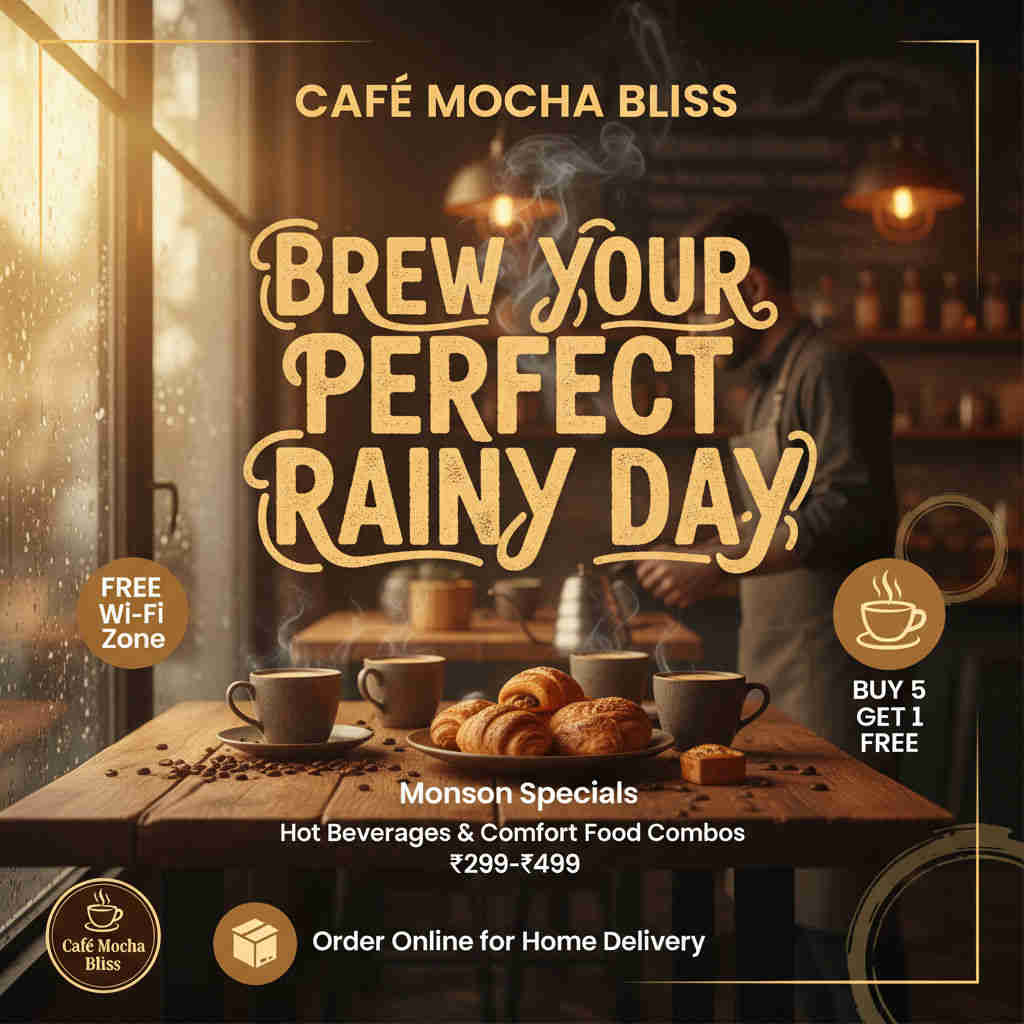
After: The marketing team spends 2 hours weekly on content planning — the highest-value part of social media management — entering post ideas into the Google Sheets content calendar for the week ahead. The automation handles everything else: writing the captions, creating the images, and publishing across all three platforms at the scheduled times, every day, including weekends and holidays. The content calendar runs on schedule whether or not anyone is in the office. Every post has a unique custom image rather than a recycled stock photo. Every caption is platform-native rather than copy-pasted across channels. And the 13 hours of weekly time reclaimed from mechanical execution is redirected to strategy, community engagement, and the creative thinking that actually determines what's worth posting in the first place.
Implementation: Live in 3 Weeks
- Google Sheets content calendar template setup (Week 1): The Google Sheets content calendar is built with the full column schema: Post Idea (the brief for content generation — can be a sentence, a topic, or a detailed description depending on the team's preference), Publication Date, Publication Time, Platforms (dropdown with options: Instagram only, LinkedIn only, Facebook only, Instagram + LinkedIn, Instagram + Facebook, LinkedIn + Facebook, All Platforms), Status (Pending / Done / Error), and optional columns for generated caption preview and published post URLs. Data validation rules are applied to the Platform and Status columns to ensure consistent values. A sample week of content entries is added to validate the scheduling logic during testing. The Sheets template is shared with the marketing team and a brief usage guide is prepared — typically a single page explaining the three required fields per row and the scheduling convention.
- AI integration configuration (Week 1–2): The ChatGPT-4 API connection is established in Make.com with the API key. Platform-specific caption generation prompts are developed and refined: the Instagram prompt instructs ChatGPT on caption length (typically 100–150 words maximum for feed posts), tone (conversational, direct, visual-complementary), hashtag count and style (5–10 relevant hashtags, mix of broad and niche), and any brand voice guidelines specific to the client. The LinkedIn prompt specifies professional tone, insight-led opening, optimal length for LinkedIn's algorithm (150–300 words tends to outperform very short or very long captions), and a professional CTA. The Facebook prompt focuses on conversation-inviting structure with an opening hook and closing question. The prompts are tested with 10–15 sample post ideas across different topic categories, reviewing caption output quality and making prompt refinements until the generated captions meet the client team's quality standard. The DALL-E 3 integration is configured with image generation prompts that produce brand-appropriate, professional-quality visuals — with style guidance (photorealistic, illustrated, minimal, etc.) tailored to the brand's visual identity.
- Social platform API authentication (Week 2): Instagram Business account authentication is established via Meta Business Suite — connecting the Instagram Business account (converted from a personal account if necessary) to a Facebook Page, then authenticating through Make.com's Meta connection with the necessary permissions: instagram_basic, instagram_content_publish, and pages_read_engagement. LinkedIn authentication connects the company page or personal profile via OAuth 2.0 with posting permissions (w_member_social for personal profiles, w_organization_social for company pages). Facebook Page authentication is established via the Meta API with pages_manage_posts and pages_read_engagement permissions. Each platform connection is tested independently — publishing a test post and confirming successful delivery — before the three routes are assembled into the complete Make.com scenario.
- Make.com scenario deployment and testing (Week 3): The complete Make.com scenario is assembled: the Google Sheets scheduled trigger (checking for Pending rows at the configured check frequency — typically every 15 minutes for scheduling precision), the ChatGPT-4 caption generation module, the DALL-E 3 image generation module, the three-route publishing router, each platform's API posting module with field mapping (caption variable, image URL, platform-specific parameters), and the Google Sheets Update Row module that writes "Done" or the error status after each run. Error handling routes are built for each platform independently — capturing API errors, authentication expiry, and rate limit responses without cascading to other platform routes. The complete scenario is tested with 5–10 real content calendar entries across different platform combinations and scheduling times, confirming end-to-end execution: caption quality, image generation appropriateness, correct platform routing, successful API publication on each platform, and accurate Sheets status updates. Minor prompt and workflow refinements are made based on test output before production activation.
The Right Fit — and When It Isn't
This solution delivers maximum value for small and mid-sized business marketing teams maintaining active social presence across Instagram, LinkedIn, and Facebook; digital marketing agencies managing social media for multiple clients; e-commerce brands requiring consistent product and brand content across platforms; B2B companies using LinkedIn for thought leadership alongside Instagram and Facebook for brand awareness; content creators managing brand accounts alongside personal channels; and any organisation where social media management currently consumes more than 5 hours weekly on mechanical execution tasks. The 3-week implementation timeline is among the shortest in the GrowwStacks portfolio — making this one of the fastest-payback automation investments available for marketing teams.
Two important calibration points: the system generates captions and images from the post idea brief the team provides — the quality of the output is directly proportional to the quality of the brief. A post idea that reads "post about our new product" produces a less specific, less effective caption than "post about our new project management tool's time-tracking feature, targeting small agency owners who currently use spreadsheets to track billable hours." The brief is the creative brief; the AI executes from it, not in place of it. Additionally, DALL-E 3 image generation produces high-quality visuals for most brand contexts but is not a replacement for professional product photography (where real product images are essential), human portrait photography (for personal brand content where authenticity requires real people), or brand-specific design work (where strict brand guidelines require precise typography, colour systems, and graphic elements that fall outside DALL-E's current output capabilities). For content categories requiring actual brand photography or design-system-compliant graphics, a hybrid approach — using the automation for AI-generatable content types and a different pipeline for photography-dependent content — is typically the right configuration, which we scope during the discovery call.