
The Task Management Cost Trap: Expensive Software, Low Adoption, and Manual Tracking That Still Happens in Spreadsheets Anyway
Most organisations face a predictable task management failure pattern: they invest in a dedicated project management platform — Asana, Monday.com, Jira, ClickUp — pay per-seat licence fees across the team, spend weeks on onboarding, and then find that adoption plateaus at 40–60% because the tool feels foreign to operational staff who live in Google Workspace and email. The team members who don't adopt the tool continue tracking their tasks in ad-hoc spreadsheets, WhatsApp messages, and mental notes. The result is fragmented visibility: the project manager has information in the PM tool, the operational team has information in Google Sheets, and nobody has a complete picture. Deadline tracking reverts to manual review. Overdue tasks are discovered in team meetings rather than caught in advance. And the organisation is paying $20,000–$200,000+ annually in software licences for a tool that isn't actually solving the tracking and accountability problem it was purchased to address.
The communication failure compounds the tracking failure. Even when tasks are logged in a system, the notification that a team member has been assigned a task — or that a deadline is approaching — relies on the team member checking the tool proactively. For operational staff who are heads-down in their daily work, checking a project management dashboard is an extra behavioural step that frequently doesn't happen until the deadline has already passed. The missed reminder. The overdue task. The manager who finds out about a delay in the weekly standup rather than 3 days before when there was still time to act. This is the accountability gap that the right notification architecture — delivered through WhatsApp, the channel every team member is already monitoring — can close.
Building the Zero-Licence Task Management System: Full Project Visibility Inside Google Workspace, Notifications on WhatsApp
GrowwStacks built a complete task management ecosystem that solves the adoption and accountability problems without introducing any new software outside the Google Workspace tools the organisation already pays for and uses daily. The architecture uses Google Apps Script — the native JavaScript automation platform built into Google Workspace — to add sophisticated task management behaviour to a Google Sheets foundation: automatic scheduled triggers for overdue detection, real-time dashboard calculations, status change event handlers, and department-wise allocation routing logic.
The notification strategy is the system's accountability differentiator: rather than relying on team members checking a dashboard proactively, the system pushes critical task information to them via WhatsApp Business API — the channel that produces the highest read rates and fastest response times of any business communication medium. Task assignments arrive as instant WhatsApp messages. Overdue reminders escalate through a configured sequence. Manager reports are delivered automatically on schedule. The employee database in Google Sheets maintains every team member's contact information, department, and notification preferences — ensuring the right person receives the right message at the right time, consistently, without manual intervention.
The Complete Task Management System: Seven Integrated Components Working in Harmony
The system operates as seven integrated components — each handling a distinct part of the task management workflow — all built within Google Workspace and connected through Google Apps Script automation. Here's how the complete system functions:
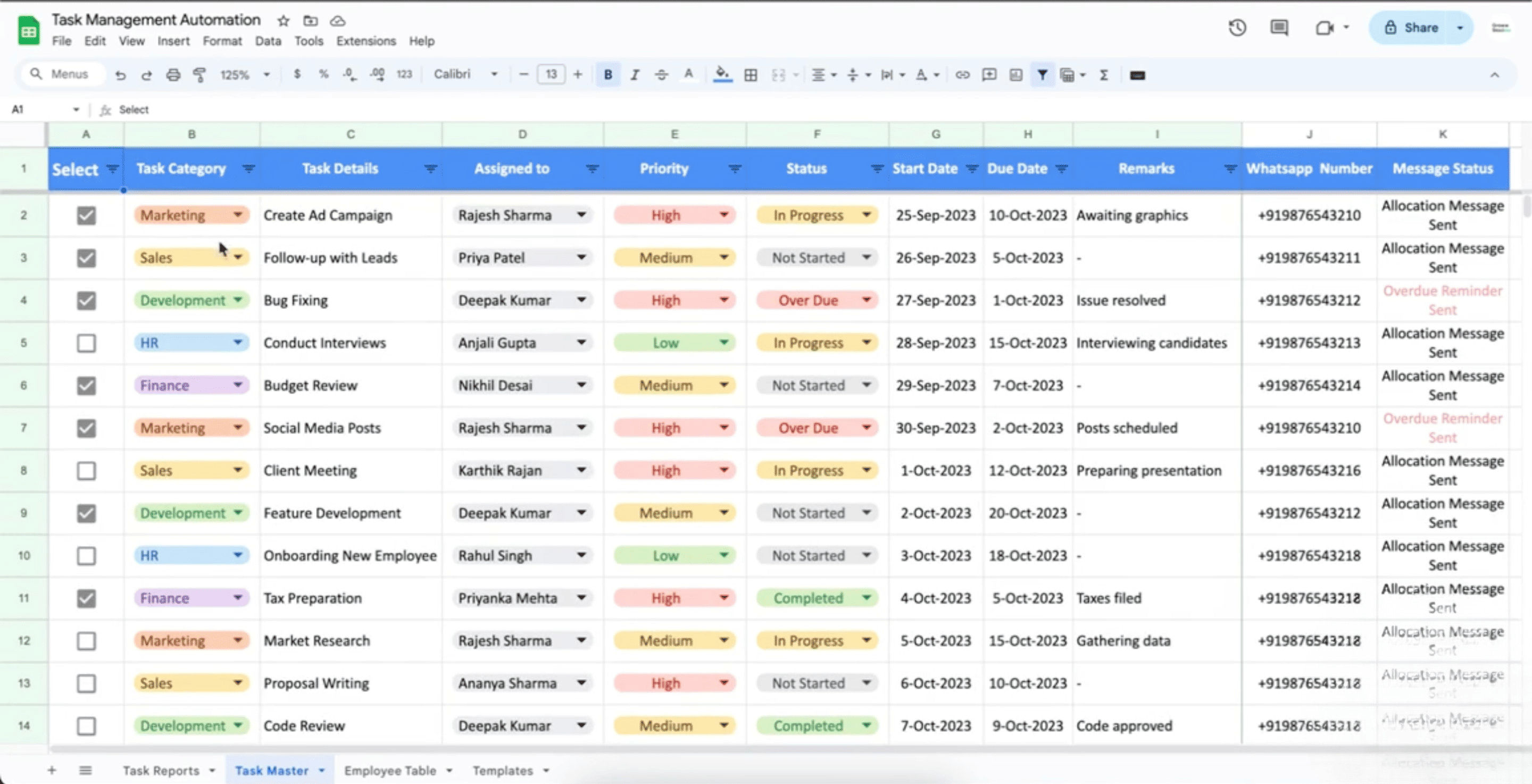
- Task creation and department-wise allocation: Tasks are created in the central Google Sheets task database — either directly by managers entering task details, or through a Google Form that provides a structured input interface for task submission. Each task record captures the task title and description, assigned team member (selected from the employee database), department, priority level (Critical / High / Medium / Low), due date, and any relevant notes or attachments linked from Google Drive. Apps Script validates the entry on submission — confirming the assigned employee exists in the database, the due date is a future date, and all required fields are populated — with data validation rules preventing incomplete task records from entering the system. Department-wise allocation logic can be configured to automatically suggest or assign tasks to team members based on department, current workload, and availability status fields maintained in the employee database.
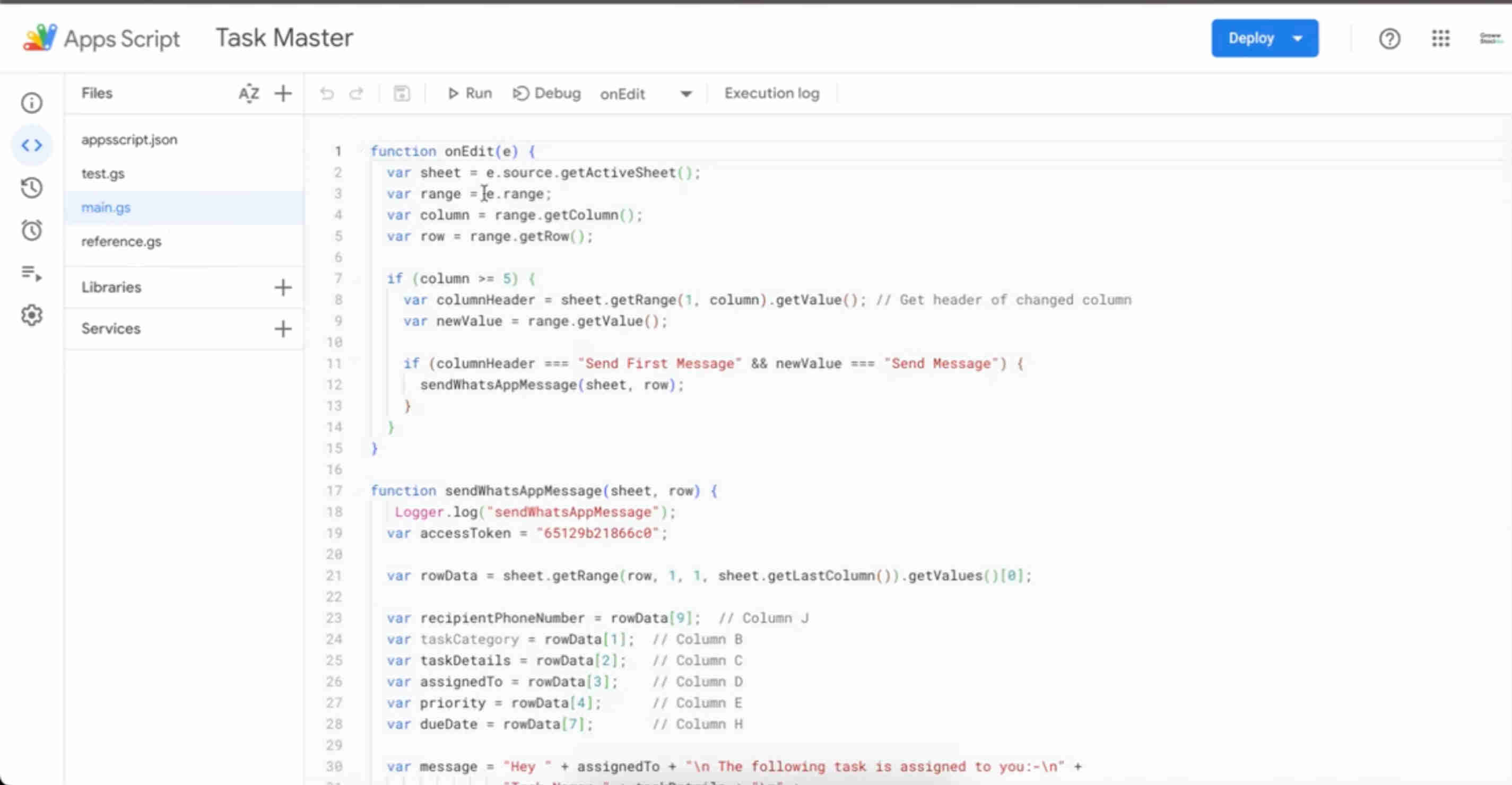
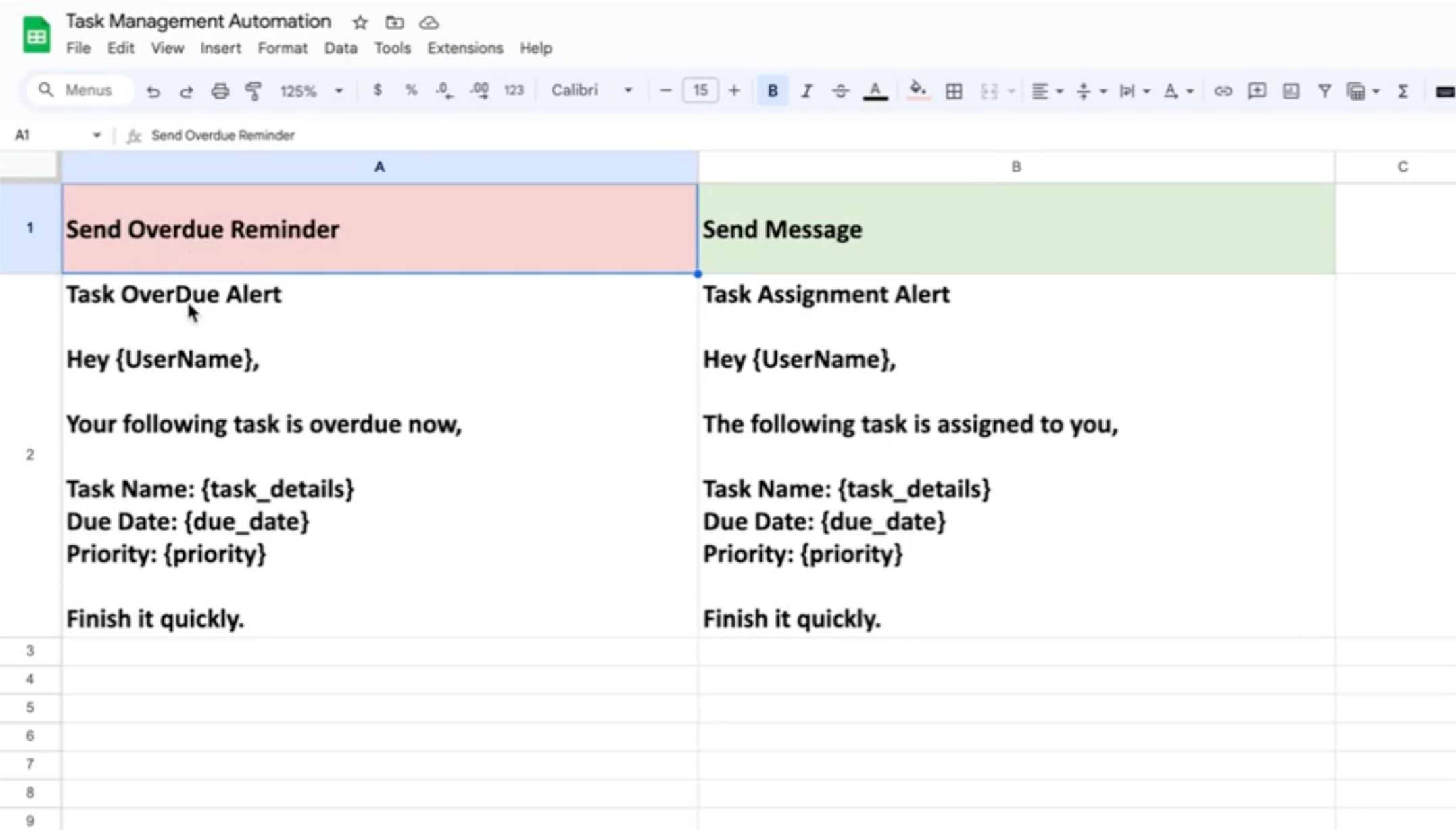
- WhatsApp task assignment notifications: When a new task is created and assigned to a team member, an Apps Script trigger fires immediately — retrieving the assignee's WhatsApp number from the employee database and sending a task assignment notification via the WhatsApp Business API. The notification message is formatted using a pre-approved WhatsApp Business message template: the task title, priority level, due date, brief description, and a link to the Google Sheets task record for full details. The template format ensures consistency across all assignment notifications and complies with WhatsApp's Business API template messaging requirements. The assignee receives the notification on WhatsApp within seconds of the task being created — with no dependency on them checking their email, the Google Sheet, or any other system.
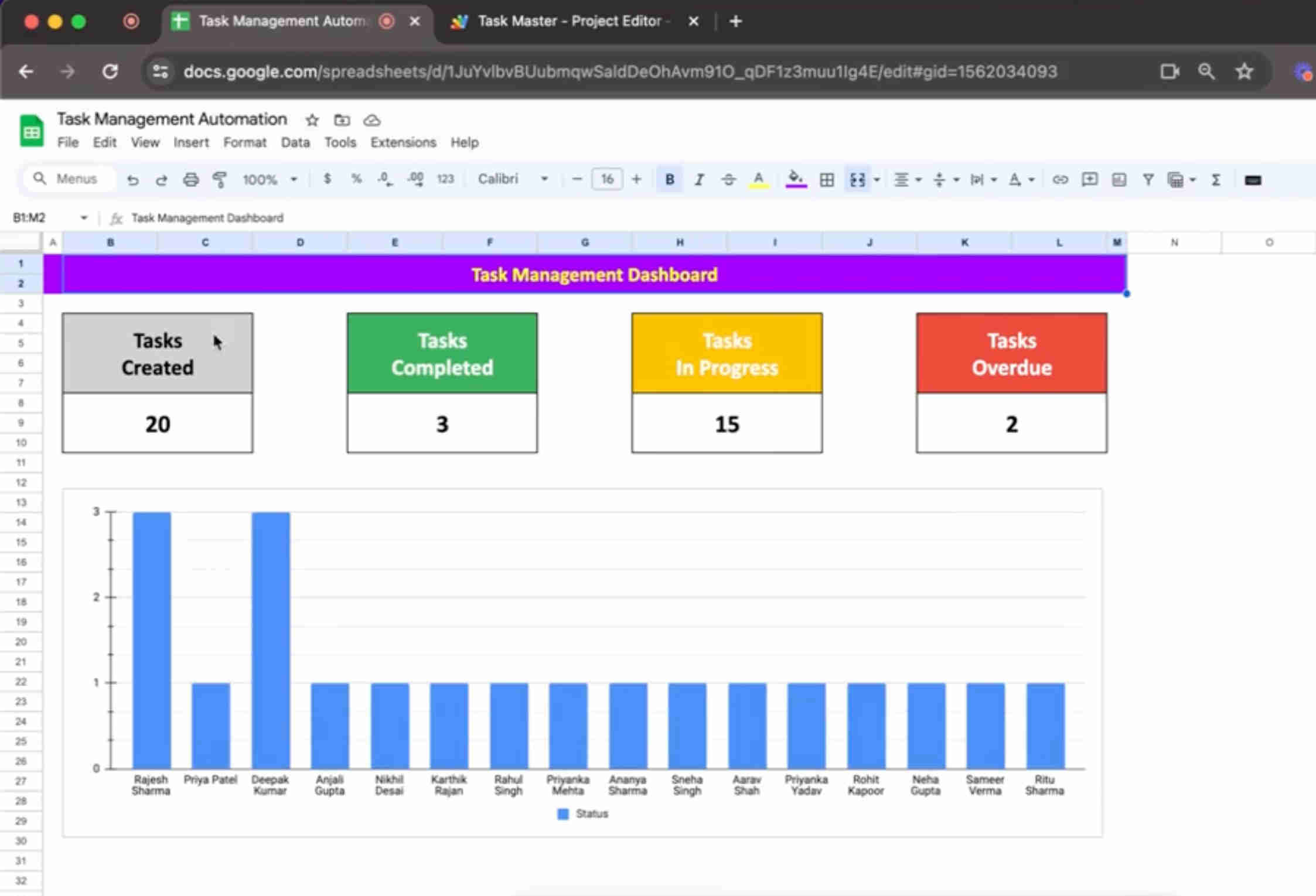
- Real-time dashboard visibility: The Google Sheets dashboard is built using Apps Script-powered calculated views that aggregate task data across the full database in real-time. The dashboard displays total task counts by status (Pending / In Progress / Completed / Overdue), task distribution by department and assignee, priority-level breakdowns, completion rate trends over configurable time periods, and individual team member workload summaries. The dashboard updates automatically whenever task data changes — no manual refresh required, no pivot table rebuild, no separate reporting step. Managers and team leads access the dashboard from their Google Sheets without logging into a separate system, and the familiar Google Sheets interface means no training is required for anyone who can read a spreadsheet.
- Automatic overdue detection: An Apps Script time-driven trigger runs on a daily schedule — scanning the full task database and comparing each incomplete task's due date against the current date. Tasks where the due date has passed and the status is not Completed are flagged as Overdue in the status column, which immediately reflects in the dashboard. The overdue detection trigger can be configured to run multiple times daily — morning and evening, for example — to ensure overdue status is current for teams that check dashboards throughout the day. The detection logic respects configured non-working days (weekends, public holidays) for organisations where due dates should not trigger overdue status on non-business days.
- Escalating overdue reminder sequence: When a task is flagged as overdue, the Apps Script overdue handler initiates a reminder sequence via WhatsApp. The first reminder goes to the task assignee — a template message noting the overdue status and requesting an update. If the task remains overdue after a configured interval (typically 24 hours), a second reminder is sent to the assignee with increased urgency. If the overdue period extends to a second threshold (typically 48 hours without status update), an escalation message is sent to the assignee's manager — alerting them to the overdue task and including both the task details and the reminder history. This escalation path ensures that genuinely blocked or forgotten tasks surface to management attention without requiring managers to monitor the dashboard continuously.
- Employee database and contact management: The employee database sheet maintains the complete record for every team member: full name, department, WhatsApp number, email address, manager name and contact, current task load, and notification preference settings (whether to receive WhatsApp notifications, notification time windows, and escalation preferences). This database is the single source of truth for all contact-based automation in the system — task assignment notifications, overdue reminders, manager escalations, and report delivery all draw contact information from this central record. Employee records can be added, updated, or deactivated by the system administrator directly in the Google Sheet, with Apps Script validation ensuring contact information is complete before any automated communication uses the record.
- Automated manager reports: On a configured schedule — daily, weekly, or per-department preference — Apps Script generates a manager report summarising team task status: total tasks assigned, completion percentage, tasks at-risk (due within 48 hours and not yet completed), overdue task list with assignee and days overdue, and completed tasks from the reporting period. The report is delivered via WhatsApp to the configured manager contact — formatted as a structured template message that is readable and actionable on a mobile device without opening a computer. Managers receive their team's task status report automatically, on schedule, without needing to open the Google Sheet, run a filter, or request the information from their team.
💡 Why the zero-licence-cost architecture produces 450% ROI regardless of team size: Commercial project management tools charge per seat — at $10–25 per user per month for standard plans, a 100-person organisation pays $12,000–$30,000 annually just for the licences, before accounting for implementation, training, and administration costs. Enterprise tiers for organisations requiring advanced features, SSO, and dedicated support can exceed $100,000 annually. This system runs entirely on Google Apps Script — which is included at zero additional cost in every Google Workspace plan (Business Starter, Business Standard, Business Plus, and Enterprise). An organisation already paying for Google Workspace adds zero incremental licence cost for this system, regardless of how many users access it. The $200K+ annual savings figure reflects the replacement value of enterprise project management licences, not an aspirational estimate — it's the actual licence cost that organisations migrating from commercial PM tools to this system eliminate from their software budget.
What This System Provides That Commercial PM Tools Don't
Real-Time Google Sheets Dashboard
Live task visibility through Google Sheets dashboards showing pending, in-progress, completed, and overdue counts by department, assignee, and priority — updating automatically as task data changes. Operates in the Google Workspace environment every team member already uses daily, eliminating the adoption barrier that makes dedicated PM tools fail at operational staff level, with zero training required for any team member who can read a spreadsheet.
WhatsApp Notification System
Delivers task assignment notifications, due date reminders, overdue escalations, and manager reports via WhatsApp Business API — the highest read-rate business communication channel. Eliminates the dependency on team members checking dashboards proactively by pushing critical task information to the channel they're monitoring continuously, producing the 300% communication efficiency improvement that email-based or in-tool notifications cannot achieve.
Automatic Overdue Detection
Apps Script scheduled triggers run daily (or multiple times daily) scanning every incomplete task against the current date, flagging overdue tasks automatically and initiating the reminder sequence without manual intervention. Detects deadline slippage before it becomes a missed commitment — with configurable non-working day awareness ensuring overdue status reflects actual business days rather than calendar days.
Escalating Reminder Sequences
Overdue tasks trigger a configurable reminder sequence — first to the assignee, then with increased urgency, then to the manager if the task remains unresolved beyond a second threshold. Ensures that genuinely blocked or forgotten tasks surface to management attention automatically, without requiring managers to run daily status checks or team members to proactively report delays they may be hoping to resolve before they're noticed.
Employee Database & Contact Management
Centralised employee database maintains contact information, department assignments, manager relationships, and notification preferences for every team member — providing the single source of truth for all automated communications. Department-wise task allocation logic routes assignments to the correct team, and the database structure supports role-based visibility, workload monitoring, and notification preference management without external HR software integration.
Zero Third-Party Dependencies
The entire system operates within Google Workspace — Google Sheets for data and dashboards, Google Apps Script for automation, Google Forms for task intake, and Google Drive for attachment storage. No third-party project management licences, no external databases, no additional SaaS subscriptions, no data leaving the organisation's Google Workspace tenant. Runs on the Google Workspace plan the organisation already pays for, eliminating $200K+ in annual software costs for organisations replacing commercial PM tools.
The System in Action
Before vs. After: What Changes When Task Management Runs Inside the Tools Teams Already Use
Before: Task management was fragmented across multiple surfaces — some tasks in a project management tool that 40–60% of the team actually used, others in personal spreadsheets, others in WhatsApp messages between managers and team members, and others tracked only in weekly meeting notes. Overdue tasks were discovered in standups rather than prevented. Managers spent time chasing status updates rather than receiving them proactively. The organisation paid significant annual licence fees for project management software that the team used inconsistently and that didn't integrate naturally with their Google Workspace workflow. Training new team members on the PM tool took time and produced inconsistent compliance. And reporting required manual effort to extract, filter, and present task status data from a system that most team members hadn't fully updated.
After: Every task is logged in a single Google Sheets system that every team member can access and update in their familiar environment — no new tool adoption, no behavioural change beyond switching from an ad-hoc spreadsheet to the structured system. Assignment notifications arrive in WhatsApp immediately on task creation — eliminating the "I didn't know I was assigned that" response. Overdue reminders reach team members on their phones before deadlines pass, not after. Managers receive daily or weekly WhatsApp summaries of their team's task status without pulling reports. The dashboard gives every stakeholder live visibility at any moment. And the organisation's $200K+ annual PM software spend is eliminated entirely — the system runs on infrastructure the business already owns.
Implementation: Live in 8 Weeks
- Google Workspace setup and configuration (Weeks 1–2): The Google Sheets database structure is designed with the complete schema for the task management system: task records sheet (with all required fields, data validation rules, and dropdown selections for status, priority, and assignee), employee database sheet (with contact fields, department, manager, and notification preferences), department and category configuration sheets, and permission settings ensuring appropriate team members can view versus edit each component. Google Forms are configured for task submission with conditional logic that maps form responses to the correct database columns. Google Drive folder structure for task attachments is established, and sharing permissions are configured for the complete Workspace environment.
- Apps Script development and automation (Weeks 3–4): Core Google Apps Script functions are written and tested: the task creation event handler (fires when a new task row is added, validates data, dispatches assignment notification), the overdue detection scheduled trigger (configured as a time-driven trigger running at the configured frequency, comparing due dates, updating status fields, initiating reminder sequences), dashboard calculation functions (updating summary counts and charts automatically when task data changes), and department-wise allocation logic (routing and suggestion functions based on department and workload fields). All functions include error handling and execution logging for monitoring and debugging.
- WhatsApp Business API integration (Weeks 5–6): The WhatsApp Business API connection is established — either through a direct WhatsApp Business API provider or through the 360dialog API, both of which Apps Script can call via UrlFetchApp. Pre-approved message templates are created for each notification type: task assignment, due-date reminder (24-hour advance notice), overdue first reminder, overdue escalation to manager, and manager summary report. Templates are submitted for WhatsApp's approval process (typically 24–72 hours for standard business templates). The Apps Script WhatsApp dispatch functions are built to retrieve the correct contact number from the employee database, select the appropriate template, populate template variables with task-specific data, and call the API with proper error handling and delivery confirmation logging.
- Testing, dashboard optimisation, and deployment (Weeks 7–8): Comprehensive end-to-end testing is conducted with a representative sample of tasks across all scenarios: new task creation with assignment notification, status updates propagating correctly to the dashboard, overdue detection firing at the correct time and updating status accurately, the full reminder and escalation sequence executing in the correct order, and manager reports generating on schedule with accurate data. Dashboard performance is optimised for the expected task volume — ensuring the real-time calculations don't create significant lag for large task databases. Error handling is validated for API failures, missing employee records, and malformed data. The system is deployed to the production Google Workspace environment and the team is briefed on the task creation workflow, status update process, and how to access the dashboard.
The Right Fit — and When It Isn't
This solution delivers maximum value for organisations already operating within Google Workspace that are managing 20–500+ tasks weekly across multiple team members and departments, where the primary failures are missed deadlines, inconsistent status visibility, and over-reliance on verbal or ad-hoc task tracking. It's particularly well-suited for organisations paying for enterprise project management software but experiencing low adoption — the migration from a PM tool to this system eliminates the licence cost while typically improving actual task compliance because the interface barrier is removed. Mid-sized organisations (50–500 employees), enterprise department teams, and SMEs with 10–50 staff all benefit strongly from the architecture.
Two important scoping notes: the system is optimised for operational and project task management — assignments, deliverables, and recurring work items with clear owners and due dates. It is not a replacement for Agile sprint management tools with story points, velocity tracking, and developer workflow integrations (Jira, Linear) in software engineering environments where those specific features are used. Additionally, the WhatsApp Business API notification component requires a verified WhatsApp Business account and pre-approved message templates — the setup process includes WhatsApp's business verification, which is guided during the implementation, and template approval timelines (24–72 hours) are factored into the project schedule. For organisations that cannot use WhatsApp Business API, the notification component can be adapted to use email via Gmail Apps Script integration or SMS via an API provider, delivering equivalent scheduling functionality through the available channel.