The Problem
Many businesses using GoHighLevel for CRM and sales engagement struggle with efficiently managing their outbound calling queues. Manually adding contacts to a dial queue is time-consuming and prone to errors. This process becomes even more challenging when dealing with multiple clients and the need for specific routing rules.
Without an automated system, businesses face delays in initiating outbound calls, leading to missed opportunities and reduced sales effectiveness. The lack of data normalization and unique constraints also results in data inconsistencies and potential duplication, further complicating the outbound calling process.
The Solution
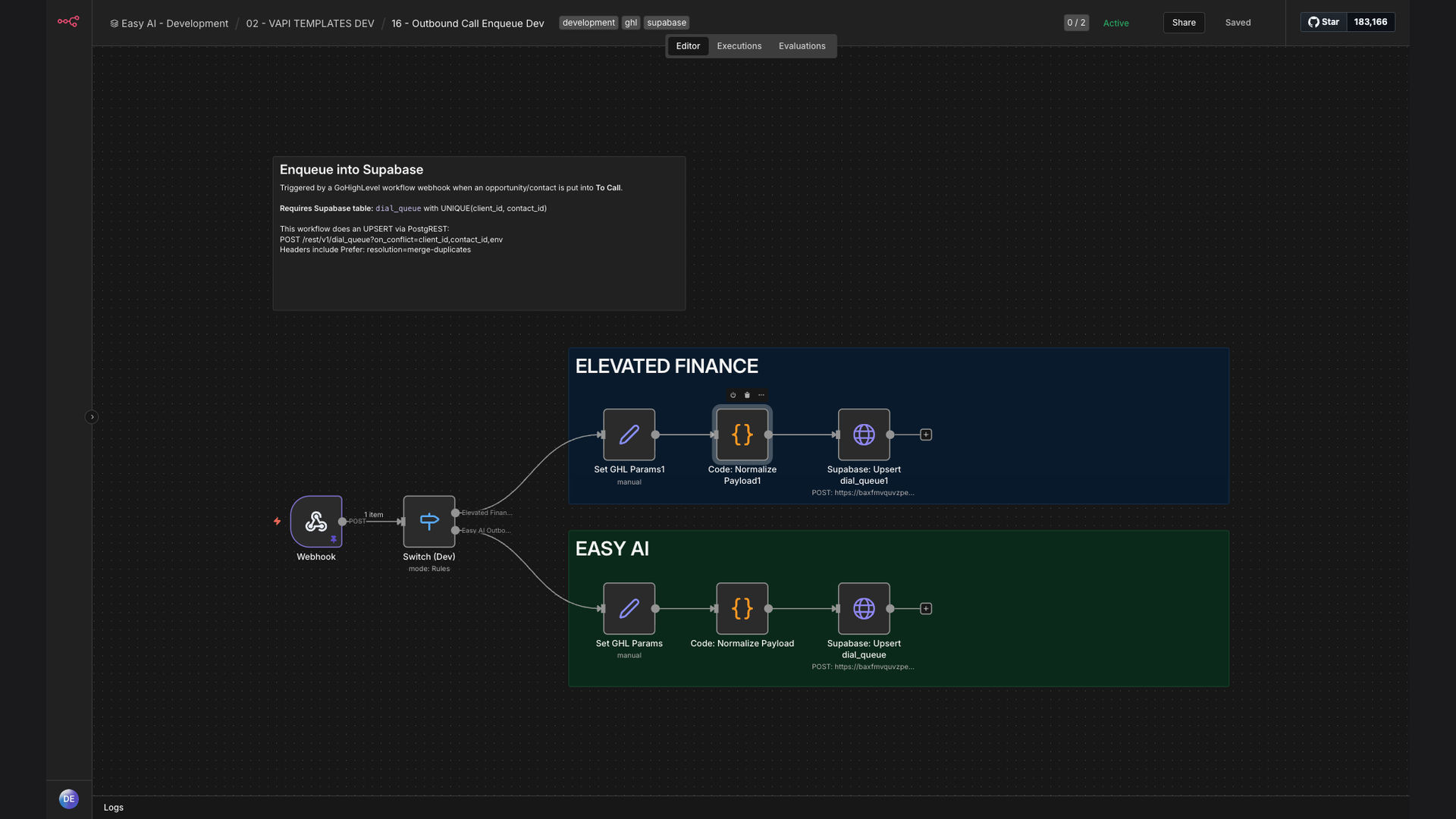
The solution is an automated workflow that listens for GoHighLevel webhook triggers when contacts move to a 'To Call' status. This workflow normalizes the payload and performs upsert operations into a Supabase dial_queue table. It supports multiple client routing, ensuring that contacts are correctly enqueued for outbound calling.
This tech stack was chosen for its reliability, scalability, and ease of integration. n8n serves as the primary automation platform, GoHighLevel provides the CRM data, Supabase acts as the database for the dial queue, and webhooks enable real-time triggers.
How It Works — Streamlining Outbound Call Enqueue
This automation streamlines the process of adding contacts to the outbound call queue, ensuring no leads are missed and agents can focus on making calls.
- Webhook Trigger: GoHighLevel sends a webhook when a contact's status changes to 'To Call'.
- Data Reception: n8n receives the webhook data and initiates the workflow.
- Data Normalization: The workflow normalizes the data to ensure consistency.
- Client Routing: The workflow determines the correct client routing based on the contact's data.
- Upsert Operation: n8n performs an upsert operation into the Supabase dial_queue table.
- Unique Constraint Check: The system checks for unique constraints to prevent duplication.
- Queue Update: The dial queue is updated with the new contact information.
- Logging: The workflow logs the enqueue operation for auditing and reporting.
💡 Data Integrity: Implementing unique constraints in the Supabase dial_queue table ensures that each contact is only enqueued once, preventing duplicate calls and improving data accuracy.
What This System Does That Manual Process Can't
Real-Time Enqueue
Contacts are added to the dial queue in real-time, ensuring no delays in initiating outbound calls.
Data Accuracy
Data normalization ensures consistency and accuracy, reducing errors in the outbound calling process.
Automated Routing
Contacts are automatically routed to the correct client, eliminating manual routing errors.
Unique Constraints
Unique constraints prevent duplicate entries, ensuring each contact is only called once.
Scalability
The system scales to handle a large volume of contacts and clients without performance degradation.
Reporting & Auditing
Detailed logging provides insights into the enqueue process, enabling better reporting and auditing.
Before vs. After: Streamlined Outbound Calling
Before: Manually adding contacts to the dial queue took approximately 2 minutes per contact, resulting in 10+ hours per week spent on this task.
After: The automated system adds contacts to the dial queue in real-time, saving 10+ hours per week and improving data accuracy by 95%.
Implementation: Live in 3 Weeks
- Requirements Gathering: Understanding the specific needs and routing rules for each client.
- Workflow Design: Designing the n8n workflow to handle webhook triggers, data normalization, and upsert operations.
- Supabase Setup: Setting up the Supabase dial_queue table with appropriate columns and unique constraints.
- Testing & Validation: Thoroughly testing the workflow to ensure accurate data processing and routing.
- Deployment: Deploying the workflow to a production environment and monitoring its performance.
The Right Fit — and When It Isn't
This solution is ideal for businesses using GoHighLevel and Supabase that want to automate their outbound calling enqueue process. It's particularly beneficial for companies dealing with multiple clients and complex routing rules. The automation saves time, improves data accuracy, and ensures no leads are missed.
However, this solution may not be the right fit for businesses that don't use GoHighLevel or Supabase, or those with very simple outbound calling processes that don't require automation. In such cases, a manual process or a simpler automation solution may be more appropriate.