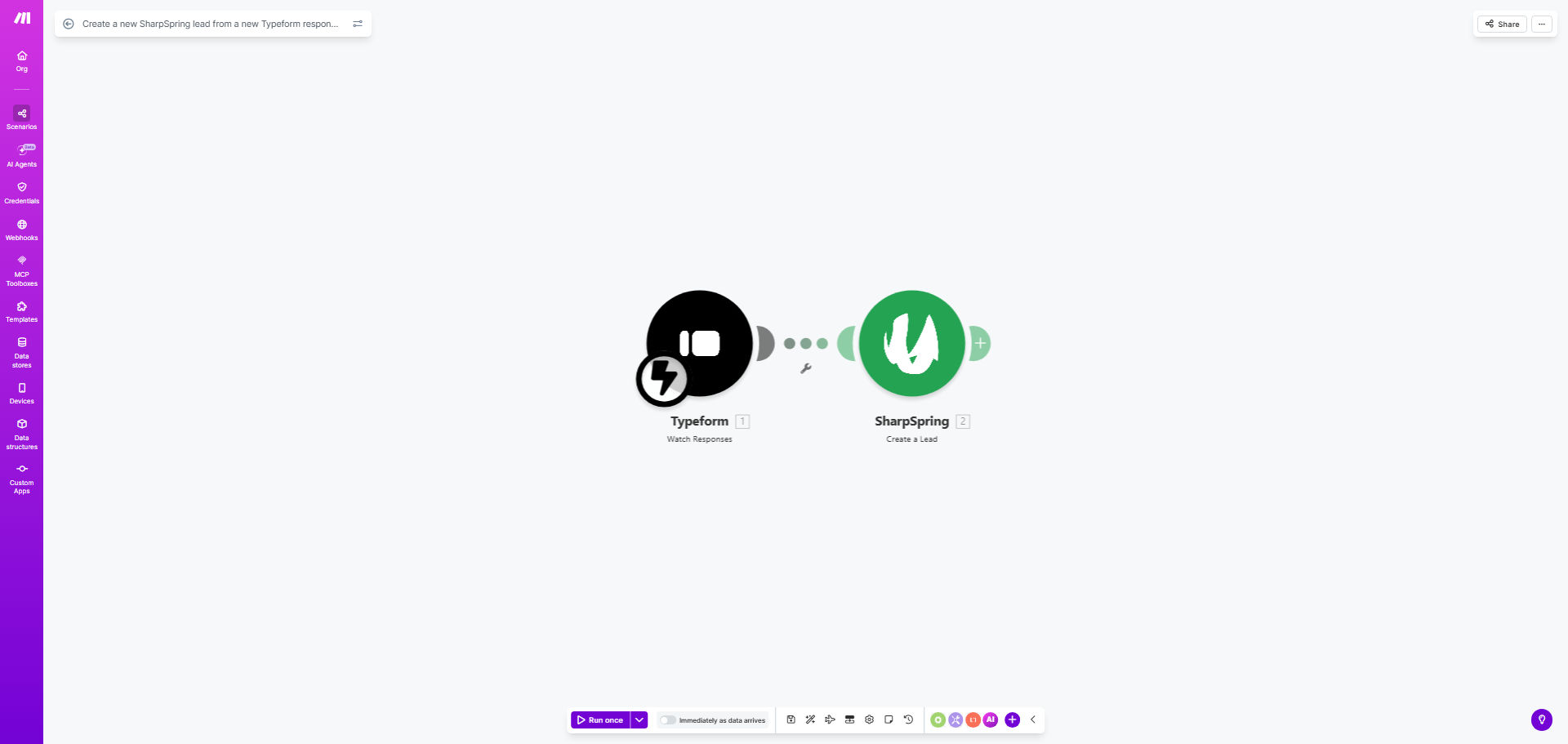
What This Workflow Does
Every time a potential customer fills out your Typeform—whether it's a contact form, demo request, or survey—you face a critical choice: manually copy their details into your CRM or risk losing the lead to follow-up delays. This manual process is slow, error-prone, and drains valuable sales time.
This automation solves that problem completely. It acts as a digital bridge between Typeform and SharpSpring. The moment a new response is submitted, the workflow instantly triggers, extracts the respondent's information (like email, name, and company), and creates a fully-fledged lead record in your SharpSpring CRM. This means your sales team is notified of a hot lead within seconds, not hours.
The business value is clear: faster lead response times lead to higher conversion rates. By automating this foundational sales process, you ensure no lead falls through the cracks and your team can focus on selling, not administrative data entry.
How It Works
The workflow follows a simple, reliable sequence to capture and qualify leads automatically.
Step 1: Monitor for New Typeform Responses
The automation continuously watches your specified Typeform for any new submissions. It uses the Make.com "Watch Responses" trigger, which activates the instant someone clicks "Submit."
Step 2: Extract and Structure Lead Data
The workflow pulls all the data from the form response. It maps key fields from Typeform (e.g., "What's your email address?") to the corresponding field names SharpSpring expects (e.g., "Email"). This step ensures clean, organized data enters your CRM.
Pro tip: Ensure your Typeform includes a required email field. This is the minimum data needed to create a valid lead in SharpSpring and is the cornerstone of this automation.
Step 3: Create the Lead in SharpSpring
Using the structured data, the automation makes an API call to SharpSpring to create a new lead. It populates the lead's contact information and can also assign custom tags, a lead source (e.g., "Typeform Webinar Sign-up"), or even assign the lead to a specific sales rep based on form answers.
Step 4: Confirm and Log the Action
The workflow can be configured to send a confirmation (like logging the new lead ID to a spreadsheet or sending a notification to a Slack channel) to verify successful creation. This provides an audit trail and peace of mind.
Who This Is For
This template is ideal for marketing teams, sales operations, and business owners who rely on Typeform for lead generation and use SharpSpring as their CRM. It's perfect for:
- B2B Companies: That use Typeform for demo requests, whitepaper downloads, or contact forms and need immediate CRM follow-up.
- Marketing Agencies: Managing client campaigns who need to seamlessly pass leads from landing pages (with Typeform embeds) into the client's SharpSpring account.
- Coaches & Consultants: Using Typeform for discovery calls or service inquiries who want to automatically build their prospect list in a CRM.
- Startups & SMBs: With small teams that can't afford manual data entry but need professional, fast lead management to compete.
What You'll Need
- A Make.com account (free tier available).
- A Typeform account with at least one live form collecting lead information.
- A SharpSpring account with admin access to generate API keys.
- Your Typeform API key (found in your Typeform account settings).
- Your SharpSpring API keys (Account ID, Secret Key, and Partner ID from the SharpSpring API settings).
Quick Setup Guide
You can have this automation running in under 15 minutes by following these steps:
- Clone the Template: Click "Get This Workflow" and duplicate the scenario into your Make.com account.
- Connect Typeform: In the first module, click the Typeform icon and authenticate your account. Then, select the specific form you want to monitor.
- Connect SharpSpring: In the "Create a Lead" module, click the SharpSpring icon. Enter your SharpSpring API credentials (Account ID, Secret Key, Partner ID) when prompted.
- Map Your Fields: This is the most important step. In the SharpSpring module, map the data from your Typeform response to the correct SharpSpring lead fields. At a minimum, map the email address.
- Test and Activate: Turn on the scenario and submit a test response to your Typeform. Check your SharpSpring lead list within a minute to confirm the new lead appears correctly.
Key Benefits
Instant Lead Capture: Reduce lead response time from hours (or days) to mere seconds. A lead that enters your CRM immediately is far more likely to be contacted while their interest is highest, boosting conversion rates by up to 400%.
Eliminate Human Error: Manual data entry is prone to typos, missed fields, and duplicate entries. This automation ensures every lead is created accurately and consistently, maintaining the integrity of your CRM data.
Reclaim Sales Hours: Save your sales team 5-10 hours per week previously spent on copying data from forms to the CRM. This time is better spent on high-value activities like calling prospects and closing deals.
Scalable Lead Management: As your form volume grows from tens to hundreds of submissions per month, this workflow scales effortlessly without requiring additional staff. Your lead process becomes a strength, not a bottleneck.
Improved ROI Tracking: By automatically tagging leads with the source (e.g., "Typeform - Q2 Campaign"), you gain clear visibility into which marketing efforts are generating the most qualified leads, allowing for better budget allocation.