What This Workflow Does
When a new employee joins your company, their information is entered into BambooHR by your HR team. Traditionally, this data stays siloed, forcing your sales or business development team to manually hunt for new contacts or miss out on timely internal networking opportunities. This disconnect creates friction, delays collaboration, and wastes valuable time on administrative data entry.
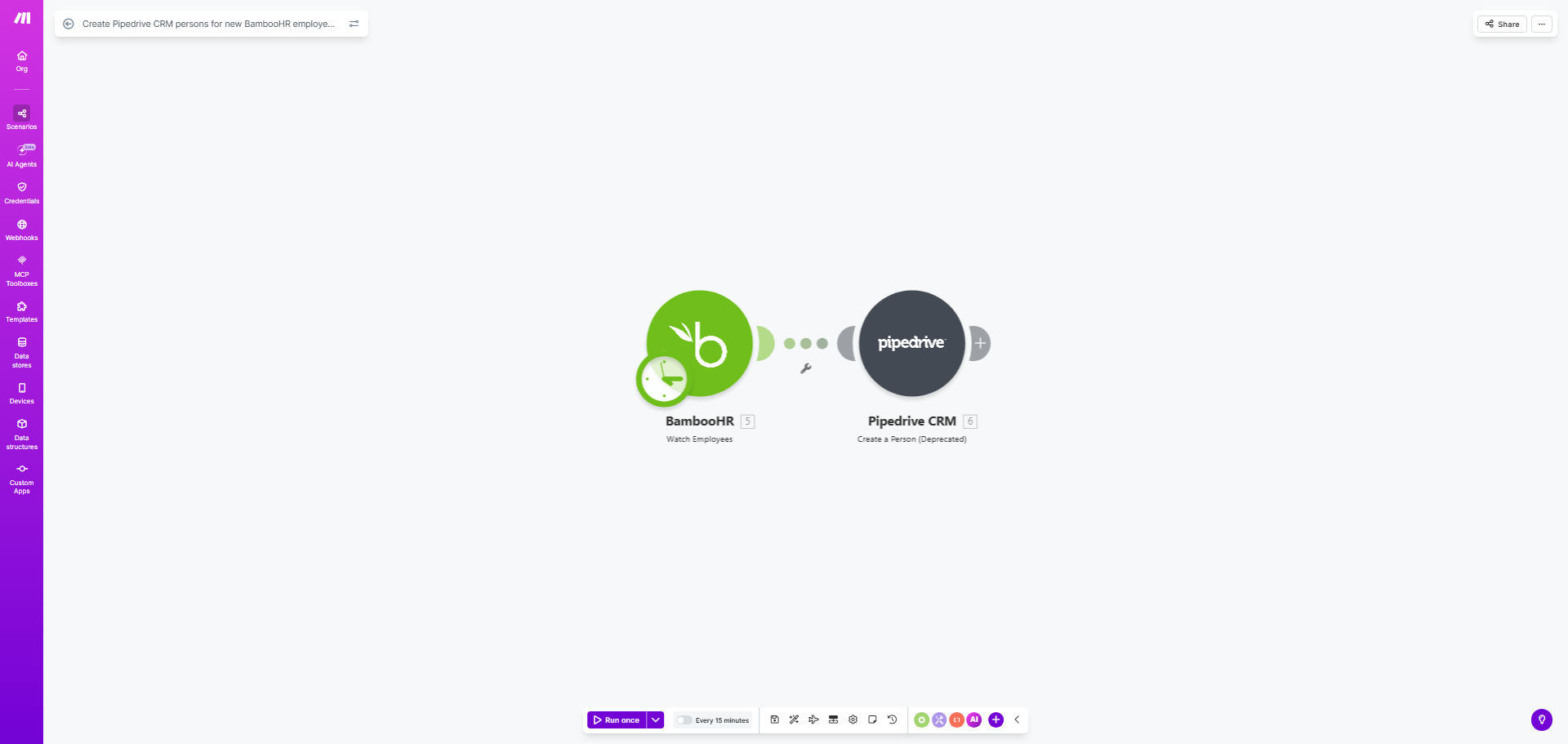
This automated workflow solves that problem by acting as a real-time bridge between your HR and sales systems. The moment an employee record is created in BambooHR, this Make.com scenario triggers and creates a corresponding "Person" in your Pipedrive CRM. It maps key details like name, email, job title, and department automatically, ensuring your entire organization has a unified, up-to-date directory.
The business value is clear: improved internal alignment, faster sales onboarding for new hires, and the elimination of a repetitive, error-prone manual task. It turns a passive HR event into an active opportunity for your sales team to build relationships and drive internal advocacy from day one.
How It Works
The automation follows a simple, reliable sequence. Once set up, it runs silently in the background, keeping your systems in perfect sync.
Step 1: Monitor BambooHR for New Employees
The workflow starts with a Make.com "Watch" module connected to your BambooHR account. It continuously monitors the employee directory for new additions. You can configure it to check at specific intervals (e.g., every hour) or use webhooks for instant triggering.
Step 2: Extract and Format Employee Data
When a new employee is detected, the workflow retrieves the relevant data fields. This typically includes the employee's full name, work email address, job title, department, manager, and start date. The data is then parsed and prepared for the next step.
Pro tip: Use Make's data transformation tools to clean and standardize data. For example, you can ensure job titles follow a consistent format (e.g., "Senior Software Engineer" vs. "Sr. SWE") before sending it to Pipedrive, improving segmentation later.
Step 3: Create a New Person in Pipedrive
The formatted data is sent to Pipedrive via the "Create a Person" API module. The workflow maps each BambooHR field to the corresponding Pipedrive person field. You can also add custom labels or tags in Pipedrive, such as "Internal - Employee" or the department name, to easily filter these contacts.
Step 4: (Optional) Trigger Follow-up Actions
After the person is created, the workflow can be extended to perform additional actions. This could include adding the new person to a specific deal or pipeline, assigning them to a sales owner, creating a follow-up task, or sending a notification to a Slack channel to alert the sales team.
Who This Is For
This automation is ideal for any business that uses both BambooHR for human resources and Pipedrive for sales or customer relationship management. It's particularly valuable for:
- Sales & Business Development Teams: Who need immediate visibility into new hires to build internal alliances and identify potential champions for their products.
- HR & People Operations: Who want to improve the new hire experience by ensuring they are seamlessly introduced to the sales organization.
- Scale-ups and Growing Companies: Where manual processes break down with increased hiring volume. Automating this sync saves dozens of hours annually.
- Companies with Distributed Teams: Where organic, in-office introductions don't happen. This automation ensures remote employees are added to the central company directory in the CRM.
What You'll Need
To implement this workflow, you will need the following accounts and access:
- An active Make.com account (formerly Integromat).
- Administrator or API access to your company's BambooHR account to create an API key or OAuth connection.
- Administrator access to your Pipedrive account to generate an API token.
- A basic understanding of the data fields you want to sync (e.g., which BambooHR fields correspond to which Pipedrive person properties).
Quick Setup Guide
You can have this automation running in under 30 minutes by following these steps:
- Get the Template: Click the "Get This Workflow" button above to clone the template into your Make.com account.
- Connect BambooHR: In the first module, click to add your BambooHR connection. You'll be prompted to log in and authorize Make.com to access your employee data.
- Connect Pipedrive: In the "Create a Person" module, add your Pipedrive connection using your company's Pipedrive domain and API token.
- Map Your Data Fields: Review the default field mappings between BambooHR and Pipedrive. Adjust them to match your specific field names and ensure data like email, name, and title are going to the right places.
- Test with a Dummy Record: Use Make's "Run once" feature to test the scenario. You can create a test employee in BambooHR or use existing data to verify a person is created correctly in Pipedrive.
- Activate and Schedule: Once testing is successful, turn the scenario "ON." Set the scheduling interval (e.g., every hour) according to your hiring frequency.
Key Benefits
Eliminate Manual Data Entry: Save 5-15 minutes of administrative work per new hire. For a company hiring 50 people a year, that's over 40 hours of reclaimed productivity annually, allowing staff to focus on high-value strategic work instead of copy-pasting.
Improve Sales & HR Alignment: Break down data silos between departments. Sales gains instant, actionable insight into new hires, enabling timely and personalized outreach that can turn new employees into internal advocates much faster.
Ensure 100% Data Accuracy and Consistency: Remove the risk of human error from manual entry. Automated mapping guarantees that names, titles, and emails are transferred correctly and formatted uniformly across both platforms, improving data integrity.
Scale Your Onboarding Process Effortlessly: As your company grows and hiring accelerates, this workflow scales with you. There is no additional manual effort required, ensuring your CRM remains complete and up-to-date regardless of hiring volume.
Create a Foundation for Advanced Automation: This sync is a foundational building block. Once in place, you can easily extend it to trigger welcome sequences, schedule introductory meetings, or update internal directories, creating a truly connected employee onboarding ecosystem.