Expense Management OCR Automation Google Sheets

Automate Receipt Processing from Photos to Google Sheets

Capture expense data instantly with Telegram, extract details using AI, and log to Sheets - no manual entry required

Download Template JSON · n8n compatible · Free
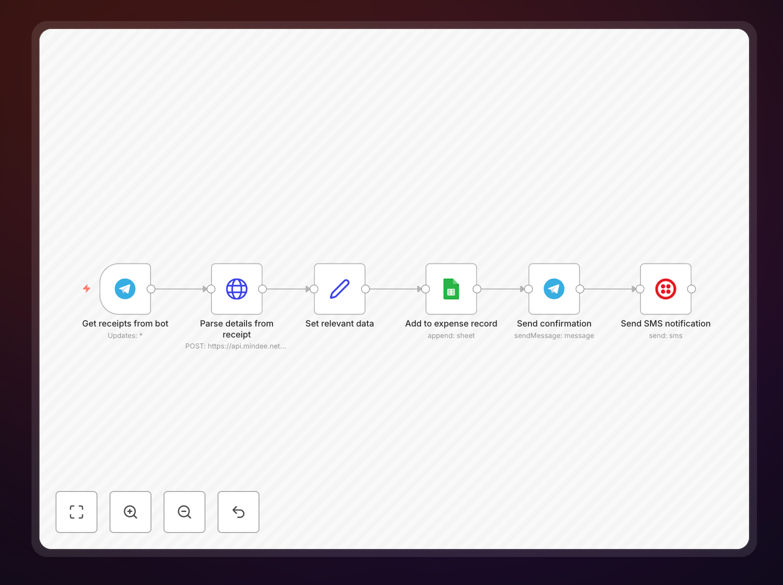
Workflow diagram showing receipt photo to Google Sheets automation

What This Workflow Does

This automation eliminates the tedious manual entry of expense receipts by transforming photos into structured data. Employees simply snap a picture of a receipt in Telegram, and the system automatically extracts key details (date, amount, vendor, etc.) using AI-powered OCR, then logs the information to your Google Sheets expense tracker.

For businesses, this means real-time expense reporting without spreadsheets or paperwork. Finance teams get accurate, searchable records while reducing processing costs by 80-90%. The workflow includes validation rules and can trigger alerts for unusual expenses or policy violations.

How It Works

1. Receipt Submission

Employees send receipt photos through a dedicated Telegram channel or chat bot. The mobile-friendly interface works anywhere, requiring no special apps beyond Telegram's messaging platform.

2. Data Extraction

The Mindee API analyzes the receipt image using optical character recognition (OCR) to identify and extract key fields: transaction date, total amount, tax, vendor name, and payment method.

3. Data Validation

The system checks for duplicate submissions, validates amounts against company policies, and flags missing or unclear data for review. Twilio can send instant SMS alerts for exceptions.

4. Google Sheets Logging

Structured expense data is appended to your designated Google Sheet with timestamps and submitter details. Formulas can automatically categorize expenses and calculate reimbursements.

Pro tip: Add a second workflow to sync approved expenses to your accounting software (QuickBooks, Xero, etc.) for complete automation.

Who This Is For

This solution benefits any business with employee expenses: consulting firms with travel costs, field service teams with equipment purchases, or remote teams with home office expenses. It's particularly valuable for:

  • Businesses processing 50+ receipts monthly
  • Teams with mobile workers needing instant submission
  • Companies wanting real-time visibility into expenses
  • Finance teams drowning in manual data entry

What You'll Need

  1. Telegram account for receipt submission
  2. Mindee API key (free tier available)
  3. Google Sheets with expense tracking template
  4. Twilio account for SMS alerts (optional)
  5. n8n instance (cloud or self-hosted)

Quick Setup Guide

  1. Download the template JSON file
  2. Import into your n8n instance
  3. Configure Telegram webhook settings
  4. Connect your Mindee API credentials
  5. Link to your Google Sheets document
  6. Test with sample receipt photos
  7. Share Telegram submission link with team

Key Benefits

90% faster expense reporting: What took 5 minutes per receipt now happens automatically in seconds.

Eliminate data entry errors: AI extraction is more accurate than manual typing, especially for numeric fields.

Mobile-first convenience: Employees submit expenses instantly from job sites or client meetings.

Real-time visibility: Finance teams see expenses as they happen, not at month-end.

Policy enforcement: Automatic checks for duplicate submissions and policy violations.

Frequently Asked Questions

Common questions about receipt processing automation

Automated receipt processing eliminates manual data entry, reducing processing time by 80-90%. The system extracts key details like date, amount, and vendor automatically from photos.

Employees spend seconds submitting instead of minutes typing. Finance teams avoid deciphering handwriting or chasing missing receipts. One accounting firm reported saving 120 hours monthly after implementation.

  • 5-minute tasks become 30-second tasks
  • No more lost or illegible receipts
  • Real-time data eliminates month-end crunch

The system processes standard retail receipts, restaurant bills, hotel invoices, and transportation tickets. It works best with clear photos of printed receipts containing structured data.

Handwritten notes or heavily crumpled receipts may require manual verification, but the system flags these exceptions automatically. Some users attach sticky notes with project codes that the OCR ignores.

  • Best for: Digital receipts, printed invoices, clear photos
  • Challenges: Poor lighting, handwritten totals, torn edges

All receipt data is encrypted in transit and at rest. The system uses Telegram's secure messaging platform for initial submission, then processes data through enterprise-grade APIs.

Financial details are never stored permanently in chat platforms, moving directly to your secured Google Sheets. One client in healthcare added HIPAA-compliant encryption for sensitive patient-related expenses.

  • End-to-end encryption for all data
  • No financial data stored in Telegram
  • Optional enterprise security add-ons

Yes, the Google Sheets output can connect to QuickBooks, Xero, or FreshBooks through additional automation steps. The structured data format makes it easy to sync with most accounting platforms.

Many businesses use this as the first step in a complete expense management workflow. One architecture firm automatically categorizes expenses by project before syncing to their accounting system.

  • Pre-built connectors for major platforms
  • Custom mapping for your chart of accounts
  • Multi-step approval workflows available

Modern OCR APIs achieve 95-98% accuracy on clear printed receipts. The system includes validation rules and duplicate checking to catch errors.

For critical expenses, you can configure approval workflows where managers verify high-value transactions before accounting import. One client reduced expense errors by 89% while processing 3x more receipts.

  • Amounts and dates: 98% accuracy
  • Vendor names: 92% accuracy
  • Automatic validation catches most errors

This solution offers more flexibility than off-the-shelf apps at lower cost. You control the data flow and can customize fields, approvals, and integrations.

Unlike proprietary apps, your data stays in your Google Workspace environment without vendor lock-in. A marketing agency customized theirs to track expenses against client budgets in real-time.

  • No per-user licensing fees
  • Full control over data structure
  • Easily add custom fields and rules

Absolutely. GrowwStacks specializes in tailored automation solutions for expense management. We can build custom workflows with your preferred apps, add approval chains, integrate with your accounting system, and train your team.

This template is just one example of what's possible with business process automation. Recent clients include a construction company that added equipment tracking and a nonprofit that automated grant expense reporting.

  • Custom fields for your expense categories
  • Multi-level approval workflows
  • Seamless accounting software integration

Need a Custom Receipt Processing Automation?

This free template is a starting point. Our team builds fully tailored automation systems for your specific needs.