What This Workflow Does
Manual competitor research on Facebook Ads is time-consuming and inconsistent. Marketing teams spend hours each week scrolling through ad libraries, taking screenshots, and trying to decode what makes competitors' ads successful. This process misses patterns, lacks scalability, and provides subjective analysis rather than data-driven insights.
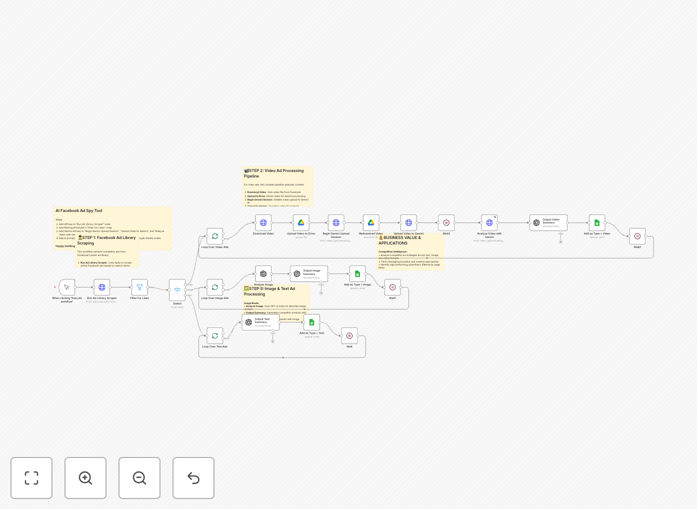
This AI-powered Facebook ad spy tool automates the entire competitive intelligence process. It scrapes active competitor ads from Facebook's public ad library using Apify, categorizes them by format (text, image, or video), routes each type to specialized AI models for analysis, and generates comprehensive strategic reports in Google Sheets. The system provides actionable intelligence including rewritten ad copy, recreation prompts for visuals, and detailed analysis of messaging strategies—turning weeks of manual research into minutes of automated processing.
How It Works
1. Facebook Ad Library Scraping
The workflow connects to Facebook's public ad library through Apify's specialized scraper. It searches for active ads using your target keywords, industries, and geographic parameters, extracting comprehensive data including creative assets, targeting information, and engagement metrics. The system filters results to focus on high-quality advertisers with substantial page followings, ensuring you analyze successful competitors rather than random advertisers.
2. Intelligent Content Routing
Each scraped ad is automatically categorized into text-only, image-based, or video content types. A switch node routes each format to specialized processing pipelines optimized for that content type. This ensures appropriate AI models analyze each creative format, maintaining data integrity while processing different content formats simultaneously across hundreds of ads.
3. Multi-Modal AI Analysis
Text ads are analyzed by GPT-4 for messaging strategy and copywriting techniques. Image ads are processed through GPT-4 Vision for comprehensive visual content understanding. Video ads are downloaded, temporarily stored in Google Drive, and analyzed by Gemini's advanced video understanding capabilities. Each AI model identifies key persuasion techniques, target demographics, emotional triggers, and messaging frameworks specific to the content format.
4. Strategic Intelligence Generation
The system generates comprehensive summaries analyzing competitor messaging strategies, target audience insights, and creative approaches. It produces rewritten ad copy that captures successful elements while maintaining originality, creates detailed prompts for recreating images and videos with AI generation tools, and organizes all insights in a structured Google Sheets database for easy analysis, reporting, and trend tracking over time.
Who This Is For
This automation is ideal for PPC agencies offering competitive analysis services to clients, in-house marketing teams researching competitor strategies before campaign launches, e-commerce businesses analyzing successful ads in their industry for creative inspiration, SaaS companies studying how competitors position their products, course creators researching educational content marketing approaches, and affiliate marketers identifying high-converting ad formats and promotional strategies.
What You'll Need
- Apify Account: API key for accessing Facebook Ad Library scraper
- OpenAI API Access: For text analysis and GPT-4 Vision image understanding
- Gemini API Key: For advanced video content analysis and description
- Google Workspace: OAuth setup for Google Drive (temporary video storage) and Google Sheets (results database)
- n8n Instance: Self-hosted or cloud version of n8n automation platform
- Target Parameters: Your specific keywords, industries, and geographic regions for competitor research
Quick Setup Guide
- Import the Template: Download the JSON file and import it into your n8n instance using the workflow import function.
- Configure API Credentials: Replace placeholder API keys in the Apify, OpenAI, Gemini, and Google nodes with your actual credentials.
- Set Up Google Sheets: Create a new Google Sheet with columns for ad_archive_id, page_name, type, summary, rewritten_ad_copy, image_prompt, and video_prompt.
- Customize Search Parameters: Modify the Facebook Ad Library search URLs in the Apify node with your target keywords and regions.
- Configure Quality Filters: Adjust the page likes threshold in the "Filter For Likes" node (recommended: 1,000+ for quality advertisers).
- Test with Sample Search: Run the workflow with a small search to verify data flow from scraping to final intelligence reports.
- Schedule Regular Runs: Set up automation triggers to run weekly or bi-weekly for ongoing competitive monitoring.
Pro tip: Start with 2-3 key competitors in your initial setup. Once the system is running smoothly, expand to broader industry searches. This approach helps you refine the AI analysis prompts and filtering parameters before scaling to hundreds of ads.
Key Benefits
Save 15-20 hours weekly on manual research that can be redirected to strategic planning and campaign optimization. The automation processes competitor analysis that would take a marketing specialist days to complete manually.
Gain comprehensive multi-format insights across text, image, and video ads with specialized AI models for each content type. This ensures you don't miss visual or narrative elements that text-only analysis would overlook.
Create actionable intelligence reports with rewritten ad copy, recreation prompts, and strategic analysis that can immediately inform your own campaign development and creative direction.
Scale across multiple markets and competitors simultaneously without additional time investment. The system can process hundreds of ads from dozens of competitors in a single run.
Build a historical intelligence database in Google Sheets that tracks competitor strategies over time, identifying trends, seasonal patterns, and strategic shifts in your market.