LegalTech AI Agent Document Retrieval n8n

๐Ÿง‘โ€โš–๏ธ AI Legal Assistant Agent โ€” AI-Powered Legal Q&A with Document Retrieval

Automate legal research with AI-powered question answering and intelligent document retrieval. This n8n workflow template helps law firms and legal departments answer client questions faster while maintaining accuracy and compliance.

Download Template JSON ยท n8n compatible ยท Free
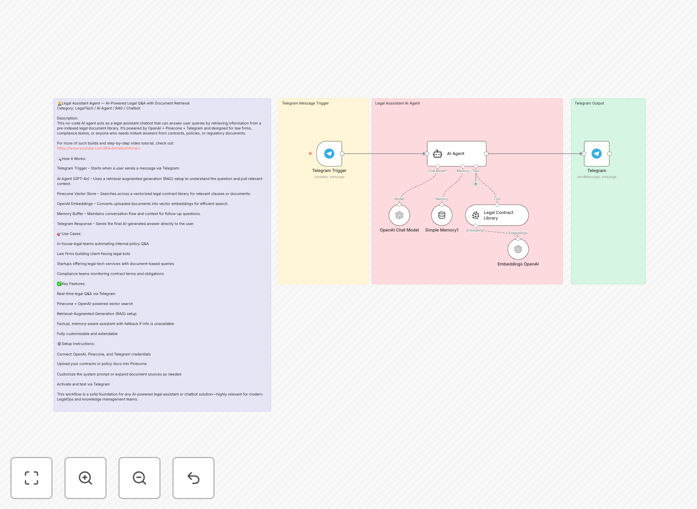
AI Legal Assistant workflow interface showing question input and document retrieval results

What This Workflow Does

This AI legal assistant workflow automates two critical legal tasks: answering legal questions and retrieving relevant documents. When a user submits a question, the AI analyzes it using natural language processing, searches your document database, and returns both a summarized answer and the most relevant source materials.

The system is particularly valuable for law firms handling repetitive inquiries, corporate legal departments managing compliance questions, or any practice needing faster access to case law and contracts. It reduces research time from hours to minutes while maintaining audit trails of all sources used.

How It Works

1. Question Submission

Users submit legal questions through a web form, email, or chat interface. The system captures the query along with any context about jurisdiction, practice area, or urgency.

2. AI Analysis

The workflow sends the question to an AI model (like GPT-4 or Claude) trained on legal terminology. The AI breaks down the query into searchable components and identifies relevant legal concepts.

3. Document Retrieval

Using vector search technology, the system scans your document repository (PDFs, Word files, case databases) to find passages most relevant to the question. It prioritizes recent and authoritative sources.

4. Answer Generation

The AI synthesizes information from retrieved documents into a clear, concise answer with proper citations. It flags any areas where human review is recommended.

5. Delivery & Logging

The system delivers the answer through the user's preferred channel while logging the query, sources used, and response for compliance purposes.

Who This Is For

This workflow benefits:

  • Law firms handling high volumes of client inquiries
  • Corporate legal departments managing compliance questions
  • Legal aid organizations with limited staff resources
  • Paralegals conducting preliminary research
  • Law libraries assisting patrons with legal research

What You'll Need

  1. An n8n instance (cloud or self-hosted)
  2. Access to an AI API (OpenAI, Anthropic, or similar)
  3. A document storage system (Google Drive, Dropbox, or legal database)
  4. Legal documents in searchable digital format (PDF, DOCX, etc.)

Quick Setup Guide

  1. Download the JSON template file
  2. Import into your n8n workspace
  3. Connect your AI service API credentials
  4. Configure your document storage connection
  5. Test with sample legal questions
  6. Deploy to your preferred interface (web, email, chat)

Key Benefits

80% faster legal research: Get answers to common legal questions in minutes instead of hours, allowing your team to focus on high-value analysis.

Consistent quality: AI provides standardized responses with proper citations, reducing variability in preliminary research.

24/7 availability: Clients and staff can get answers anytime, even outside business hours, with proper disclaimers.

Knowledge retention: The system captures and organizes your firm's legal knowledge, making it accessible to all team members.

Scalable service: Handle more client inquiries without proportionally increasing staff hours or costs.

Frequently Asked Questions

Common questions about legal AI integration and automation

AI legal assistants use natural language processing to understand legal questions and retrieve relevant case law, statutes, or contracts from your document database. They can analyze thousands of pages in seconds, identify key precedents, and summarize findings in plain language.

This automation reduces research time by 60-80% compared to manual methods while improving accuracy through consistent analysis. For example, a personal injury firm might use it to quickly find similar cases with matching fact patterns and damage awards.

  • Works with existing document management systems
  • Learns your firm's preferred citation formats
  • Maintains full audit trails for compliance

AI document retrieval works best with structured legal content like case law databases, contract repositories, compliance manuals, and legal memos. The system indexes PDFs, Word docs, and even scanned images using OCR.

For optimal results, documents should have clear metadata (case numbers, dates, jurisdictions) and be organized by practice area. Courts and corporate legal departments see the biggest efficiency gains from this automation when processing standardized document types.

  • Prioritize digitizing frequently referenced materials
  • Add consistent metadata tags during upload
  • Start with one practice area before expanding

Current AI legal assistants achieve 85-90% accuracy on straightforward legal questions when properly trained on quality data. They excel at retrieving facts and identifying relevant statutes but should always be verified by attorneys for complex matters.

Leading law firms use AI for first-pass research, saving 15-20 hours per week per associate while maintaining human oversight on final advice. The technology works best for questions with clear precedents rather than novel legal theories.

  • Set clear expectations with clients about AI use
  • Establish review protocols for different question types
  • Monitor accuracy rates by practice area

Legal AI systems require enterprise-grade encryption, access controls, and audit trails to protect client confidentiality. Data should be processed on secure servers with attorney-client privilege safeguards.

Many firms choose private AI deployments rather than cloud solutions for sensitive matters. Regular security audits and staff training on proper use are essential compliance requirements when handling privileged information through automated systems.

  • Require multi-factor authentication for all users
  • Maintain detailed access logs
  • Conduct quarterly security assessments

Yes, AI contract review tools can identify key clauses, flag unusual terms, and compare language against your standard templates in minutes. They analyze hundreds of contracts simultaneously, highlighting risks and opportunities.

Corporate legal teams report reducing contract review time by 70% while catching more inconsistencies than manual review alone. The technology works particularly well for NDAs, service agreements, and other standardized contracts that follow predictable patterns.

  • Create custom clause libraries for your templates
  • Train the AI on your risk tolerance thresholds
  • Combine with redlining automation for full workflow

Specialized legal AI requires training on relevant case law, statutes, and firm documents. Start by uploading your practice area materials and marking up sample queries with correct responses. The system learns your terminology and citation preferences over time.

Many solutions offer pre-trained models for common areas like corporate law, IP, or employment that can be fine-tuned. A family law practice might train the system on local court rules and judge-specific procedures to improve answer relevance.

  • Begin with your most frequent question types
  • Involve senior attorneys in training validation
  • Schedule monthly model refreshes with new cases

Firms typically see ROI within 3-6 months through time savings. Associates spend 30% less time on research while handling more cases. Paralegal productivity increases 40-50% on document retrieval tasks.

Additional benefits include improved client response times, reduced outside research costs, and competitive differentiation through tech-forward service offerings. One mid-sized firm reported saving $150,000 annually in research costs while increasing billable hours.

  • Track time savings by practice area
  • Measure client satisfaction improvements
  • Calculate reduced Westlaw/LexisNexis costs

Yes, GrowwStacks specializes in building tailored legal automation solutions for firms of all sizes. Our team will design an AI assistant that integrates with your existing systems and workflows, trained on your specific documents and practice areas.

We handle everything from implementation to staff training, with ongoing support to ensure maximum value. Our solutions range from simple document retrieval systems to comprehensive legal ops automation with matter management and billing integration.

  • Free initial consultation to assess needs
  • Phased rollout approach
  • Compliance-focused design

Need a Custom Legal AI Integration?

This free template is a starting point. Our team builds fully tailored automation systems for your specific needs.