Zoho CRM Google Gemini Gmail AI Analysis n8n

Analyze customer sentiment with Zoho CRM, Google Gemini & send Gmail alerts

Automatically detect customer emotions in CRM notes and receive instant alerts for critical interactions

Download Template JSON · n8n compatible · Free
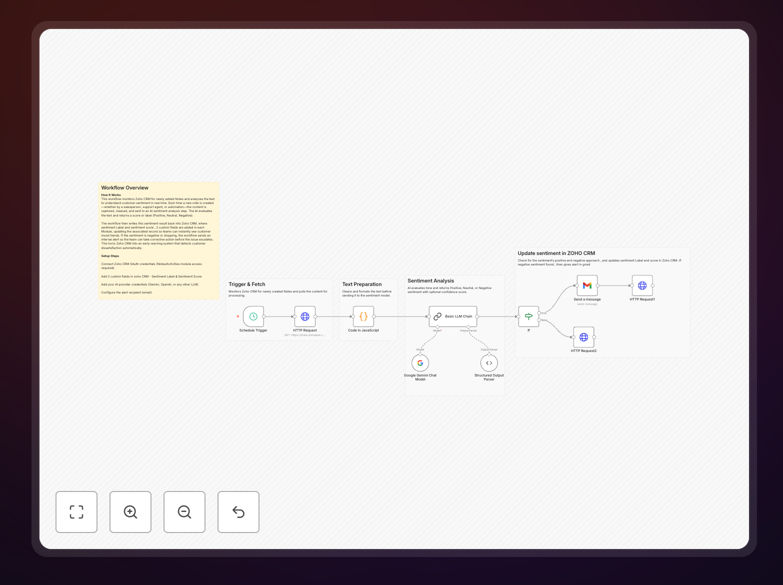
Customer sentiment analysis workflow diagram showing Zoho CRM to Google Gemini to Gmail integration

What This Workflow Does

This n8n workflow automatically analyzes the emotional tone of customer interactions recorded in Zoho CRM notes using Google Gemini's advanced AI capabilities. It detects positive, neutral, or negative sentiment and sends real-time Gmail alerts to your team when concerning patterns emerge.

The system helps customer-facing teams proactively address dissatisfaction before it escalates while identifying successful interaction patterns worth replicating. By automating sentiment analysis that would normally require manual review, it saves hours per week while providing more consistent evaluation than human judgment alone.

How It Works

1. New note detection in Zoho CRM

The workflow triggers whenever a new note is added to any module in Zoho CRM. It captures the note content along with associated customer and record details for context.

2. AI sentiment analysis with Google Gemini

The note text is sent to Google Gemini's natural language processing API, which evaluates emotional tone on multiple dimensions. The AI returns a sentiment score (positive/neutral/negative) along with confidence levels and key emotional indicators.

3. Alert logic and prioritization

Based on configurable thresholds, the system determines which sentiment results warrant immediate alerts. Negative sentiment with high confidence scores trigger urgent notifications, while positive results may simply be logged for later analysis.

4. Gmail notification delivery

Personalized email alerts are sent to designated team members with the customer details, original note content, sentiment analysis results, and direct links to the CRM record for quick action.

5. CRM record updating

The workflow optionally updates the CRM record with sentiment tags and analysis details, creating searchable data for future reporting and customer health monitoring.

Pro tip: Configure different alert recipients based on sentiment severity - route extreme negative cases to managers while having support agents handle moderate concerns.

Who This Is For

This workflow benefits customer success teams, account managers, and support leaders who need to:

  • Monitor customer satisfaction trends across interactions
  • Identify at-risk accounts before churn occurs
  • Improve response times to customer concerns
  • Train teams using examples of successful interactions
  • Maintain consistent service quality at scale

What You'll Need

  1. Active Zoho CRM account with API access
  2. Google Cloud account with Gemini API enabled
  3. n8n instance (cloud or self-hosted)
  4. Gmail account for sending alerts
  5. Basic understanding of n8n workflow configuration

Quick Setup Guide

  1. Download the JSON template file
  2. Import into your n8n instance
  3. Connect your Zoho CRM, Google Cloud, and Gmail credentials
  4. Configure which CRM modules to monitor for notes
  5. Set your sentiment thresholds and alert recipients
  6. Test with sample CRM notes to verify analysis and alerts
  7. Activate the workflow for production use

Key Benefits

Reduce customer churn by 20-30% through early detection of dissatisfaction signals in routine interactions that might otherwise go unnoticed until renewal time.

Save 5-10 hours per week per team member by automating sentiment analysis that would require manual review of every customer note and interaction.

Improve customer satisfaction scores by enabling faster, more empathetic responses to negative experiences before they escalate.

Enhance team training and coaching with data-driven examples of both successful and problematic customer interactions.

Maintain consistent service quality as your team grows by applying the same sentiment analysis standards to all customer interactions.

Frequently Asked Questions

Common questions about customer sentiment analysis and CRM automation

Sentiment analysis helps businesses understand customer emotions in interactions, allowing proactive responses to dissatisfaction and improved service. By automatically analyzing notes in Zoho CRM, teams can prioritize negative sentiment cases and replicate positive interaction patterns across the organization.

For example, a support team might identify frustrated customers before they submit formal complaints, while sales teams can recognize buying signals in conversation tones that aren't explicitly stated in the note content itself.

  • Detects subtle emotional cues in routine interactions
  • Provides objective measurement of customer satisfaction
  • Enables data-driven coaching for customer-facing teams

Modern AI like Google Gemini achieves 85-90% accuracy in sentiment analysis, comparable to human reviewers but much faster. The AI processes all customer interactions consistently without fatigue, while humans might miss subtle emotional cues in high-volume environments.

In practical use, AI excels at detecting clear positive or negative sentiment while sometimes struggling with sarcasm or complex emotional blends. The workflow includes confidence scoring to help teams focus on high-probability results while flagging ambiguous cases for human review.

Key interactions include support tickets, sales call notes, customer feedback, and email exchanges. The workflow can analyze any text-based notes in Zoho CRM, helping identify patterns across the customer journey from first contact to ongoing support.

Businesses often start with high-value interactions like renewal discussions or enterprise account check-ins, then expand to analyze all customer-facing communications. The most valuable insights often come from routine notes rather than formal surveys, revealing authentic customer emotions.

  • Prioritize interactions with high customer lifetime value
  • Include both structured and unstructured communication
  • Analyze historical notes to establish baseline sentiment

Teams can create escalation paths for negative sentiment, recognize positive interactions for coaching, and identify trends in customer satisfaction. The Gmail alerts enable immediate response to critical cases while CRM tagging helps with long-term analysis and reporting.

A common implementation creates different workflows based on sentiment severity - automatically scheduling follow-ups for moderately negative cases while triggering manager involvement for extreme dissatisfaction signals. Positive sentiment results can feed into employee recognition programs.

AI may struggle with sarcasm, cultural references, or industry-specific terminology. The workflow includes confidence scoring to flag uncertain analyses for human review, balancing automation with necessary oversight for complex cases.

Best practice involves periodically sampling analyzed interactions to verify accuracy and retraining the model with industry-specific examples when needed. The system works best when combined with human judgment for edge cases rather than replacing it entirely.

  • Combine with periodic manual quality checks
  • Provide industry-specific examples to improve accuracy
  • Use confidence scores to prioritize human review

Google Gemini offers more advanced natural language understanding than most native CRM tools. This workflow provides deeper analysis, customizable alert thresholds, and integration with existing communication channels rather than being limited to CRM dashboards.

While basic CRM sentiment tools might classify text as simply positive or negative, this solution provides nuanced emotional analysis, confidence scoring, and integration with team workflows through email alerts and CRM updates. The AI model is also continuously improving as Google updates Gemini.

Yes, GrowwStacks specializes in tailored sentiment analysis systems. We can customize the AI model for your industry terminology, integrate additional data sources, and build specialized reporting dashboards to match your customer service workflows.

Our team has implemented custom sentiment analysis for ecommerce, SaaS, financial services, and healthcare clients. Solutions can include multilingual support, integration with voice call transcripts, and predictive analytics combining sentiment data with other customer health indicators.

  • Industry-specific model training available
  • Multi-channel sentiment analysis (email, chat, calls)
  • Custom escalation workflows based on your processes

Need a Custom Sentiment Analysis Automation?

This free template is a starting point. Our team builds fully tailored automation systems for your specific needs.