SEO Semrush Google Sheets Data Analysis

Analyze website backlinks with Top Backlink Checker API and Google Sheets logging

Automate backlink monitoring to track SEO performance and identify high-value linking opportunities

Download Template JSON · n8n compatible · Free
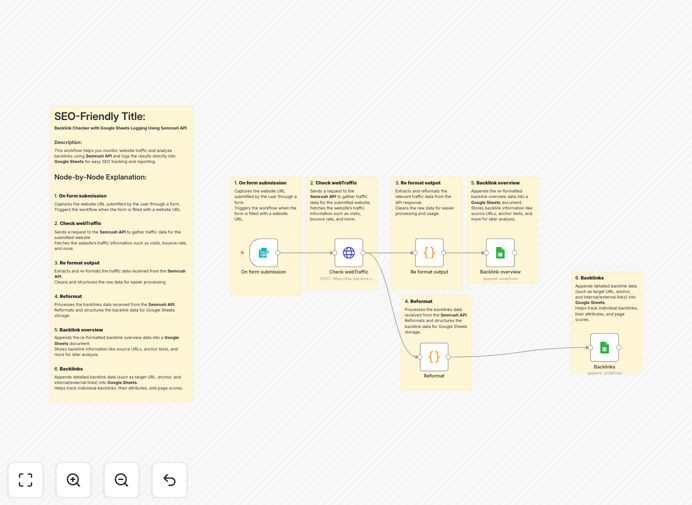
Backlink analysis workflow interface

What This Workflow Does

This automation solution connects the Semrush Backlink Analytics API with Google Sheets to create a powerful backlink monitoring system. It automatically retrieves your latest backlink data, analyzes key metrics like domain authority and link types, and logs everything in an organized spreadsheet for historical tracking.

Manual backlink analysis is time-consuming and often inconsistent. This workflow eliminates the repetitive work while ensuring you never miss important changes in your link profile. It's particularly valuable for SEO agencies managing multiple clients or businesses tracking their organic growth over time.

How It Works

1. API Connection Setup

The workflow begins by authenticating with the Semrush API using your credentials. It establishes a secure connection to pull backlink data for your specified domain.

2. Data Retrieval

It requests the latest backlink report from Semrush, including details like referring domains, anchor texts, and authority scores. The API returns this data in a structured format.

3. Data Processing

The workflow cleans and formats the raw data, calculating additional metrics like link type distribution and growth percentages compared to previous scans.

4. Google Sheets Integration

Processed data gets appended to your designated Google Sheet, with timestamps for each update. The workflow can create new tabs for different date ranges or maintain a running log.

Pro tip: Set this workflow to run weekly to maintain an up-to-date backlink profile without manual effort.

Who This Is For

This solution is ideal for SEO professionals, digital marketing agencies, and business owners who:

  • Need regular backlink monitoring but lack time for manual checks
  • Want historical data to analyze link growth trends
  • Manage multiple client websites and need consistent reporting
  • Are building quality backlinks and need to track their impact

What You'll Need

  1. Semrush account with API access (Business plan or higher)
  2. Google account with Sheets access
  3. n8n instance (cloud or self-hosted)
  4. Target domain you want to analyze

Quick Setup Guide

  1. Download the template file and import it to your n8n instance
  2. Configure the Semrush API node with your credentials
  3. Set up the Google Sheets connection with your target spreadsheet
  4. Specify the domain you want to analyze
  5. Test the workflow with a manual execution
  6. Schedule regular runs (weekly recommended)

Key Benefits

Save 5+ hours monthly by automating what would otherwise be a manual data collection and reporting process.

Improve decision-making with consistent, historical backlink data that shows trends rather than snapshots.

Identify opportunities faster by automatically highlighting new high-authority referring domains.

Maintain cleaner backlink profiles with regular monitoring of toxic or spammy links.

Create professional reports by using the Google Sheets data as a source for dashboards and client updates.

Frequently Asked Questions

Common questions about backlink analysis and automation

Backlink analysis helps identify high-quality referring domains and toxic links that could harm rankings. By automating this analysis, you can continuously monitor your backlink profile, track new/lost links, and make data-driven decisions to improve domain authority and search rankings.

For example, seeing which high-DA sites recently linked to you can inform outreach strategies, while spotting spammy links early lets you disavow them before they hurt your rankings.

  • Quality backlinks boost domain authority
  • Toxic link identification protects rankings
  • Historical tracking reveals what strategies work

Key metrics include domain authority of referring pages, anchor text distribution, follow/nofollow ratios, and link growth trends. This workflow specifically tracks referring domains, backlink types, and authority scores to help you identify the most valuable links for your SEO strategy.

A health check might reveal that 70% of your links come from low-authority sites, indicating a need for better outreach. Or you might discover valuable .edu links worth cultivating further.

  • Prioritize referring domain quality over quantity
  • Watch for unnatural anchor text patterns
  • Balance follow vs. nofollow links

For most websites, monthly analysis is sufficient to track meaningful changes. High-traffic or competitive sites may benefit from weekly monitoring. This automation makes frequent analysis practical by eliminating manual data collection and reporting.

An ecommerce site during holiday seasons might monitor weekly to capitalize on new referral opportunities, while a B2B service could stick to monthly checks.

  • Monthly for most businesses
  • Weekly for competitive niches
  • After major content campaigns

Yes, the workflow can be adapted to analyze competitors' backlink profiles. This helps identify link-building opportunities by seeing where competitors are getting their links while avoiding their toxic backlinks.

If a competitor gets links from industry directories you're missing, you can prioritize those. Conversely, if they have spammy links, you'll know to avoid those sources.

  • Discover new link opportunities
  • Learn from competitors' successes
  • Avoid their mistakes

Google Sheets provides historical tracking, easy sharing with teams, and the ability to create custom dashboards. Automated logging ensures your backlink data is always current without manual updates.

Teams can collaborate on analysis, create pivot tables to spot trends, and even connect the data to visualization tools like Data Studio for client reporting.

  • Automatic version history
  • Real-time team collaboration
  • Custom reporting flexibility

Semrush maintains one of the most comprehensive backlink indexes, with regular crawls of the web. While no tool is 100% complete, it provides reliable data for making comparative analyses and tracking trends over time.

For most SEO purposes, the data is sufficiently accurate. The key value is in relative measurements (month-over-month changes) rather than absolute counts.

  • Industry-standard accuracy
  • Best for trend analysis
  • Regularly updated index

Absolutely. Our team specializes in building tailored SEO automation solutions. We can create custom workflows that integrate with your existing tools, track specific KPIs, and provide actionable insights for your unique backlink profile.

Whether you need competitor tracking, client reporting dashboards, or specialized alerting for toxic links, we can design a system that fits your exact requirements and scales with your business.

  • Custom metrics tracking
  • Competitor monitoring
  • Automated alerts for critical changes

Need a Custom Backlink Analysis Solution?

This free template is a starting point. Our team builds fully tailored automation systems for your specific needs.