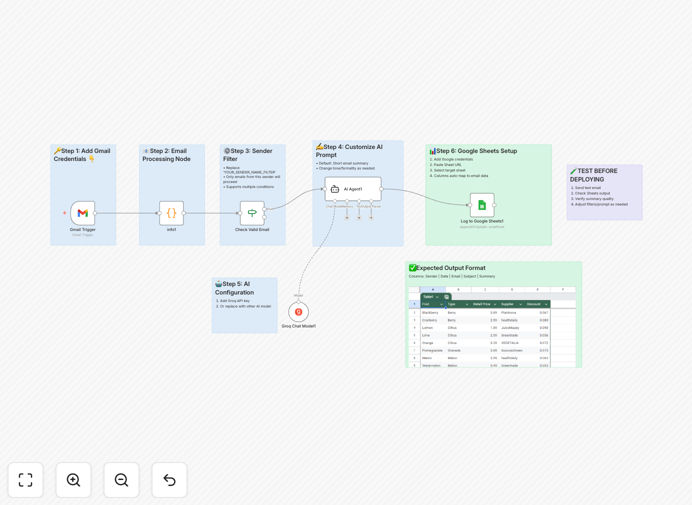
What This Workflow Does
Email overload is a universal business problem. Professionals spend 3-5 hours daily reading, sorting, and responding to emails, often missing critical information in the process. This free n8n workflow solves that by creating an automated email assistant that works around the clock.
The system monitors your Gmail inbox for new emails, applies custom filters based on your criteria, extracts key information, uses AI to generate concise summaries, and automatically logs everything to a Google Sheets spreadsheet. It transforms chaotic email communication into structured, searchable data that your team can actually use.
Whether you're tracking customer inquiries, monitoring project communications, or managing executive correspondence, this automation ensures no email gets lost in the shuffle while providing instant insights through AI-powered analysis.
How It Works
1. Email Monitoring & Trigger
The workflow starts with a Gmail trigger that checks your inbox at regular intervals (configurable from 1 minute to 1 hour). When a new email arrives, it captures all relevant data including sender, subject, date, and full content.
2. Data Processing & Filtering
Using JavaScript nodes, the email data is formatted and prepared for analysis. A conditional node then applies your custom filtering rules—you can validate senders, check for specific keywords, or apply department-specific criteria.
3. AI-Powered Summarization
Approved emails are sent to an AI agent (powered by Groq's language model) that reads the content and generates a concise summary. The AI extracts key points, action items, and sentiment, providing the essence of the email in 2-3 sentences.
4. Automated Logging & Organization
All processed data—including the original email details and AI summary—is automatically appended to a Google Sheets document. This creates a searchable database of all communications with timestamps, categories, and summaries.
Who This Is For
This workflow is ideal for business professionals drowning in email communication. Customer service teams can use it to track and prioritize support tickets. Sales departments can monitor client communications and identify opportunities. Project managers can stay on top of stakeholder updates without reading every thread.
Executives and managers who receive 100+ daily emails will find particular value in the AI summarization feature, allowing them to quickly scan the day's important communications. Any team that needs to maintain organized records of email correspondence for compliance or analysis will benefit from the automated Google Sheets logging.
Pro tip: Start by filtering emails from your most important clients or projects first. Once you see the time savings and organization benefits, expand the automation to cover more of your inbox.
What You'll Need
- A running n8n instance (cloud or self-hosted)
- Gmail account with OAuth2 access enabled
- Google Sheets account and a spreadsheet created
- AI API access (Groq, OpenAI, or similar)
- Basic understanding of n8n workflow configuration
Quick Setup Guide
1. Download the template using the button above and import it into your n8n instance.
2. Set up Gmail OAuth2 credentials in n8n's credential management section.
3. Configure Google Sheets OAuth2 credentials with edit permissions.
4. Obtain and add your AI API credentials (Groq recommended for speed).
5. Update the Google Sheets document ID in the workflow to point to your spreadsheet.
6. Customize the sender validation criteria in the conditional node to match your needs.
7. Activate the workflow and test with a few sample emails to ensure proper functioning.
Key Benefits
Save 5-10 hours weekly per employee by eliminating manual email reading and organization. The automation works 24/7 without breaks, ensuring consistent processing even during off-hours.
Never miss important communications with systematic filtering and logging. All emails are captured, summarized, and stored in a searchable database that your entire team can access.
Improve response times by 40-60% through instant email categorization and summarization. Customer service teams can prioritize urgent issues while sales teams can identify opportunities faster.
Create valuable business intelligence from your email communications. The structured data in Google Sheets can be analyzed for trends, sentiment, and communication patterns that inform business decisions.
Scale your email management without adding staff. As your business grows and email volume increases, the automation scales effortlessly, maintaining organization and insight extraction.