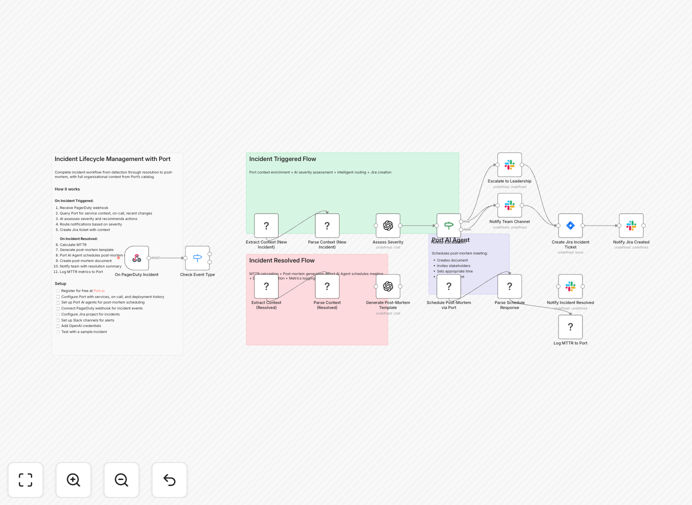
What This Workflow Does
When systems fail, every minute counts. Manual incident response wastes precious time—figuring out who's on call, what changed recently, where to create tickets, and how to notify stakeholders. This disjointed process leads to longer outages, frustrated teams, and missed learning opportunities.
This automated workflow solves that by creating a seamless bridge between your monitoring, collaboration, and documentation tools. From the moment PagerDuty detects an issue to the final post-mortem documentation, every step is coordinated automatically with full context from your entire software catalog.
The system doesn't just pass alerts—it enriches them with intelligence. It knows which team owns the service, what deployments happened recently, who should be notified, and how similar incidents were resolved. This turns chaotic firefighting into a structured, repeatable process that improves with every incident.
How It Works
The workflow orchestrates a complete incident lifecycle across multiple systems:
1. Incident Detection & Enrichment
When PagerDuty triggers an alert, the workflow immediately queries Port's software catalog. It pulls service ownership, recent deployments, related runbooks, and past incident history—giving responders instant context that would normally take 15-20 minutes to gather manually.
2. Intelligent Routing & Notification
Based on severity and service criticality, the workflow routes incidents appropriately. Critical issues automatically escalate to leadership channels in Slack, while standard incidents notify the responsible team with all necessary context and investigation checklists.
3. Automated Ticket Creation
A comprehensive Jira ticket is created with the enriched context, recommended actions, and investigation checklist. The ticket includes links to relevant documentation, deployment history, and team contact information—everything needed for efficient resolution.
4. Resolution & Post-Mortem Automation
When the incident resolves, the workflow calculates MTTR, generates a structured post-mortem template, and triggers Port AI Agents to schedule meetings and create documentation. This ensures learning is captured and processes are improved.
Who This Is For
This automation is ideal for DevOps teams, SREs, and IT operations managers who handle frequent incidents across multiple services. It's particularly valuable for:
- Companies with microservices architectures where ownership changes frequently
- Teams struggling with alert fatigue and manual coordination overhead
- Organizations wanting to improve their incident response metrics (MTTA/MTTR)
- Companies implementing or maturing their Site Reliability Engineering practices
- Teams that already use PagerDuty, Jira, and Slack but want better integration
What You'll Need
- PagerDuty account with webhook capabilities for incident events
- Port account with your software catalog configured (services, teams, deployments)
- Jira Cloud project with permissions to create and update tickets
- Slack workspace with appropriate channels and bot permissions
- n8n instance (self-hosted or cloud) with Port's custom node installed
- OpenAI API key (optional, for AI severity assessment and post-mortem generation)
Pro tip: Start by automating non-critical incidents first. This lets your team build confidence in the system before applying it to P1 emergencies. Document your escalation paths and severity definitions clearly—automation works best with well-defined rules.
Quick Setup Guide
- Import the template into your n8n instance using the downloaded JSON file
- Configure credentials for PagerDuty, Port, Jira, and Slack in n8n's credential management
- Set up webhooks in PagerDuty to point to your n8n workflow trigger URL
- Customize Jira fields to match your incident tracking project structure
- Test with a sample incident to verify all connections work correctly
- Deploy and monitor the workflow, watching for any connection issues
Key Benefits
Reduce MTTR by 60-80%: Automated context gathering and routing eliminates the 15-20 minutes typically spent manually investigating who owns what and what changed.
Eliminate human error in escalation: Critical incidents never get missed because someone forgot to notify the right person—the system follows predefined rules every time.
Capture institutional knowledge: Every incident automatically generates post-mortem documentation, creating a searchable knowledge base that improves future responses.
Free engineering time: Teams spend less time coordinating and more time solving actual problems, increasing overall engineering productivity.
Improve compliance and reporting: Automated logging of all incident actions creates audit trails and makes compliance reporting straightforward.