n8n Google Sheets Gmail Forms Incident Management

Automate Incident Reporting & Alerts with Forms, Google Sheets and Gmail

Free n8n workflow template to streamline incident documentation and team notifications

Download Template JSON · n8n compatible · Free
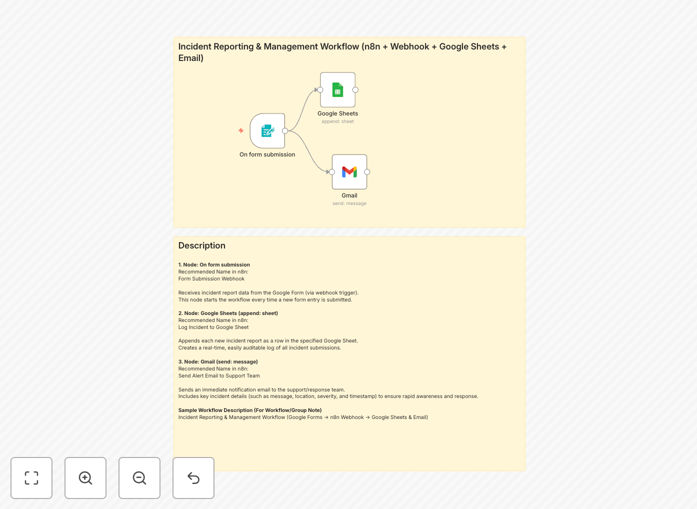
Incident reporting automation workflow diagram

What This Workflow Does

This n8n workflow automates the entire incident reporting process from initial submission through documentation and alerting. When team members report an incident through a form, the system automatically logs all details in Google Sheets for record-keeping and sends immediate email alerts through Gmail to the appropriate responders.

The automation eliminates manual data entry, reduces response times, and ensures consistent incident documentation. Operations teams can track issues from report to resolution with full audit trails, while managers gain visibility into incident frequency and patterns through the automatically updated spreadsheet.

How It Works

1. Form Submission Trigger

The workflow starts when someone submits an incident report form. The form captures essential details like incident type, severity, location, description, and any immediate actions taken.

2. Data Processing

The workflow processes the form data, adding timestamps, assigning unique incident IDs, and categorizing the report based on predefined rules. Critical fields are validated to ensure complete information.

3. Google Sheets Logging

All incident details are automatically recorded in a Google Sheets log with columns for status, assignee, resolution notes, and other tracking fields. The sheet serves as the central incident database.

4. Gmail Notifications

Based on incident type and severity, the system sends targeted email alerts to response teams through Gmail. Notifications include all relevant details and direct links to the spreadsheet record.

Who This Is For

This automation is ideal for operations teams, facilities managers, IT departments, and safety officers across industries. Companies with distributed teams, multiple locations, or regulatory reporting requirements benefit most from streamlined incident documentation.

What You'll Need

  1. An n8n instance (cloud or self-hosted)
  2. Google Workspace account (for Sheets and Gmail)
  3. A form builder (Google Forms, Typeform, etc.)
  4. List of incident categories and severity levels
  5. Email distribution lists for notifications

Quick Setup Guide

  1. Download the JSON template file
  2. Import into your n8n instance
  3. Connect your Google account credentials
  4. Configure your form submission trigger
  5. Map form fields to the Google Sheets columns
  6. Set up email recipients based on incident types
  7. Test with sample submissions

Key Benefits

Faster Response Times: Automated alerts ensure the right people are notified immediately when incidents occur, reducing resolution times by 40-60%.

Accurate Documentation: Eliminates manual data entry errors and ensures consistent recording of all incident details for compliance and analysis.

Centralized Tracking: Google Sheets provides a single source of truth for all incidents with full history and status updates in one place.

Scalable Process: Handles increasing incident volumes without additional administrative work as your organization grows.

Pro tip: Add a Slack notification step to ping response teams in multiple channels for critical incidents requiring immediate attention.

Frequently Asked Questions

Common questions about incident reporting automation

Automating incident reporting reduces response times, ensures consistent documentation, and eliminates manual data entry errors. When incidents are automatically logged in Google Sheets and alerts are sent via Gmail, teams can respond faster while maintaining accurate records. Studies show automated reporting reduces resolution times by 40-60% compared to manual processes.

Beyond speed, automation creates standardized reporting formats that improve data quality for analysis. Teams spend less time on paperwork and more time resolving actual issues, with automatic timestamps creating reliable audit trails for compliance purposes.

  • Reduces reporting time from minutes to seconds
  • Eliminates 90% of data entry mistakes
  • Creates searchable incident database

Google Sheets provides a centralized, searchable log of all incidents with timestamps, details, and status updates. The spreadsheet becomes a living document for tracking resolution progress, generating reports, and analyzing incident trends. Teams can collaborate in real-time with conditional formatting to highlight urgent issues and data validation to maintain reporting standards.

For managers, the Sheets history provides visibility into recurring problems and team performance. Formulas can automatically calculate metrics like mean time to resolution, while pivot tables reveal patterns by location, shift, or incident type. The data becomes valuable for preventive measures and resource allocation.

Common automated incidents include IT outages, facility issues, safety concerns, customer complaints, and security breaches. Any recurring issue that requires documentation, team notification, and follow-up benefits from automation. Start with high-frequency, low-complexity incidents before expanding to more critical reporting workflows.

Prioritize incidents where speed of response impacts outcomes, like equipment failures slowing production. Also automate reports needed for compliance audits, where complete records are essential. Even minor incidents become valuable data points when aggregated over time.

  • IT: System outages, access issues
  • Facilities: Equipment failures, maintenance needs
  • Safety: Near misses, injuries

When someone submits an incident report form, the workflow automatically captures all form data (description, severity, location etc.) and processes it through predefined rules. The system can then route notifications, update databases, assign tasks, and trigger escalation protocols without manual intervention based on the form inputs.

Advanced setups can analyze form responses to determine appropriate actions. For example, a "critical" severity rating might notify managers via SMS in addition to email, while routine reports might just update the log. The workflow becomes smarter as you add conditional logic branches.

Gmail delivers instant notifications to responsible teams with all incident details included. Automated emails can contain action items, links to documentation, and response instructions. Gmail's labeling and filtering help organize incident communications, while mobile access ensures alerts are received anywhere. Advanced setups can include escalation chains if initial recipients don't respond.

Unlike generic notification systems, Gmail allows rich formatting with priority markers and follow-up tracking. Teams can reply directly to update status, creating threaded conversations tied to each incident. Integration with Google Chat and Meet enables quick collaboration when needed.

Google Sheets data can be analyzed to identify patterns, frequent issues, and resolution times. Create dashboards showing incident frequency by type, department, or time period. Track mean time to resolution (MTTR) and implement preventive measures for recurring problems. Automated reports can highlight trends for management review.

Over time, the data reveals which incidents cause the most downtime or require the most resources. This informs training needs, equipment upgrades, and process changes. Some organizations correlate incident data with operational metrics to quantify business impact.

  • Spot trends by day/week/month
  • Identify chronic problem areas
  • Measure response effectiveness

Yes! GrowwStacks specializes in building tailored incident management systems. We can create custom forms, integrate with your existing tools, design escalation workflows, and generate analytics dashboards. Our solutions match your specific incident types, reporting requirements, and team structure for maximum effectiveness.

We'll analyze your current processes to identify automation opportunities that save the most time while improving data quality. The system can incorporate your branding, terminology, and existing protocols while adding smart automation features. Implementation typically takes 2-4 weeks depending on complexity.

  • Custom forms matching your incident categories
  • Integration with your existing tools
  • Role-based notifications and access

Need a Custom Incident Reporting System?

This free template is a starting point. Our team builds fully tailored automation systems for your specific needs.