What This Workflow Does
This automation solves the challenge of manually tracking Instagram performance and interpreting audience sentiment. Marketing teams often spend hours analyzing comments and engagement metrics without gaining actionable insights.
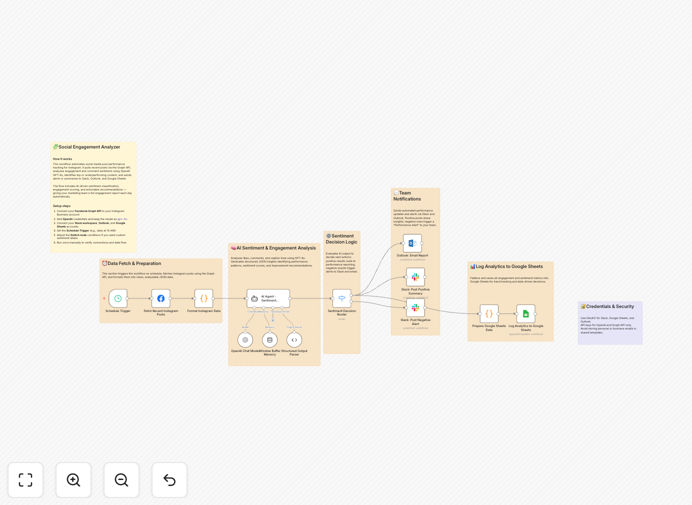
The workflow automatically collects your Instagram post data, analyzes engagement patterns using GPT-4's natural language processing, and delivers summarized reports directly to your Slack channel. It identifies top-performing content, detects emerging trends in audience sentiment, and flags potential issues before they escalate.
How It Works
1. Instagram Data Collection
The workflow connects to Instagram's API to pull engagement metrics and comments from your recent posts. It captures likes, shares, saves, and all textual comments for analysis.
2. GPT-4 Sentiment Processing
All comments are processed through GPT-4 which performs advanced sentiment analysis, identifies key themes, and detects emotional tone. The AI evaluates whether audience reactions are positive, negative, or neutral.
Pro tip: Configure GPT-4 to focus on industry-specific keywords that matter most to your brand when analyzing sentiment.
3. Performance Insights Generation
The system compares engagement metrics against your historical averages and benchmarks. GPT-4 generates written insights explaining why certain posts performed better than others.
4. Slack Report Delivery
A formatted report is automatically sent to your designated Slack channel, highlighting key findings, sentiment trends, and recommended actions to improve engagement.
Who This Is For
This automation is ideal for social media managers, digital marketers, and content creators who need to:
- Track Instagram performance without manual spreadsheet work
- Understand audience sentiment at scale
- Identify content that resonates best with their followers
- Receive actionable insights directly in their team communication tool
What You'll Need
- An Instagram Business or Creator account with API access
- n8n account (self-hosted or cloud version)
- OpenAI API key for GPT-4 access
- Slack workspace with webhook permissions
- Basic understanding of n8n workflow configuration
Quick Setup Guide
- Download the JSON template file
- Import into your n8n instance
- Configure Instagram API credentials
- Add your OpenAI API key
- Set up Slack webhook integration
- Adjust analysis parameters (time period, post count)
- Test with sample data before activating
Key Benefits
Save 5-10 hours weekly by automating what would otherwise require manual comment reading and spreadsheet analysis.
Discover hidden audience insights through AI-powered sentiment analysis that goes beyond simple positive/negative classification.
Improve content strategy with data-backed recommendations on what types of posts generate the most engagement.
Respond faster to trends by receiving real-time alerts about shifting audience sentiment in your niche.
Centralize reporting by delivering insights directly to your team's Slack channel where discussions happen.