Jotform QuickBooks Outlook Invoicing Automation

Automate invoice creation & smart reminders with Jotform, QuickBooks & Outlook AI

Transform form submissions into professional invoices with automated payment reminders - saving hours of manual work each week

Download Template JSON · n8n compatible · Free
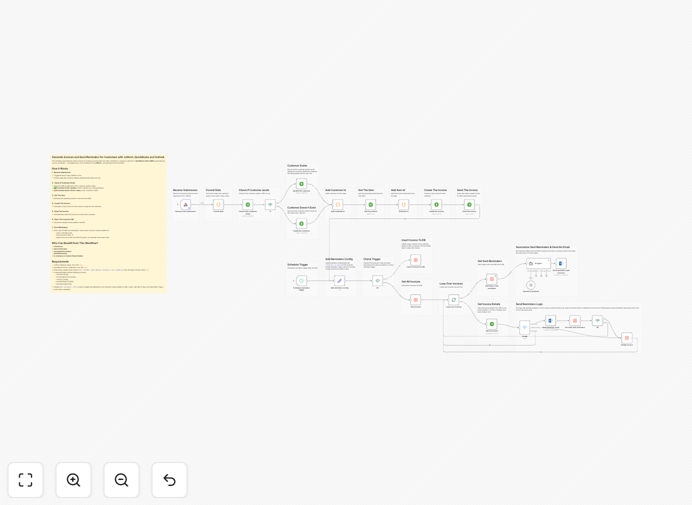
Invoice automation workflow diagram showing Jotform to QuickBooks to Outlook integration

What This Workflow Does

This automation eliminates the tedious manual process of creating invoices and following up on payments. When a customer submits information through your Jotform (like a service request or order form), the workflow automatically generates a professional invoice in QuickBooks with all the correct details.

The system then sends the invoice to your customer via email and sets up smart payment reminders in Outlook. If payment isn't received by the due date, polite follow-up emails are automatically sent at optimal intervals to maintain cash flow without straining customer relationships.

How It Works

1. Form Submission Trigger

The workflow starts when a customer submits your Jotform with service details, products ordered, or project information. All form fields are captured including contact information, items/services, quantities, and pricing.

2. QuickBooks Invoice Creation

The system takes the form data and creates a complete invoice in QuickBooks with your branding, terms, and payment options. Line items, taxes, and discounts are automatically calculated and applied based on your QuickBooks settings.

3. Email Delivery

The completed invoice is sent to the customer via Outlook with a professional template. The email includes payment terms, due date, and clickable payment options for easy settlement.

4. Smart Reminder System

Outlook AI monitors payment status and sends automated reminders at strategic intervals (3 days before due, on due date, and follow-ups if late). The tone becomes progressively more urgent while maintaining professionalism.

Pro tip: Customize reminder intervals in the workflow to match your business's typical payment cycles - service businesses often use 7/14/30 day sequences.

Who This Is For

This automation is ideal for service businesses, freelancers, and small retailers who need to:

  • Convert customer requests into invoices quickly
  • Reduce time spent on manual billing tasks
  • Improve payment turnaround with consistent follow-ups
  • Maintain professional communication without daily admin work

What You'll Need

  1. Active Jotform account with your order/service form
  2. QuickBooks Online subscription with invoice templates set up
  3. Microsoft 365 Business account with Outlook access
  4. n8n account (free or paid) to host the workflow

Quick Setup Guide

  1. Download the JSON template file
  2. Import into your n8n instance
  3. Connect your Jotform, QuickBooks and Outlook accounts
  4. Map form fields to invoice line items in the workflow
  5. Test with sample form submissions
  6. Activate the workflow for live use

Key Benefits

Save 5-10 hours weekly by eliminating manual invoice creation and payment follow-ups. The system handles all repetitive billing tasks automatically.

Reduce payment delays by 30% with consistent, timely reminders that maintain positive customer relationships while ensuring prompt payment.

Minimize billing errors since all data flows directly from form submission to invoice without manual transcription mistakes.

Professionalize customer communications with branded, consistent invoice and reminder templates that build trust.

Frequently Asked Questions

Common questions about invoice automation and payment reminders

Automating invoices saves 5-10 hours per week by eliminating manual data entry. The system automatically creates invoices when form submissions come in, reducing human error. Businesses using automation report 30% faster payment cycles as reminders go out consistently.

A consulting firm with 50 monthly clients reduced their billing admin from 15 hours to just 2 hours weekly. The owner now focuses on client work instead of chasing payments. Automation ensures no invoices are forgotten during busy periods.

  • Eliminates duplicate data entry
  • Reduces late payments with auto-reminders
  • Scales effortlessly with business growth

Service businesses with recurring billing (consultants, agencies, freelancers) see the biggest benefits. Retailers with custom orders and B2B companies with complex billing also gain efficiency. Any business processing 20+ invoices monthly should automate to reduce administrative overhead.

A web design agency implemented this workflow and cut their invoice processing time from 3 hours per project to 15 minutes. The system handles their variable billing rates, rush fees, and client-specific terms automatically while maintaining their brand voice in communications.

Smart reminders automatically follow up at optimal intervals (3, 7, 14 days) based on due dates. This maintains professional relationships while ensuring timely payments. Automated systems achieve 15-25% higher on-time payment rates compared to manual follow-ups.

A landscaping company reduced their average payment time from 42 days to 28 days using automated reminders. The system sends gentle nudges before accounts become seriously overdue, preventing awkward conversations while keeping cash flowing.

  • Customizable reminder schedules
  • Progressively urgent tone
  • Payment links included in every message

Yes, the workflow uses QuickBooks' template system allowing full branding customization. You can add logos, adjust colors, and modify fields to match your business needs. The automation preserves all customization while handling the repetitive generation process.

A boutique hotel chain uses customized templates with room photos and package details. Their automated system creates beautiful, on-brand invoices for weddings and events while saving their staff hours of design work for each booking.

The system supports all QuickBooks payment options including credit cards, ACH, PayPal and checks. Automated reminders include payment links for digital methods. Integration with accounting software ensures all payments are automatically recorded and reconciled.

An IT services company offers multiple payment options through their automated invoices. Clients can pay immediately via credit card or schedule ACH payments - all tracked automatically in QuickBooks without manual entry from their accounting team.

Enterprise-grade security protects data through encryption in transit and at rest. Jotform and QuickBooks both maintain SOC 2 compliance. The workflow only transfers necessary billing information, never storing full financial details in the automation platform.

A medical billing service uses this workflow while maintaining HIPAA compliance. Sensitive patient information stays protected while automating their high-volume invoicing process between specialized forms and accounting software.

  • Bank-level 256-bit encryption
  • Regular security audits
  • Minimal data transfer between systems

Yes, GrowwStacks specializes in tailored invoicing solutions. Our team can build custom workflows for unique billing cycles, approval processes, or industry-specific requirements. We integrate with 500+ apps to create perfect-fit automation for your operations.

We recently built a custom solution for a law firm needing matter-specific billing with partner approval workflows. Their system now automatically generates invoices from time entries while enforcing compliance with client billing guidelines.

  • Free consultation to assess your needs
  • Industry-specific expertise
  • Ongoing support and optimization

Need a Custom Invoice Automation Solution?

This free template is a starting point. Our team builds fully tailored automation systems for your specific billing needs and workflows.