Job Search API Google Sheets Automation Recruitment n8n

Automate Job Searches with Job Search Global API & Google Sheets

Free workflow template to automatically fetch job listings, log them to Google Sheets, and get alerts for failures—saving hours of manual searching.

Download Template JSON · n8n compatible · Free
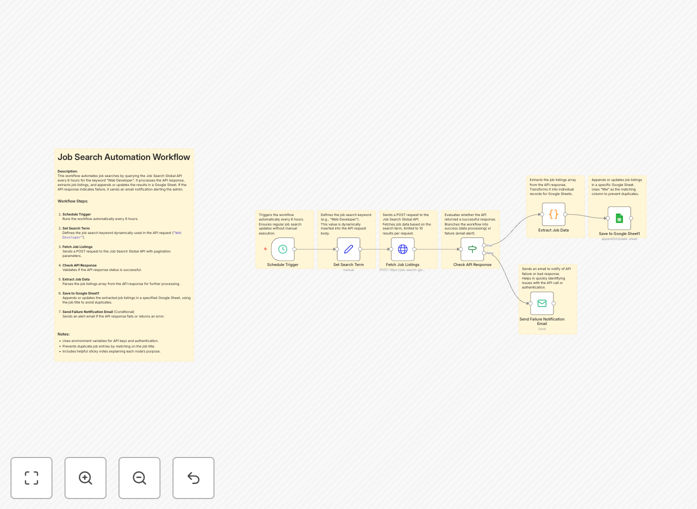
Job search automation workflow diagram showing API integration with Google Sheets

What This Workflow Does

Manual job searching is time-consuming, inconsistent, and prone to missing opportunities. This automation solves that by querying the Job Search Global API via RapidAPI every 6 hours for keywords like "Web Developer," extracting listings, and saving them directly to Google Sheets. It also sends alert emails if the API fails, ensuring reliability.

The workflow centralizes job data for easy filtering, sharing, and tracking. Recruiters, job seekers, HR teams, and data analysts can monitor market trends in real-time without manual effort. It transforms sporadic searching into a systematic, automated process that delivers fresh listings consistently.

How It Works

Step 1: Scheduled Trigger

The workflow runs automatically every 6 hours, ensuring up-to-date job listings without manual initiation.

Step 2: Set Search Term

Defines the dynamic job keyword (e.g., "Web Developer") used in API requests. This can be changed anytime to tailor searches.

Step 3: Fetch Job Listings

Sends a POST request to the Job Search Global API via RapidAPI to retrieve job listings with pagination support.

Step 4: Check API Response

Validates the API response status. If successful, proceeds to data extraction; if failed, branches to send failure notification.

Step 5: Extract Job Data

Parses the job listings array from the API response, preparing structured data for logging.

Step 6: Save to Google Sheet

Appends or updates job listings in Google Sheets, avoiding duplicates by matching job titles. Columns include title, URL, company, post date, source, and sentiment.

Step 7: Send Failure Notification Email

Sends an alert email if the API response fails or returns an error, helping maintain workflow reliability.

Who This Is For

Recruiters looking to monitor job market trends in real-time for multiple clients or industries.

Job Seekers who want to automate discovery for specific roles, locations, or salary ranges.

HR Teams managing talent pipelines, tracking competitor hiring, and analyzing posting patterns.

Data Analysts needing structured job market data for research, reporting, or trend analysis.

What You'll Need

  1. A RapidAPI account with subscription to the Job Search Global API.
  2. Your unique X-RapidAPI-Key for authentication.
  3. A Google Sheets spreadsheet shared with your Google Service Account email.
  4. n8n instance (cloud or self-hosted) to import and run the workflow.
  5. Email credentials for failure notifications (optional but recommended).

Quick Setup Guide

  1. Download the template JSON file and import it into your n8n workspace.
  2. Obtain your RapidAPI key from the Job Search Global API dashboard and insert it into the HTTP Request node headers.
  3. Create a Google Sheet, share it with your service account, and update the Google Sheets node with the sheet URL.
  4. Configure the search keyword in the Set node to match your target role (e.g., "Data Analyst").
  5. Test the workflow manually, then activate the schedule trigger for automatic 6-hour runs.

Pro tip: Use multiple keywords separated by commas in the API request to broaden your search without creating separate workflows.

Key Benefits

Save 10+ hours weekly on manual searching. Automation eliminates repetitive browsing across job boards, giving you time for strategic activities.

Never miss relevant opportunities. Consistent 6-hour queries ensure you capture new listings as soon as they're posted.

Centralized, analyzable data. Google Sheets provides filtering, sorting, and dashboard capabilities for better decision-making.

Immediate failure alerts. Email notifications when API calls fail maintain system reliability without manual monitoring.

Customizable for any role or industry. Change keywords anytime to adapt to shifting hiring needs or explore new markets.

Frequently Asked Questions

Common questions about job search automation and integration

Automation saves hours of manual searching by automatically scanning job boards, filtering results, and organizing them in a spreadsheet. It ensures you never miss relevant opportunities and can track application status efficiently.

For example, a recruiter can set up searches for five different technical roles across three locations, receiving consolidated results every morning without visiting any website.

Google Sheets provides a centralized, shareable database for job listings. You can filter, sort, and analyze data easily, collaborate with team members, and create dashboards to monitor hiring trends without complex database setup.

Teams can add columns for application status, interview dates, or notes, turning a simple list into a full recruitment management system.

Absolutely. Agencies can automate sourcing for multiple clients simultaneously, track candidate pipelines, and generate reports on market demand. This reduces manual research time and improves client service with real-time data.

Instead of dedicating staff to daily searches, automation delivers curated listings that can be reviewed and forwarded to clients within minutes.

Configure filters for location, salary range, experience level, and keywords. Most job APIs allow parameter customization. Combine with logic nodes to exclude duplicate listings or companies you've already contacted.

Advanced filtering can remove postings from specific domains, filter by date posted, or prioritize listings with certain benefits mentioned.

Avoid overly broad keyword searches that return irrelevant results. Don't forget to implement duplicate detection. Schedule queries appropriately to avoid API rate limits. Always include error handling for API failures.

Testing with sample data before full deployment helps identify issues like incorrect column mapping or missing required fields.

Yes. Analyze job postings to identify industry trends, skill demand, competitor hiring patterns, and geographic salary variations. This data supports business strategy, training programs, and competitive analysis.

Companies can track which technologies competitors are hiring for, revealing strategic shifts before they become public.

Monitor API documentation updates, implement version checking in your workflow, and use flexible parsing logic. Maintain backup data sources and consider multi-API integration to reduce dependency on any single provider.

Building workflows with modular components makes swapping APIs easier when one service changes or becomes unavailable.

Yes. GrowwStacks builds tailored job search automation systems for recruitment agencies, HR departments, and market research teams. We integrate multiple APIs, add custom filtering logic, and create dashboards specific to your needs.

Custom solutions can include applicant tracking integration, automated email outreach to hiring managers, and predictive analytics on hiring trends.

  • Multi-API aggregation for comprehensive coverage
  • Custom dashboards with KPIs for your business
  • Integration with your existing CRM or ATS

Need a Custom Job Search Automation?

This free template is a starting point. Our team builds fully tailored automation systems for your specific business needs.