What This Workflow Does
Running a SaaS business means juggling multiple operational streams simultaneously: new user signups, support requests, billing events, and performance analytics. When these systems operate in silos, you face delayed responses, billing errors, and fragmented customer data that hurts retention.
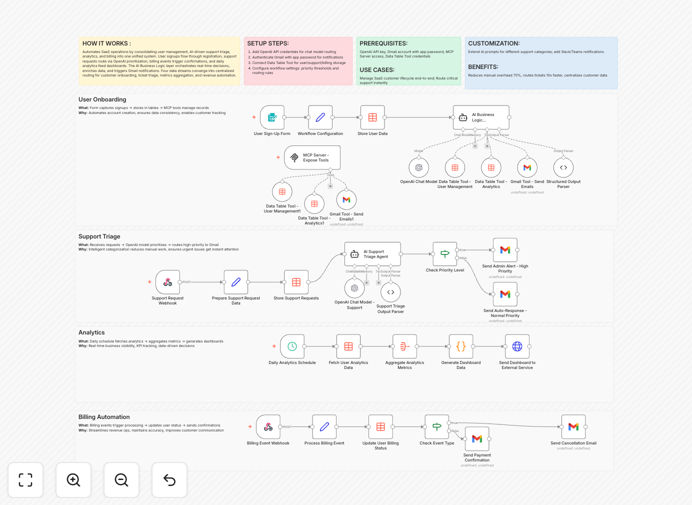
This n8n workflow template solves that by creating a unified automation system that connects all your SaaS operations. It automatically processes user registrations, uses AI to triage and prioritize support tickets, triggers billing confirmations, and feeds daily analytics into your dashboards. The AI Business Logic layer makes real-time decisions, enriches customer data, and ensures nothing falls through the cracks.
By consolidating four critical data streams—customer onboarding, ticket management, metrics aggregation, and revenue automation—you create a seamless operational backbone that scales with your business while reducing manual overhead by up to 70%.
How It Works
1. User Registration & Onboarding
When a new user signs up, the workflow automatically captures their information, creates their account in your database, sends a personalized welcome email, and adds them to your CRM. It also triggers initial setup tasks and schedules follow-up engagement based on their subscription tier.
2. AI-Powered Support Triage
Incoming support requests are analyzed by GPT-4.1-mini to determine urgency, sentiment, and required expertise. The AI categorizes tickets, suggests solutions for common issues, and routes critical problems to senior support staff immediately—reducing response times by 10x compared to manual sorting.
3. Automated Billing & Revenue Operations
The system monitors subscription events, processes payments, sends invoices, and handles failed charges automatically. When a user upgrades, downgrades, or cancels, all connected systems are updated in real-time, ensuring accurate billing and reducing revenue leakage.
4. Consolidated Analytics & Reporting
Daily metrics from user activity, support volume, revenue, and system performance are aggregated into unified dashboards. The workflow can trigger alerts for unusual patterns, generate scheduled reports for stakeholders, and feed data into your business intelligence tools.
Who This Is For
This template is ideal for SaaS companies, subscription businesses, and digital product teams experiencing growing operational complexity. If you're spending hours each week manually processing support tickets, reconciling billing data, or trying to piece together customer insights from multiple systems, this automation will transform your operations.
It's particularly valuable for teams with 100-10,000 customers where manual processes are becoming unsustainable but enterprise-scale solutions are overkill. Founders, operations managers, and customer success teams will benefit most from the time savings and improved customer experience.
What You'll Need
- An OpenAI API key for GPT-4.1-mini access
- A Gmail account or email service with API access
- Database or data table tool credentials (Airtable, Google Sheets, or similar)
- Your SaaS application's user registration/webhook endpoint
- Payment processor API keys (Stripe, PayPal, etc.)
- n8n instance (cloud or self-hosted)
Pro tip: Start with the support triage automation first—it typically delivers the most immediate time savings and customer satisfaction improvements. Once that's running smoothly, add the billing and analytics components.
Quick Setup Guide
- Import the template: Download the JSON file above and import it into your n8n instance.
- Configure credentials: Add your OpenAI API key, email service credentials, and database connections in n8n's credentials management.
- Set up webhooks: Configure the webhook nodes to receive data from your SaaS application for user signups and support requests.
- Customize AI prompts: Adjust the GPT-4.1-mini prompts in the workflow to match your specific support categories and business language.
- Test each branch: Use sample data to verify user onboarding, support triage, billing events, and analytics aggregation work correctly.
- Go live: Activate the workflow and monitor the first few days of operation, making adjustments as needed.
Key Benefits
Reduce manual operational work by 70% by automating repetitive tasks like ticket sorting, invoice generation, and data entry. Your team can focus on strategic initiatives instead of administrative overhead.
Route support tickets 10x faster with AI-powered triage that understands urgency and context. Critical issues reach the right person immediately, improving customer satisfaction and reducing resolution times.
Eliminate billing errors and revenue leakage through automated payment processing, invoice generation, and subscription management. Every dollar is accounted for without manual reconciliation.
Centralize customer data from multiple systems into a single source of truth. Make better decisions with complete visibility into user behavior, support trends, and financial performance.
Scale operations without proportional headcount growth as your customer base expands. The automation system handles increased volume efficiently, protecting your margins.