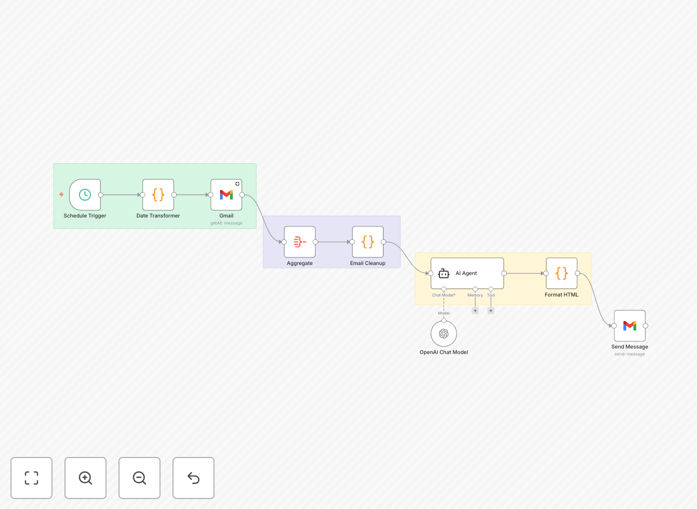
What This Workflow Does
This automation solves the modern professional's biggest productivity drain - email overload. The system connects to your Gmail account, processes all incoming messages through GPT-4o's advanced natural language processing, and generates a structured daily digest highlighting key information.
Instead of spending hours sorting through your inbox each morning, you receive a single organized report containing action items, important updates, and summarized conversations. The AI identifies urgent requests, extracts deadlines, and even categorizes messages by project or priority level.
How It Works
1. Email Collection
The workflow connects to your Gmail account via n8n's Google node, fetching all messages from the past 24 hours. It can be configured to process specific labels or skip certain senders.
2. Content Analysis
Each email is sent to OpenAI's GPT-4o API where the AI identifies key elements: action items, decisions needed, important dates, and core messages. The system maintains thread context across related messages.
3. Summary Generation
GPT-4o compiles the analyzed data into a structured Markdown report with clear sections for different message types. The summary preserves all critical information while removing redundant content.
4. Delivery
The final digest is delivered via your preferred channel - email, Slack, Notion, or any other connected platform. The template includes multiple output options.
Who This Is For
This workflow benefits anyone overwhelmed by email volume:
- Executives and managers receiving 100+ daily messages
- Sales professionals managing multiple client threads
- Project managers coordinating across teams
- Freelancers juggling multiple client communications
- Anyone who wants to reclaim 5+ hours per week from email
Pro tip: Combine this with calendar integration to automatically schedule follow-ups from email action items.
What You'll Need
- An n8n instance (cloud or self-hosted)
- Google Workspace account with API access
- OpenAI API key with GPT-4o access
- Destination for summaries (email, Slack, etc.)
Quick Setup Guide
- Download the JSON template file
- Import into your n8n instance
- Configure Google OAuth credentials
- Add your OpenAI API key
- Set your preferred delivery method
- Test with a small batch of emails
- Schedule to run daily at your preferred time
Key Benefits
Save 5-7 hours weekly by eliminating manual email processing. The AI handles the heavy lifting of reading and categorizing messages.
Never miss important actions with systematic extraction of deadlines, requests, and follow-ups from all communications.
Reduce stress and cognitive load by starting your day with a clean, organized summary instead of an overflowing inbox.
Improve response times by immediately seeing which messages require attention versus those that can wait.
Maintain better records with structured archives of daily communications that are searchable and organized.