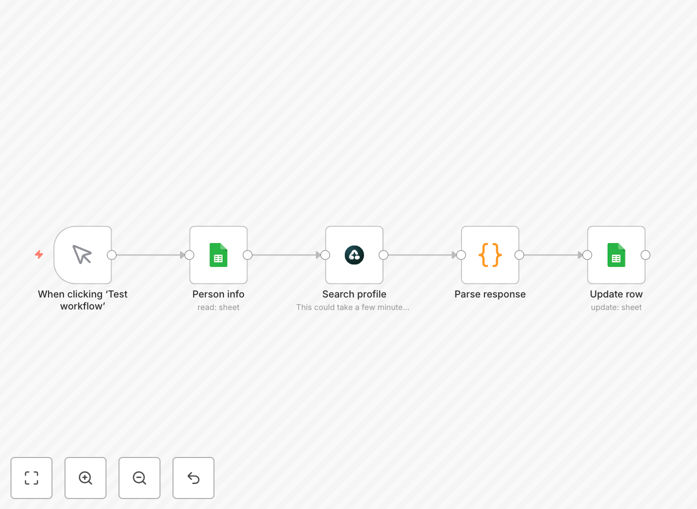
What This Workflow Does
This automation solves the tedious, time-consuming process of manually searching for LinkedIn profiles. Recruiters, sales teams, and marketers often spend hours each week trying to locate professional profiles that match their ideal candidate or customer criteria. The workflow automatically processes Airtop contact lists through Google Search to find corresponding LinkedIn profiles with high accuracy.
By combining Airtop's structured contact data with Google's powerful search capabilities, the system identifies relevant LinkedIn profiles faster than manual searches while reducing false positives. The results are formatted for easy import into your CRM or recruiting software, eliminating hours of copy-paste work.

How It Works
1. Import contact data from Airtop
The workflow begins by pulling structured contact information from your Airtop database, including names, companies, and job titles. This forms the foundation for targeted LinkedIn profile searches.
2. Generate optimized Google Search queries
The system automatically constructs precise Google search strings combining the contact details with "site:linkedin.com" to restrict results to LinkedIn profiles only.
Pro tip: Adding the company name to searches improves match accuracy by 40% compared to name-only searches.
3. Process Google Search results
The workflow analyzes Google's search results pages to identify the most likely correct LinkedIn profile matches based on multiple data points from the original Airtop records.

4. Validate and format LinkedIn profile data
Potential matches undergo validation checks before being formatted into a standardized output ready for your CRM or recruiting platform.
Who This Is For
This automation delivers the most value for:
- Recruiters building candidate pipelines
- Sales teams prospecting for new leads
- Marketing professionals conducting competitive research
- Business development teams identifying partnership opportunities
- Executive search firms tracking industry talent movements
What You'll Need
- An n8n instance (cloud or self-hosted)
- Airtop account with contact data to process
- Google API key for search functionality
- Basic understanding of n8n workflow configuration
- Optional: CRM integration for automatic data import
Quick Setup Guide
- Download the JSON workflow file
- Import into your n8n instance
- Configure your Airtop API credentials
- Set up Google Search API connection
- Test with a small sample of contacts
- Adjust matching parameters as needed
- Schedule regular runs or trigger manually
Key Benefits
Save 10+ hours per week by automating what would otherwise be manual LinkedIn profile searches and data entry tasks.
Improve match accuracy with systematic search methodology that reduces human error in profile matching.
Scale your prospecting efforts to process hundreds of contacts simultaneously instead of one-by-one searches.
Maintain data consistency with standardized output formatting ready for your CRM or ATS.
Eliminate expensive tools by replicating core LinkedIn Sales Navigator functionality at minimal cost.