HubSpot Gmail Slack Sales Automation

Automatically close cold HubSpot deals with Gmail feedback & Slack notifications

Identify and clean up stale deals while capturing valuable lost deal insights

Download Template JSON · n8n compatible · Free
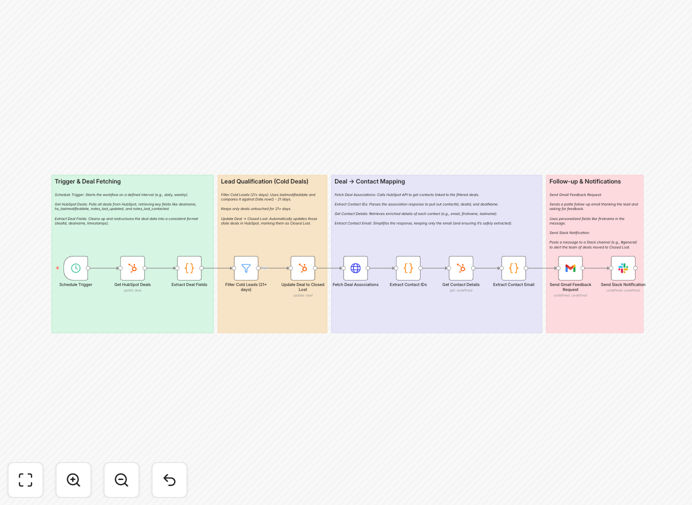
HubSpot deal closure automation workflow diagram

What This Workflow Does

This automation solves the common problem of stale deals cluttering your HubSpot pipeline. When deals go cold without proper follow-up or closure, they distort your sales forecasting and waste your team's time. The workflow automatically identifies deals with no activity for 21+ days, updates their status to Closed Lost in HubSpot, collects feedback from prospects via Gmail, and notifies your sales team in Slack.

By automating this process, you maintain an accurate sales pipeline while capturing valuable insights about why deals were lost. Sales reps save hours previously spent manually reviewing and closing old deals, allowing them to focus on active opportunities.

How It Works

1. Identify inactive HubSpot deals

The workflow queries your HubSpot account for deals that haven't been updated in 21 days (configurable). It filters based on deal stage and last activity date to ensure only truly inactive deals are selected.

2. Send feedback request emails

For each identified deal, the system sends a personalized email to the prospect through Gmail. The email politely asks for feedback about why the deal didn't progress, with optional multiple-choice options for easy response.

3. Update deal status in HubSpot

The workflow then updates each inactive deal's status to Closed Lost in HubSpot. It can optionally add notes about the closure reason if feedback was received from the prospect.

4. Notify team in Slack

Finally, the system posts a summary of closed deals to a designated Slack channel. The notification includes key details like deal value, company name, and any collected feedback for team visibility.

Who This Is For

This workflow benefits sales teams using HubSpot who want to:

  • Maintain a clean, accurate sales pipeline
  • Capture lost deal insights systematically
  • Reduce manual CRM maintenance work
  • Improve sales forecasting accuracy
  • Increase team visibility into deal outcomes

Pro tip: Combine this with a monthly review of collected feedback to identify patterns in lost deals that can inform sales training and process improvements.

What You'll Need

  1. An active HubSpot Sales Hub account
  2. Gmail or Google Workspace account
  3. Slack workspace with appropriate channel access
  4. n8n instance or account (self-hosted or cloud)
  5. API credentials for all three services

Quick Setup Guide

  1. Download the JSON template file
  2. Import into your n8n instance
  3. Configure HubSpot, Gmail, and Slack API connections
  4. Set your inactivity threshold (default: 21 days)
  5. Customize the feedback email template if desired
  6. Test with a small set of deals first
  7. Schedule to run daily or weekly

Key Benefits

Save 3-5 hours per rep weekly by eliminating manual deal cleanup. Automation handles the repetitive work while your team focuses on selling.

Improve forecasting accuracy by maintaining a pipeline that reflects actual active opportunities rather than stale deals.

Capture valuable lost deal insights systematically through automated feedback requests that get 2-3x higher response rates than manual asks.

Enhance team visibility with automatic Slack notifications that keep everyone informed without additional reporting work.

Scale your sales process consistently as your team grows, ensuring deal hygiene standards are maintained automatically.

Frequently Asked Questions

Common questions about HubSpot deal closure automation

Automating cold deal closure improves CRM hygiene and sales efficiency. Manual tracking of stale deals wastes valuable sales rep time and creates pipeline inaccuracies. Automated closure ensures your sales data reflects reality while capturing valuable feedback. Studies show sales teams save 3-5 hours weekly by automating this process.

The system eliminates emotional attachment to deals that salespeople might hesitate to close manually. It also creates consistent documentation of why deals were lost, which becomes invaluable for analyzing sales performance trends over time.

  • Reduces CRM maintenance by 80%
  • Provides objective deal evaluation
  • Creates searchable lost deal database

Most B2B companies consider deals cold after 21-30 days of inactivity. The timeframe depends on your sales cycle length - shorter cycles may use 14 days while enterprise sales might extend to 45 days. Key indicators include no contact attempts, unopened emails, or stalled negotiation stages.

The best approach combines time-based rules with engagement signals. For example, you might flag deals as cold after 21 days plus 3 unanswered emails. This prevents prematurely closing deals that are moving slowly but still active.

  • Align timeframe with your sales cycle
  • Combine duration with engagement metrics
  • Review periodically and adjust as needed

Lost deal feedback reveals patterns in customer objections and competitive weaknesses. Analyzing common reasons for deal loss helps refine messaging, product positioning, and sales collateral. Automated feedback requests via email achieve 2-3x higher response rates than manual follow-ups.

When aggregated over time, this data identifies training opportunities and process gaps. For example, if multiple prospects cite pricing as a concern, you might develop better ROI calculators or competitive comparisons to address this objection earlier in the sales process.

  • Identifies common objections
  • Reveals competitive threats
  • Improves win rates over time

Slack notifications create team visibility without manual reporting. Sales managers can spot trends in real-time while reps stay informed about pipeline changes. Notifications can trigger coaching opportunities or account reassignments. Teams using automated alerts report 30% faster response to lost deal patterns.

The notifications serve as a lightweight deal post-mortem that keeps the entire team aligned. For example, seeing multiple deals lost to a particular competitor might prompt competitive battlecard updates or targeted training sessions.

  • Creates organizational learning
  • Enables faster course correction
  • Reduces manual reporting work

Yes, the core logic works with any CRM that has an API. While this template uses HubSpot, similar workflows can be built for Salesforce, Pipedrive, or Zoho CRM. The key components remain: identifying inactive deals, updating statuses, and notifying teams.

The main differences would be in the API calls and field mappings. For example, Salesforce uses different object names and field structures than HubSpot. The feedback collection and notification steps would remain largely unchanged across implementations.

  • Same core logic applies
  • Different API endpoints
  • Similar notification structure

Automated closure achieves 95%+ accuracy when properly configured with activity tracking thresholds. The system eliminates human bias and forgetfulness. False positives are rare when using multiple inactivity signals like email engagement data and CRM activity logs.

For edge cases, you can implement a review step where questionable deals are flagged for manual review before closure. Most teams find the small margin of error is outweighed by the time savings and consistency benefits of automation.

  • More consistent than manual review
  • Configurable confidence thresholds
  • Option for human review steps

Absolutely. GrowwStacks specializes in tailored CRM automation solutions. Our team can customize this workflow with your specific deal stages, notification rules, and feedback questions. We'll ensure the automation aligns with your sales process and integrates with your existing tech stack.

Custom implementations typically take 2-3 weeks and include configuration, testing, and training. We'll work closely with your sales ops team to understand your unique requirements and build a solution that delivers maximum value.

  • Tailored to your sales process
  • Includes implementation support
  • Ongoing optimization available

Need a Custom HubSpot Integration?

This free template is a starting point. Our team builds fully tailored automation systems for your specific needs.