LINE Google Drive Google Sheets File Management

Automatically save & organize LINE message files in Google Drive with Sheets logging

Never lose customer files again with automated backup and organization of all LINE message attachments

Download Template JSON · n8n compatible · Free
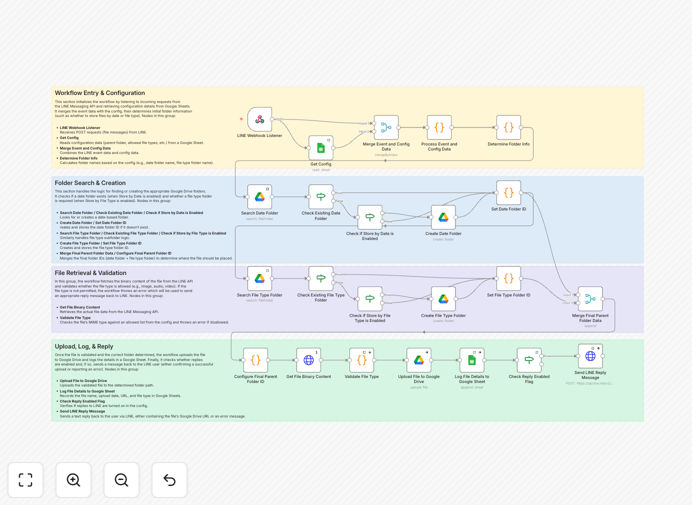
LINE to Google Drive automation workflow diagram

What This Workflow Does

This automation solves the common problem of losing important files shared through LINE messages. Customer service teams, sales reps, and field staff often receive critical documents via LINE - contracts, receipts, ID copies - that need proper archival. Manual saving leads to lost files, disorganization, and compliance risks.

The workflow automatically detects file attachments in incoming LINE messages, saves them to designated Google Drive folders with proper naming conventions, and creates a detailed log in Google Sheets. This creates a searchable archive while eliminating manual file management work.

How It Works

1. LINE Message Trigger

The workflow monitors your LINE channel for new messages containing file attachments. It captures the file along with sender details and timestamp.

2. File Processing

Each file gets renamed using a consistent format (e.g. "2023-11-15_ClientName_Document.pdf") and has its metadata extracted. The system checks for duplicate files to prevent unnecessary transfers.

3. Google Drive Upload

Files get saved to predetermined Drive folders, which can be organized by date, department, or project. The folder structure automatically creates subfolders as needed.

4. Google Sheets Logging

A row gets added to your tracking sheet with file details including: original message text, sender info, timestamp, file type, Drive link, and any custom tags. This creates an audit trail.

Pro tip: Add a column in your Sheet for status tracking to manage follow-up actions on received files.

Who This Is For

This automation benefits any business using LINE for customer communication:

  • Customer support teams receiving documentation
  • Sales teams getting signed contracts via LINE
  • Field service technicians submitting work reports
  • Healthcare providers receiving patient documents
  • Education institutions managing student submissions

What You'll Need

  1. A LINE Business account with Messaging API access
  2. Google Workspace account (for Drive and Sheets)
  3. n8n instance (self-hosted or cloud)
  4. Google Cloud Project with Drive and Sheets API enabled

Quick Setup Guide

  1. Download the JSON template file
  2. Import into your n8n instance
  3. Connect your LINE channel credentials
  4. Authorize Google Drive and Sheets access
  5. Configure target folder paths in Drive
  6. Set up your tracking Sheet template
  7. Test with sample LINE messages

Key Benefits

Eliminate lost files with automatic backup of every LINE attachment to your secure Google Drive, ensuring compliance with data retention policies.

Save 5+ hours weekly by removing manual file saving and organization work from your team's workload.

Improve response times with instant access to customer documents through the searchable Sheets log, no more digging through message history.

Customizable organization that adapts to your business needs with folder structures by date, department, or project.

Audit-ready documentation with complete tracking of when files were received, by whom, and where they're stored.

Frequently Asked Questions

Common questions about LINE and Google Drive integration

Automating LINE message file management saves teams hours of manual work while ensuring no files get lost. Businesses can automatically organize customer documents, receipts, and media files with proper metadata tracking. This creates an audit trail for compliance while making files instantly searchable in Google Drive.

For example, a real estate agency receiving signed contracts via LINE can automatically file them by property address with timestamps proving when documents were received. The system eliminates frantic searches through message history when documents are needed.

  • Reduces human error in file handling
  • Creates standardized naming conventions
  • Enables quick retrieval during customer inquiries

The workflow handles all file types sent through LINE messages including PDFs, images (JPG/PNG), documents (DOCX/XLSX), audio files, and videos. Each file gets saved with metadata like sender info, timestamp, and file type. The system maintains original file formats while adding organizational structure.

A common use case involves healthcare providers receiving patient ID copies and insurance cards as images. The automation preserves the original image quality while adding patient identifiers to filenames and logging the submission time for compliance purposes.

  • Supports files up to LINE's size limits
  • Preserves original file integrity
  • Handles multiple attachments per message

The integration uses official API connections with OAuth authentication for both LINE and Google services. Files transfer directly between platforms without intermediate storage. Access permissions follow the principle of least privilege, only granting necessary permissions for the specific folders being used.

Financial institutions using this solution appreciate that sensitive client documents move securely from LINE to their encrypted Google Drive without manual handling. The audit log in Sheets provides visibility while maintaining strict access controls on the actual files.

  • End-to-end encrypted transfers
  • No third-party storage involved
  • Granular permission controls

Yes, the workflow allows complete customization of Drive folder hierarchy. Common structures organize by date, sender, department, or project. You can create subfolders automatically based on message metadata. The template includes examples for different organizational approaches that can be modified.

An education provider might organize files by course code → student ID → assignment type. Meanwhile, a sales team could structure by opportunity stage → client name → document type. The flexibility accommodates various business needs without coding.

  • Dynamic folder creation based on message content
  • Multiple organization schemes available
  • Easy to modify as business needs change

The workflow includes error handling that retries failed transfers and logs issues in the Google Sheet. Administrators receive alerts for persistent failures. The system maintains message IDs to prevent duplicate transfers while ensuring no files get missed during temporary connection issues.

When network problems occur, the workflow queues files and attempts transfers at increasing intervals. Critical failures trigger email notifications to IT staff. This reliability is crucial for businesses handling time-sensitive documents like legal filings or medical records.

  • Automatic retry logic built in
  • Failure notifications for administrators
  • Prevents duplicate file transfers

The Sheet creates a searchable database of all transferred files with clickable Drive links. Teams can filter by date, sender, or file type without navigating Drive folders. The log enables reporting on file volumes, response times, and helps demonstrate compliance with data retention policies.

Customer service managers use the Sheet to track document receipt times for SLA reporting. The search functionality lets agents quickly pull up files during calls by searching client names or dates, significantly reducing call handling times.

  • Enables powerful filtering and searching
  • Provides analytics on file volumes
  • Simplifies compliance reporting

Absolutely! GrowwStacks specializes in tailored automation solutions. We can build custom workflows that integrate LINE with your existing systems, add approval steps, implement advanced security controls, or create department-specific filing rules. Our team handles everything from initial consultation to ongoing maintenance.

Recent customizations we've delivered include adding OCR processing for received documents, integrating with CRM systems to auto-tag files by customer, and creating multi-level approval workflows for sensitive documents. We adapt the solution to your exact business requirements.

  • End-to-end implementation support
  • Custom features beyond the template
  • Ongoing optimization and maintenance

Need a Custom LINE Integration?

This free template is a starting point. Our team builds fully tailored automation systems for your specific needs.