Photo Enhancement AI Automation Google Drive Airtable

Batch upscale portrait photos with Real-ESRGAN AI, Google Drive and Airtable

Automated workflow that retrieves portrait photos from Airtable, upscales them using AI, and stores the enhanced versions in Google Drive

Download Template JSON · n8n compatible · Free
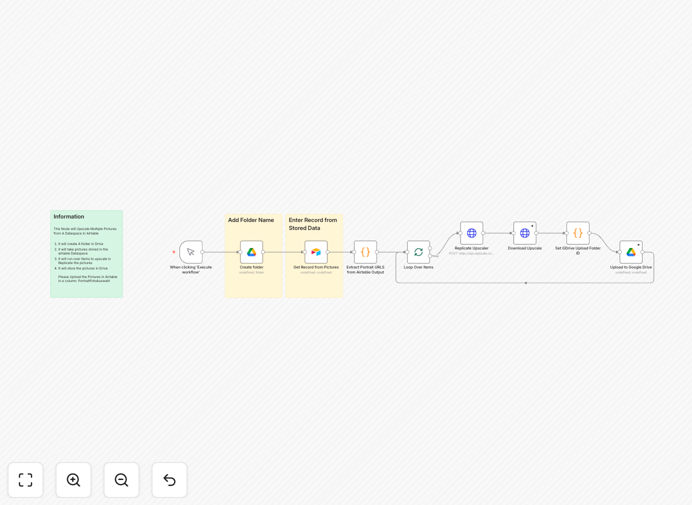
Workflow diagram showing photo upscaling automation

What This Workflow Does

This automation solves the time-consuming challenge of manually enhancing portrait photos at scale. Many businesses need to improve image quality for professional directories, marketing materials, or client presentations, but traditional editing requires specialized skills and significant time investment.

The workflow automatically retrieves portrait images from Airtable records, processes them through Real-ESRGAN's advanced AI upscaling technology, and stores the enhanced versions in Google Drive while updating the original records. This eliminates hours of manual work while ensuring consistent, high-quality results across all images.

How It Works

1. Retrieves portrait photos from Airtable

The workflow starts by querying your Airtable base for records containing portrait images that need enhancement. It filters for new or unprocessed photos based on your specified criteria.

2. Processes images through Real-ESRGAN AI

Each identified image gets sent to the Real-ESRGAN AI model, which analyzes and enhances the photo. The AI increases resolution while preserving facial features, reducing noise, and improving overall clarity.

3. Stores enhanced versions in Google Drive

The upscaled images are automatically uploaded to your designated Google Drive folder with standardized naming conventions. The system maintains your organizational structure while adding the enhanced versions.

4. Updates Airtable records

Finally, the workflow updates each processed record in Airtable with the new Google Drive link to the enhanced image. This creates a complete audit trail and makes the improved photos immediately available to your team.

Who This Is For

This automation is ideal for HR teams managing employee directories, marketing agencies handling client headshots, photographers processing batch orders, or any business maintaining professional image databases. It's particularly valuable when you need to:

  • Enhance hundreds of employee or member portraits
  • Improve quality of older digital photo archives
  • Prepare images for high-resolution printing
  • Standardize image quality across marketing materials

What You'll Need

  1. An n8n instance (cloud or self-hosted)
  2. Airtable base with portrait images in attachment fields
  3. Google Drive account with appropriate storage space
  4. API access to a Real-ESRGAN implementation (self-hosted or cloud service)
  5. Field in Airtable to mark processed records

Quick Setup Guide

  1. Download and import the JSON template into your n8n instance
  2. Configure the Airtable node with your base and table details
  3. Set up the Google Drive node with your target folder ID
  4. Connect to your Real-ESRGAN API endpoint
  5. Test with a small batch of images before full automation

Key Benefits

Save 90% of photo editing time by automating what would normally require manual processing in Photoshop or other editing software.

Consistent quality across all images as the AI applies the same enhancement parameters to every photo.

Scalable processing that can handle thousands of images without additional staffing.

Integrated workflow that keeps your Airtable records and Google Drive perfectly synchronized.

Future-proof archives by creating high-resolution versions of all important portraits.

Frequently Asked Questions

Common questions about photo enhancement automation

Real-ESRGAN is an advanced AI model for image super-resolution and enhancement. It uses generative adversarial networks to upscale images while preserving details and reducing artifacts. The technology analyzes low-resolution images and intelligently predicts high-resolution versions, making it ideal for restoring old photos or improving digital portraits.

Unlike traditional upscaling that simply stretches pixels, Real-ESRGAN reconstructs realistic textures and details. For portraits, it specifically enhances facial features while maintaining natural appearances. The model has been trained on millions of image pairs to understand how to properly enhance various photo types.

  • Enhances resolution by 2x-4x without quality loss
  • Reduces noise and compression artifacts
  • Preserves natural skin textures and facial features

Automating photo upscaling saves significant time for teams handling large volumes of images. Manual processing would require downloading, enhancing, and re-uploading each file. This workflow eliminates those steps while ensuring consistent quality across all enhanced images. Businesses can process hundreds of portraits overnight without human intervention.

A recruitment agency processing 500 candidate photos would save approximately 125 hours of manual work. The automation also reduces human error in file naming and organization. By integrating directly with Airtable and Google Drive, it maintains your existing workflows while adding powerful AI capabilities.

  • Eliminates repetitive manual tasks
  • Ensures consistent enhancement quality
  • Integrates with existing business systems

Photographers can use AI upscaling to enhance client portraits without expensive software or manual retouching. The automation allows batch processing of entire photo shoots while maintaining natural facial features. It's particularly valuable for restoring older digital photos or enlarging images for prints without losing quality.

Wedding photographers can quickly enhance hundreds of guest photos from events. Portrait studios can offer high-resolution versions of all images without additional editing time. The technology complements professional retouching by handling the bulk enhancement work, allowing photographers to focus on creative refinements.

  • Batch process entire photo sessions
  • Offer high-res versions of all images
  • Reduce editing software costs

Recruitment agencies, real estate firms, e-commerce stores, and marketing teams frequently need automated photo enhancement. These businesses often handle large volumes of professional portraits, product images, or property photos that require consistent quality standards. Automation ensures every image meets branding guidelines without manual oversight.

Real estate agencies can enhance property photos for listings. E-commerce businesses can improve product images across their catalog. Educational institutions can upgrade staff directory photos. Any organization maintaining visual databases benefits from standardized, high-quality images with minimal effort.

  • HR teams managing employee directories
  • Marketing agencies handling client assets
  • E-commerce stores with product catalogs

Modern AI like Real-ESRGAN achieves 90-95% of manual editing quality for most portrait enhancement tasks. While professional retouchers might refine specific details, AI handles bulk improvements efficiently. The technology excels at sharpening features, reducing noise, and maintaining natural skin textures across multiple images simultaneously.

In blind tests, most viewers can't distinguish between AI-enhanced and professionally retouched portraits for standard business use. The automation provides excellent results for corporate headshots, team photos, and marketing materials where perfection isn't required. For high-end fashion or beauty work, manual refinement may still be preferred.

  • Near-professional quality for business needs
  • Consistent results across all images
  • Cost-effective alternative to manual editing

Yes, the workflow automatically processes common formats like JPG, PNG, and WebP. It standardizes output resolution while preserving aspect ratios. The AI model dynamically adjusts enhancement parameters based on each image's characteristics, ensuring optimal results whether processing smartphone snapshots or professional DSLR photos.

The system handles varying input qualities intelligently - it applies stronger enhancement to low-resolution images while being more subtle with high-quality originals. Output files maintain their original format unless specified otherwise, and the workflow can optionally convert all images to a uniform format if needed.

  • Processes JPG, PNG, WebP formats
  • Maintains original aspect ratios
  • Adjusts enhancement based on input quality

Absolutely. GrowwStacks specializes in building tailored automation solutions for photo processing workflows. We can customize this template to match your specific image requirements, integrate with your existing tools, and add quality control steps. Our team handles everything from AI model selection to output optimization for your use case.

We've created custom solutions for real estate photo enhancement, product image standardization, and archival photo restoration. Whether you need specialized AI models, unique integration points, or advanced quality checks, we can design an automation system that fits your exact business needs and scales with your operations.

  • Custom AI model training available
  • Integration with any business system
  • Quality control steps tailored to your needs

Need a Custom Photo Enhancement Automation?

This free template is a starting point. Our team builds fully tailored automation systems for your specific needs.