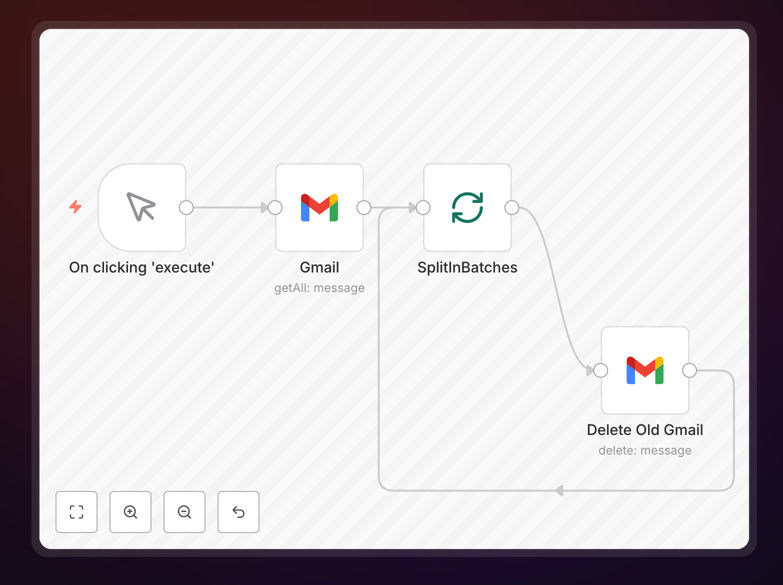
What This Workflow Does
Email overload is one of the biggest productivity killers in modern business. The average professional spends 28% of their workweek managing email, much of which involves sorting through and deleting unwanted messages. This automation workflow solves this problem by automatically cleaning out unwanted emails from Gmail based on customizable rules and criteria.
The workflow automatically identifies and processes emails that meet specific conditions you define, such as emails from certain senders, messages containing specific keywords, promotional content, or emails older than a specified period. It can either delete these emails permanently or move them to archive, depending on your preference. This ensures your inbox stays clean and organized while you focus on high-value work.
How It Works
Email Monitoring and Filtering
The workflow begins by monitoring your Gmail inbox for new emails or can be scheduled to process existing emails at regular intervals. It applies your predefined filters to identify emails that match your cleanup criteria. These filters can include sender addresses, subject line keywords, message content, email age, or specific labels.
Rule-Based Processing
Once emails are identified as unwanted, the workflow processes them according to your specified actions. This can include moving emails to trash, permanently deleting them, archiving them, or applying specific labels for further review. The system ensures that only emails meeting your exact criteria are processed, protecting important communications from accidental removal.
Automated Scheduling and Logging
The workflow can be scheduled to run automatically at set intervals—daily, weekly, or monthly—ensuring your inbox stays consistently clean. It also maintains a log of all actions taken, providing transparency and allowing you to review what emails were processed and when. This audit trail is valuable for compliance purposes and peace of mind.
Pro tip: Start with conservative rules and test the workflow on a small batch of emails before applying it to your entire inbox. This prevents accidental deletion of important messages while you refine your filtering criteria.
Who This Is For
This workflow is ideal for busy professionals, entrepreneurs, small business owners, and teams who receive high volumes of email daily. It's particularly valuable for sales teams managing multiple inboxes, customer support departments handling ticket notifications, and executives who need to maintain focus by eliminating distractions. Marketing teams can use it to clean up campaign notifications and analytics reports after they've been processed.
Companies with multiple employees using Gmail will find this automation especially beneficial as it can be scaled across the organization, ensuring consistent email management practices and reducing the collective time spent on email maintenance. It's also perfect for individuals who struggle with email overload and want to implement a "inbox zero" approach without manual effort.
What You'll Need
- A Gmail or Google Workspace account with access to the emails you want to clean
- n8n account set up and configured
- Basic understanding of email filtering criteria (senders, keywords, dates)
- Permission to modify or delete emails in the target Gmail account
- Clear criteria for what constitutes "unwanted" emails in your specific context
Quick Setup Guide
- Download the workflow template using the button above
- Import the JSON file into your n8n instance
- Connect your Gmail account to n8n using OAuth authentication
- Configure the filter criteria to match your unwanted email parameters
- Set your preferred action (delete, archive, or label)
- Configure the schedule for how often the cleanup should run
- Test the workflow with a small batch of emails first
- Activate the workflow and enjoy your cleaner inbox
Key Benefits
Save 2-5 hours weekly by eliminating manual email sorting and deletion. This time can be redirected toward revenue-generating activities and strategic work.
Reduce email storage costs by automatically removing large attachments and old messages that consume Google Workspace storage space.
Improve focus and productivity by maintaining a clean inbox free from distractions and clutter that slow down email processing.
Enhance email security by automatically removing potential phishing emails and suspicious messages that could pose security risks.
Maintain compliance with automated retention policies that ensure emails aren't kept longer than necessary according to your industry regulations.