n8n CAD BIM Automation Data Conversion

Convert CAD & BIM Files to Analysis-Ready Formats Automatically

Transform Revit, IFC, and AutoCAD files into structured spreadsheets with this one-click workflow

Download Template JSON · n8n compatible · Free
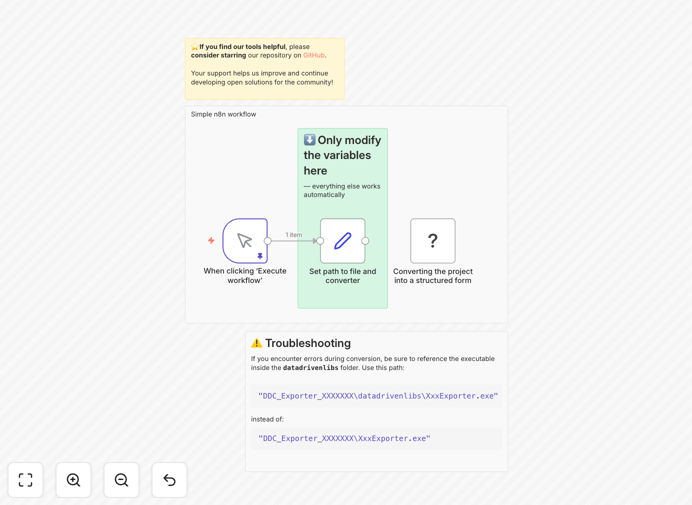
CAD/BIM conversion workflow interface

What This Workflow Does

This automation solves the tedious manual process of converting architectural CAD and BIM files between formats. Architects and engineers often need to transform Revit, IFC, or DWG files into spreadsheet formats for cost analysis, material takeoffs, or client reports. The traditional method involves exporting files manually through multiple software interfaces - a time-consuming and error-prone process.

The workflow automatically converts your CAD/BIM projects into analysis-ready XLSX spreadsheets (with optional DAE 3D files) with just two variable inputs. It handles the entire conversion pipeline, preserving critical building data while outputting in formats that stakeholders across your organization can use without specialized software.

How It Works

1. Set Input Parameters

Configure two simple variables: the source file location and your desired output format (XLSX or XLSX+DAE). The workflow accepts cloud storage paths or local file references.

2. File Processing

The automation extracts BIM metadata, element properties, and geometric data while converting the file. It maintains data relationships between building components during conversion.

3. Data Transformation

Critical BIM information gets organized into logical spreadsheet tabs - one for architectural elements, another for structural components, and separate sheets for MEP systems if present.

4. Output Delivery

The final XLSX file gets saved to your specified location with timestamps and version control. Optional DAE files include simplified 3D geometry for visualization in other applications.

Pro tip: Schedule this workflow to run nightly, automatically converting updated BIM models so your team always has current data.

Who This Is For

This workflow benefits architecture firms, engineering consultancies, and construction companies that regularly exchange CAD/BIM files with clients and partners. It's particularly valuable for:

  • Project managers coordinating between design and construction teams
  • BIM managers maintaining model integrity across disciplines
  • Cost estimators needing material quantities from models
  • Facility managers requiring as-built data in accessible formats

What You'll Need

  1. An n8n instance (cloud or self-hosted)
  2. Access to your CAD/BIM files (local or cloud storage)
  3. Basic familiarity with setting variables in automation workflows
  4. Optional: Google Drive or Dropbox for cloud file handling

Quick Setup Guide

  1. Download the JSON template file
  2. Import into your n8n instance
  3. Set your source file path variable
  4. Configure output format (XLSX or XLSX+DAE)
  5. Specify destination folder for converted files
  6. Test with a sample Revit/IFC/DWG file
  7. Schedule regular runs or trigger via webhook

Key Benefits

Save 10+ hours per project by eliminating manual file conversions. What typically takes days of exporting and reformatting now happens with one click.

Reduce errors by 90% in data transfers between teams. Automated conversions maintain consistent formatting and complete data transfer.

Enable real-time collaboration across disciplines by providing always-current data in accessible formats to all stakeholders.

Scale your BIM operations without adding staff. Process dozens of files simultaneously instead of one-at-a-time manual conversions.

Future-proof your data with standardized outputs that integrate with analytics tools, ERP systems, and digital twin platforms.

Frequently Asked Questions

Common questions about CAD/BIM integration and automation

Automating CAD/BIM conversions saves architects and engineers hours of manual work. Typical projects require converting files between Revit, IFC, DWG formats for different stakeholders. Automation ensures consistency, reduces human error, and allows batch processing of multiple files simultaneously.

Construction firms report 60-80% time savings on file conversion tasks when using automated workflows. The standardized outputs also improve collaboration between teams working with different software platforms.

  • Eliminates repetitive manual exports
  • Ensures version control across teams
  • Enables processing of multiple files overnight

Converting BIM data to spreadsheets enables better analysis and collaboration. Excel files allow non-technical stakeholders to access building data without specialized software. Spreadsheets facilitate cost estimation, material takeoffs, and schedule tracking.

Many firms use this approach to integrate BIM data with ERP systems or share progress reports with clients in accessible formats. The structured data also works well for creating dashboards that track construction progress against the BIM model.

  • Makes BIM data accessible to non-technical users
  • Simplifies integration with business systems
  • Enables custom reporting and analysis

Automated conversion creates seamless handoffs between design and construction teams. When BIM models automatically convert to analysis-ready formats, it eliminates version control issues and reduces rework.

Project managers can trigger conversions on schedule or when files update, ensuring all teams work with current data. This prevents costly mistakes from using outdated drawings or models. Some firms integrate these conversions with their document management systems for complete traceability.

  • Reduces RFIs caused by outdated drawings
  • Accelerates decision-making with current data
  • Creates audit trails of model changes

IFC and Revit formats work best for automated BIM processing due to their structured data. IFC (Industry Foundation Classes) is the open standard for BIM interoperability. For CAD conversions, DWG and DXF files process well in automation workflows.

The workflow can output to XLSX for analysis or DAE for 3D visualization in other applications. Some advanced implementations also generate PDF reports with key model metrics alongside the data exports.

  • IFC preserves the most BIM metadata
  • Revit files maintain family relationships
  • DAE outputs work in most 3D viewers

Modern automation tools can handle complex BIM conversions with proper configuration. The workflow preserves element properties, materials, and spatial relationships during conversion.

For large models, the automation can split outputs by discipline (architecture, structure, MEP) or by building levels. Some firms add quality checks to validate data integrity after conversion. The most sophisticated implementations include clash detection rules that flag potential issues during the conversion process.

  • Handles models with 100,000+ elements
  • Maintains parametric relationships
  • Optionally splits outputs by discipline

Forward-thinking firms use automated BIM data for quantity takeoffs, clash detection, and progress tracking. The converted data feeds into project management dashboards, cost estimation tools, and fabrication systems.

Some integrate with IoT sensors to compare as-built conditions with design models. Automation makes BIM data actionable across the project lifecycle. The most advanced implementations connect BIM data to ERP systems for real-time cost tracking against the model.

  • Automated quantity surveys
  • Progress vs. model comparisons
  • Fabrication data for prefab

Yes! GrowwStacks specializes in custom CAD/BIM automation solutions tailored to your specific workflows. Our team can build integrations with your existing Revit, AutoCAD, or BIM software stack.

We'll analyze your file conversion needs and design a system that saves your team hours each week while improving data accuracy across projects. Our solutions range from simple format converters to complete model-to-construction automation pipelines.

  • Tailored to your software ecosystem
  • Built for your project workflows
  • Scalable as your needs grow

Need a Custom CAD/BIM Integration?

This free template is a starting point. Our team builds fully tailored automation systems for your specific needs.