What This Workflow Does
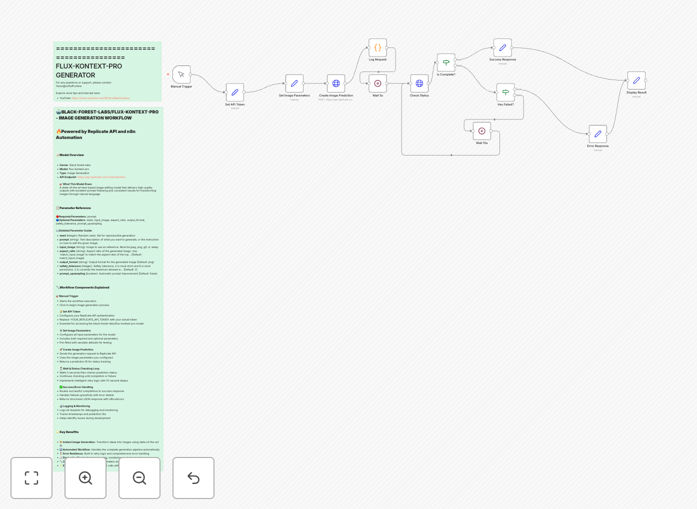
This n8n workflow automates the process of generating high-quality images from text prompts using the powerful Flux Kontext Pro AI model through Replicate's API. It solves the time-consuming manual process of creating marketing visuals, product mockups, and content illustrations by turning text descriptions into professional images automatically.
The workflow handles the entire pipeline: receiving text prompts, formatting API requests, processing the AI-generated images, and delivering the results to your preferred destination (cloud storage, CMS, or email). It eliminates the need for manual prompt engineering and batch processing, saving creative teams hours of repetitive work each week.
How It Works
1. Input Trigger
The workflow begins when it receives a text prompt from your chosen source - this could be a form submission, spreadsheet row, CMS webhook, or manual entry. The trigger is fully customizable to match your existing content creation process.
2. API Request Preparation
n8n formats the prompt according to Flux Kontext Pro's specifications, adding any predefined style parameters, resolution settings, or quality modifiers you've configured. This ensures consistent output quality across all generated images.
3. Replicate API Integration
The workflow sends the formatted request to Replicate's API endpoint for Flux Kontext Pro. Replicate handles the heavy lifting of model execution, automatically scaling GPU resources as needed while you pay only for the compute time used.
4. Image Processing
Once generated, the workflow can optionally apply post-processing: resizing, adding watermarks, converting formats, or running quality checks. This step ensures all output meets your brand standards before delivery.
5. Output Delivery
The final images are sent to your specified destinations - common options include cloud storage (Google Drive, Dropbox), CMS platforms (WordPress, Shopify), or directly to team members via email or Slack notifications.
Who This Is For
This workflow is ideal for marketing teams, ecommerce stores, content creators, and agencies that need to produce high volumes of quality visuals quickly. Specifically:
- Marketing teams creating social media content and ads
- Ecommerce businesses needing product mockups and variations
- Publishers generating article illustrations and featured images
- Agencies producing client deliverables at scale
- SaaS companies creating UI/UX mockups and documentation
Pro tip: Combine this workflow with a spreadsheet of pre-approved prompts to maintain brand consistency across all generated images while allowing for creative variation.
What You'll Need
- An n8n instance (cloud or self-hosted)
- A Replicate API account with billing configured
- Flux Kontext Pro model access via Replicate
- Destination storage or platform credentials (e.g., Google Drive, WordPress)
- Basic understanding of n8n workflow editing
Quick Setup Guide
- Download the JSON template file using the button above
- Import it into your n8n instance (Settings → Workflows → Import)
- Configure your Replicate API key in the workflow settings
- Set up your trigger method (webhook, manual, or scheduled)
- Connect your output destinations (cloud storage, CMS, etc.)
- Test with sample prompts and adjust parameters as needed
- Activate the workflow and start generating images automatically
Key Benefits
Save 5-10 hours weekly by automating repetitive image creation tasks that would normally require manual prompt engineering and batch processing.
Reduce content production costs by 80%+ compared to hiring designers or purchasing stock photos, especially for high-volume needs.
Maintain brand consistency through predefined style parameters that ensure all generated images match your visual identity.
Scale output instantly from one image to thousands without additional effort, perfect for seasonal campaigns or product launches.
Integrate seamlessly with your existing tools and workflows through n8n's 300+ app connectors.