n8n JSON Data Transformation Automation

Create multiple JSON items from an array

Automatically convert arrays into individual JSON items with this n8n workflow template

Download Template JSON · n8n compatible · Free
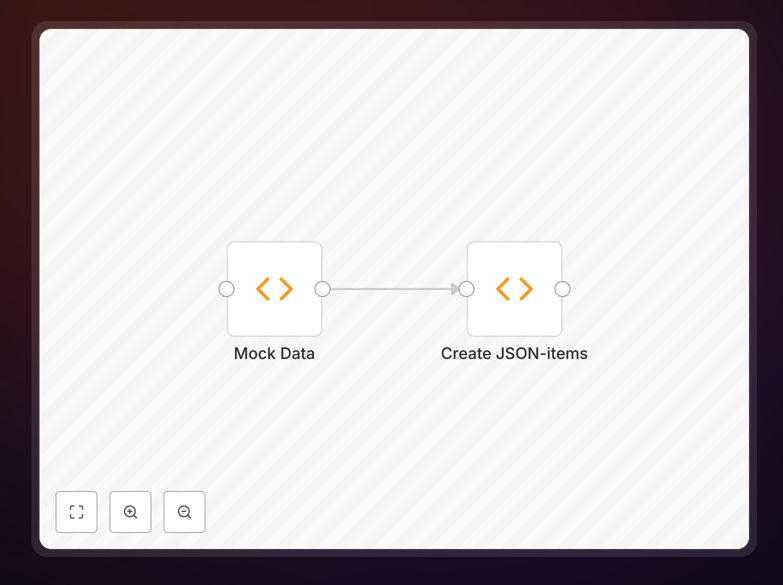
n8n workflow for creating multiple JSON items from an array

What This Workflow Does

This n8n workflow solves a common data transformation challenge: converting array data into individual JSON items. Many APIs and systems return data in array format, but downstream applications often require each item to be processed separately as distinct JSON objects.

ByBy automating this conversion, you eliminate manual data restructuring that would otherwise consume valuable developer time. The workflow uses n8n's Function node to efficiently iterate through array elements and output them as separate JSON items ready for further processing.

How It Works

1. Input Array Processing

The workflow begins by accepting an input array from any source data. This could come from an API response, database query, or file import.

2. Array Iteration

The Function node iterates through each element of the array, applying any necessary transformations or filters to the data.

3. JSON Item Creation

For each array element, the workflow creates a properly formatted JSON object containing all relevant fields and values.

4. Output Generation

The final output consists of individual JSON items that can be passed to other systems or stored for later use.

Who This Is For

This workflow is ideal for developers and data engineers who regularly work with API integrations or data pipelines. It's particularly valuable for:

  • Teams building integrations between systems with different data formats
  • Businesses processing large datasets from multiple sources
  • Organizations automating data transformation tasks

What You'll Need

  1. An n8n instance (self-hosted or cloud)
  2. Source data containing arrays that needs to be converted
  3. Basic understanding of JSON data structures

Quick Setup Guide

  1. Download and import the JSON template into your n8n instance
  2. Adjust the Function node code to match your specific array structure
  3. Connect the workflow to your data source
  4. Test with sample data to verify output format
  5. Deploy the workflow for production use

Key Benefits

Save developer hours: Automating this common task eliminates manual coding for each new integrations.

Reduce errors: Standardized conversion process ensures consistent JSON output every time.

Scale processing: Handle large arrays efficiently without performance degradation.

Flexible integration: Output can be connected to any system that accepts JSON data.

Pro tip: Use this workflow as part of a larger data pipeline to automate complex transformations between systems.

Frequently Asked Questions

Common questions about JSON data transformation and automation

Converting arrays to individual JSON items enables better compatibility with downstream systems that process records one at a time. Many APIs, databases, and applications expect data in this format rather than arrays.

For example, when sending customer data to a CRM system, each customer profile needs to be processed separately. This workflow automates that transformation automatically, saving manual restructuring effort.

  • Enables record-by-record processing
  • Simplifies integration with most APIs
  • Reduces memory usage for large datasets

JSON transformation bridges gaps between systems with different data requirements. It allows businesses to connect disparate tools without custom coding for each integration.

A retail company might use this to transform product data from their inventory system (which outputs arrays) into individual JSON items required by their ecommerce platform. This automation ensures real-time sync between systems.

  • Eliminates manual data reformatting
  • Enables real-time system integration
  • Reduces dependency on IT for simple transformations

API responses frequently return arrays that need conversion. Common examples include customer lists, product catalogs, transaction batches, and log entries.

Marketing platforms often process lead data in batches (arrays), while CRM systems typically handle records individually. This workflow bridges that gap automatically.

  • Ecommerce product data
  • CRM contact lists
  • Financial transaction batches

Yes, the Function node in n8n can handle complex nested arrays with additional coding. The template provides a foundation that can be extended for hierarchical data structures.

For example, a multi-level product catalog with categories, subcategories, and items can be flattened into individual JSON records with proper transformation logic. This maintains data relationships while creating separate items.

  • Requires additional JavaScript coding
  • Preserves parent-child relationships
  • Maintains data integrity through transformation

JSON provides more flexibility than flat formats like CSV because it supports hierarchical data and explicit data types. While CSV is simpler for tabular data, JSON handles complex relationships better.

For analytics systems that require flat tables, JSON can be transformed to CSV after processing. This workflow could extended to output multiple formats from the same source data.

  • JSON preserves data structure
  • Easier to convert JSON to CSV than vice versa
  • JSON is the web's lingua franca for APIs

JSON data should be validated sanitized like any other data format. Common security practices include checking for malformed input, setting size limits, and filtering sensitive fields.

When processing customer data, for example, you might want to remove or encrypt personal information before conversion. The Function node can implement these safeguards as part of the transformation process.

  • Validate input structure
  • Filter sensitive data fields
  • Set reasonable size limits

Absolutely! GrowwStacks specializes in building custom automation solutions for complex data transformation challenges. Our team can design workflow tailored workflows that match your specific data structures and business requirements.

Whether you need to connect legacy systems, process specialized data formats, or create custom validation rules, we can develop a solution that saves your team time and reduces errors.

  • Custom data mapping
  • Specialized validation logic
  • Enterprise-grade error handling

Need a Custom JSON Transformation Automation?

This free template is a starting point. Our team builds fully tailored automation systems for your specific needs.