What This Workflow Does
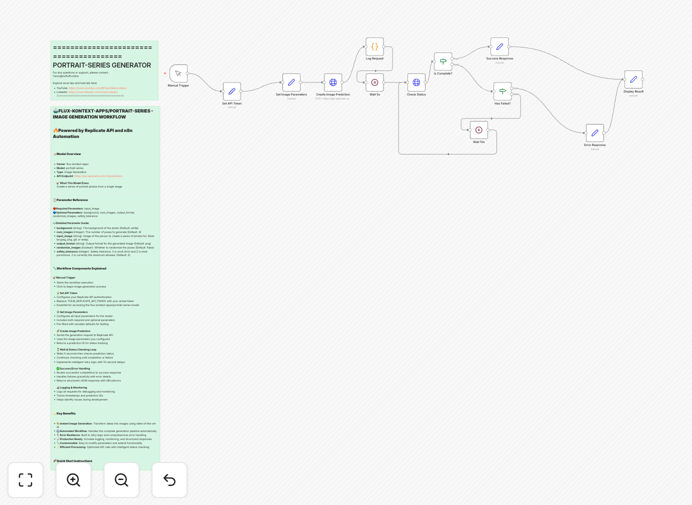
This workflow automates the process of generating multiple portrait variations from a single source image using Flux Kontext's Portrait Series AI model through the Replicate API. It eliminates the manual work of submitting individual requests and collecting results, streamlining creative workflows for photographers, designers, and marketing teams.
The template handles the entire process from image submission to receiving multiple styled portrait variations. It's particularly valuable for businesses needing consistent branded imagery across campaigns, or creative professionals looking to explore different artistic interpretations of their subjects.
How It Works
1. Image Submission
The workflow begins when you upload a source portrait image. This can be triggered manually or automatically from connected apps like Dropbox, Google Drive, or your CMS.
2. API Processing
The image is sent to Replicate's API endpoint for Flux Kontext Portrait Series. The workflow handles authentication, API calls, and error handling automatically.
3. Portrait Generation
The AI model generates multiple portrait variations with different styles, compositions, or artistic interpretations based on your parameters.
4. Result Delivery
Generated portraits are automatically saved to your preferred destination (cloud storage, email, CMS) with proper naming conventions and metadata.
Who This Is For
This workflow is ideal for:
- Photography studios creating client presentation options
- Marketing teams needing varied campaign imagery
- E-commerce businesses generating product model variations
- Creative agencies exploring artistic directions
- Content creators building diverse social media assets
What You'll Need
- An n8n instance (cloud or self-hosted)
- Replicate API account with credits
- Access to Flux Kontext Portrait Series model
- Destination storage (Dropbox, Google Drive, etc.)
Quick Setup Guide
- Download the JSON template file
- Import into your n8n instance
- Configure your Replicate API credentials
- Set your output destination parameters
- Test with sample images
- Deploy as a production workflow
Key Benefits
Save hours per project by automating what would normally require manual API calls and file management for each portrait variation.
Ensure consistency across all generated portraits by using standardized parameters and processing.
Scale creative output exponentially - generate dozens of variations from a single source image with minimal effort.
Integrate seamlessly with your existing tools and workflows through n8n's extensive app connections.