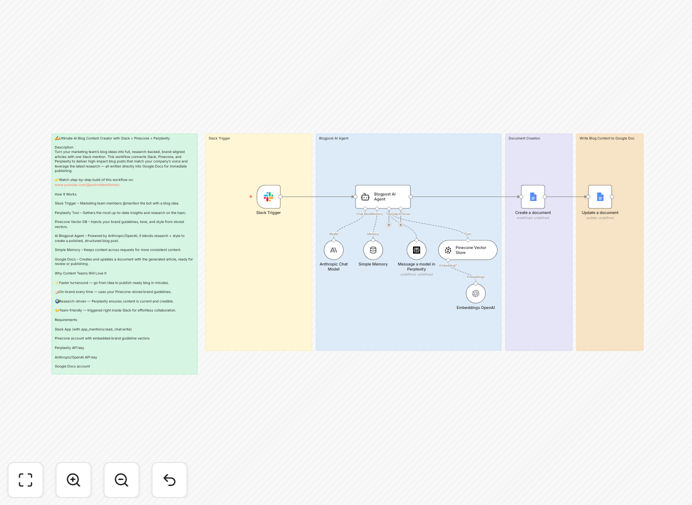
What This Workflow Does
This automation transforms your team's blog ideas into fully researched, AI-assisted content drafts automatically. When a content idea is posted in Slack, the workflow uses Perplexity AI to gather relevant research, stores findings in Pinecone for future reference, and compiles everything into a structured Google Doc ready for writing.
The system eliminates the most time-consuming part of content creation - the research phase - while ensuring every post is backed by credible data. Marketing teams can produce higher-quality content faster, with less manual effort and more consistent research standards across all writers.
How It Works
1. Slack Trigger
Team members submit content ideas through a designated Slack channel using a standardized format. The workflow captures the topic, target keywords, and any specific research requests.
2. Perplexity Research
The system queries Perplexity AI with the topic to gather current statistics, studies, and expert opinions. It evaluates source credibility and extracts the most relevant findings.
3. Pinecone Knowledge Base
All research findings are stored in Pinecone as vector embeddings, creating a searchable knowledge base. Before new research begins, Pinecone checks for existing relevant information.
4. Google Docs Compilation
The workflow structures the research into a Google Doc with proper citations, suggested headings, and key takeaways. Writers receive a notification when their research-backed outline is ready.
Who This Is For
This workflow is ideal for content teams that need to produce authoritative, research-backed articles consistently. It's particularly valuable for:
- Marketing agencies managing multiple client blogs
- SaaS companies publishing technical content
- Content teams producing 5+ posts weekly
- Businesses competing on content quality rather than quantity
What You'll Need
- n8n instance (cloud or self-hosted)
- Slack workspace with appropriate permissions
- Perplexity API access
- Pinecone account
- Google Workspace account
Quick Setup Guide
- Download the JSON template file
- Import into your n8n instance
- Connect your Slack, Perplexity, Pinecone and Google Docs accounts
- Configure your target Slack channel and Google Drive folder
- Test with a sample content request
Pro tip: Create a standardized Slack message format for content requests including target keywords, audience, and word count to get the most relevant research.
Key Benefits
5-10 hours saved per blog post by automating the research phase. Writers can focus on crafting great content instead of data gathering.
Consistent research quality across all content pieces, ensuring every post meets your editorial standards for credible sources.
Compounding knowledge base in Pinecone means each new piece of content benefits from all previous research.
Real-time collaboration through Slack allows editors to review and approve research before writing begins.