n8n Taiga Project Management Automation

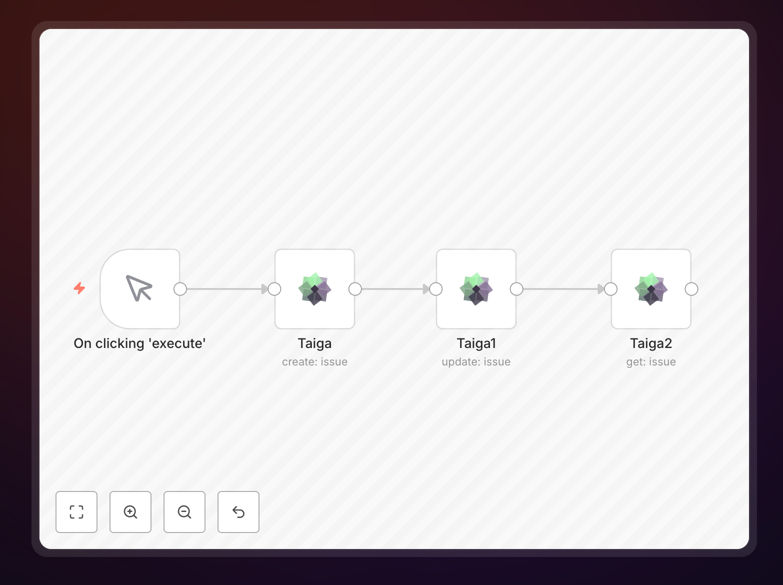
Create, update, and get an issue on Taiga

Automate your Taiga issue management with this n8n workflow template. Streamline issue creation, updates, and tracking to keep your projects moving forward without manual data entry.

Download Template JSON · n8n compatible · Free
Taiga issue management workflow screenshot

What This Workflow Does

This n8n workflow template automates three critical Taiga issue management functions: creating new issues, updating existing issues, and retrieving issue details. It eliminates the need for manual data entry in Taiga's interface, saving development teams hours of administrative work each week.

The workflow serves as a complete automation solution for Taiga issue tracking, connecting your project management system with other tools in your stack. Whether you need to create issues from support tickets, update statuses based on external triggers, or pull issue data for reporting, this template provides the foundation.

How It Works

1. Issue Creation

The workflow can create new Taiga issues automatically based on triggers from other systems. This might include form submissions, email alerts, or monitoring system notifications. Each new issue includes all relevant details mapped from the source data.

2. Issue Updates

Existing Taiga issues can be updated automatically when certain conditions are met. For example, when a linked pull request is merged or when time tracking reaches certain thresholds. The workflow handles status changes, assignment updates, and comment additions.

3. Issue Retrieval

The template includes functionality to query Taiga for specific issue details. This enables automated reporting, dashboard updates, or triggering additional actions based on current issue states.

Who This Is For

This workflow is ideal for development teams using Taiga for agile project management, especially those managing multiple projects with frequent issue turnover. It benefits:

  • Engineering teams wanting to reduce manual ticket management
  • Project managers needing real-time visibility into issues
  • Support teams that need to convert tickets into development tasks
  • QA teams tracking bugs across sprints

What You'll Need

  1. An active Taiga account with API access
  2. n8n instance (self-hosted or cloud)
  3. Source systems that will trigger issue creation/updates (optional)
  4. Destination systems for issue data (optional)

Quick Setup Guide

  1. Download the JSON template file
  2. Import into your n8n instance
  3. Configure Taiga API credentials in the workflow
  4. Map your source data fields to Taiga issue fields
  5. Test with sample data before going live

Pro tip: Start by automating just one type of issue (like bugs) before expanding to other categories. This lets you refine the workflow with minimal risk.

Key Benefits

Reduce manual data entry by 80% by automatically creating and updating Taiga issues from various triggers across your toolset.

Improve issue tracking accuracy with standardized, automated updates that eliminate human error in status changes and assignments.

Gain real-time visibility into project blockers by automatically pulling issue data into dashboards and reports.

Accelerate development cycles by ensuring issues are created and updated immediately when triggers occur, rather than waiting for manual processing.

Frequently Asked Questions

Common questions about Taiga integration and automation

Automating Taiga issue management saves teams significant time by eliminating manual data entry. It ensures consistent issue tracking across projects, reduces human error in status updates, and provides real-time visibility into project blockers.

Development teams using automation report 30-50% faster issue resolution times and better cross-team collaboration. The automated workflow becomes your project's single source of truth, syncing data across all connected platforms.

  • Saves 5-10 hours per week on administrative tasks
  • Reduces miscommunication about issue status
  • Provides audit trails for all changes

Taiga integrations streamline agile processes by automatically syncing issues with other tools in your stack. This creates a single source of truth for sprint planning, eliminates duplicate work, and provides automated status updates.

Teams can focus on development rather than administrative tracking while maintaining full visibility into project progress. Automated standup reports, sprint retrospectives, and velocity tracking become more accurate with integrated data flows.

  • Automated sprint planning data collection
  • Real-time velocity metrics
  • Reduced meeting time for status updates

Common triggers for Taiga automation include new emails in support inboxes, form submissions, calendar events, or changes in connected project tools. Technical triggers might include CI/CD pipeline failures, error logs reaching certain thresholds, or monitoring alerts.

The workflow then automatically creates corresponding Taiga issues with relevant details. For example, a failed build in GitHub Actions could automatically create a high-priority Taiga issue with the error logs attached and assigned to the on-call developer.

  • Support ticket systems
  • Monitoring alerts
  • CI/CD pipeline events

Automated Taiga workflows can generate reports by pulling issue data at scheduled intervals, analyzing trends, and distributing insights to stakeholders. This eliminates manual report generation while providing more frequent, data-driven visibility into team velocity, blocker patterns, and sprint success metrics.

For example, an automated daily report could highlight aging issues, identify bottlenecks in workflows, and track resolution SLAs. These reports help teams continuously improve processes without spending time compiling data manually.

  • Daily standup reports
  • Sprint retrospectives
  • Executive dashboards

When automating Taiga, use API keys with minimal required permissions and store them securely. Implement error handling for failed operations and consider rate limits to avoid service disruptions. Audit logs should track all automated changes.

For sensitive projects, review automation rules to prevent unintended data exposure through integrations. Consider IP restrictions for API access and regularly rotate credentials. The workflow should validate all incoming data before creating/updating issues.

  • Use least-privilege API keys
  • Implement input validation
  • Maintain comprehensive logs

Automated issue tracking gives developers more coding time by reducing administrative overhead. Studies show developers spend 15-20% less time on ticket management with automation. Immediate issue creation from triggers means problems get addressed faster, while automatic status updates keep stakeholders informed without developer interruptions.

Developers can focus on solving problems rather than documenting them. Automated workflows ensure all necessary context is captured without requiring manual note-taking. This leads to faster resolution times and higher quality code.

  • More time for actual development
  • Faster response to critical issues
  • Better documentation with less effort

Yes, GrowwStacks specializes in custom Taiga automation solutions tailored to your specific project workflows. Our team will analyze your current processes, identify automation opportunities, and build a system that integrates Taiga with your existing tools.

We handle everything from initial consultation to implementation and ongoing support. Our solutions are designed to scale with your team and adapt to changing processes, ensuring long-term value from your automation investment.

  • Tailored to your specific workflow
  • Integration with your existing tools
  • Ongoing support and optimization

Need a Custom Taiga Integration?

This free template is a starting point. Our team builds fully tailored automation systems for your specific needs.