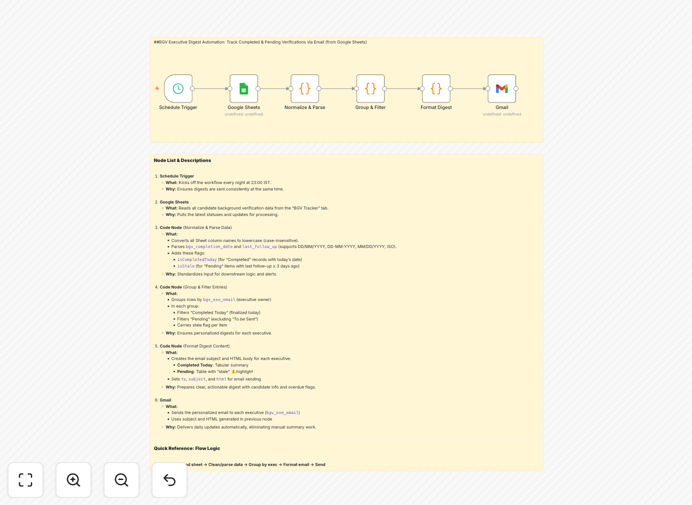
What This Workflow Does
This n8n automation solves the common HR challenge of tracking background verification (BGV) statuses across multiple candidates. Instead of manually checking spreadsheets or waiting for verification providers to update your team, this workflow automatically compiles all verification statuses into a clear, actionable daily digest email.
The system pulls data from your Google Sheets tracking document (or directly from verification providers), organizes it by status and urgency, then sends formatted reports to designated HR team members. You'll instantly see which verifications are complete, which are pending, and which require immediate attention - all without manual data compilation.
Pro tip: Configure the workflow to highlight verifications approaching their SLA deadline in yellow and overdue ones in red for immediate visual prioritization.
How It Works
1. Data collection from Google Sheets
The workflow connects to your designated Google Sheet containing BGV tracking data. It reads the latest status updates for all active verifications, typically including candidate name, verification type, start date, current status, and any notes.
2. Status categorization
Each verification is automatically categorized as "Completed", "Pending", or "Requires Attention" based on your predefined rules (like days outstanding or specific status flags). The system can apply different rules for different verification types (employment, education, criminal, etc.).
3. Report generation
The workflow compiles the categorized data into an organized HTML email template. Completed verifications are listed first for quick processing, followed by pending items sorted by urgency. Critical items requiring immediate action appear in a highlighted section.
4. Scheduled delivery
The system sends the formatted digest email to your specified recipients (HR team, hiring managers) at your chosen time each morning. The workflow can be configured for different email formats (HTML table, PDF attachment) and different distribution lists based on department or role.
Who This Is For
This automation delivers the most value to:
- HR teams processing 10+ background verifications monthly
- Recruiting agencies managing verifications for multiple clients
- Companies with distributed hiring teams needing centralized status visibility
- Organizations using multiple verification providers that need consolidated reporting
- Compliance officers who need audit trails of verification processes
What You'll Need
- An n8n instance (cloud or self-hosted)
- A Google Sheet tracking your BGV statuses with consistent column headers
- Gmail or Google Workspace email for sending the digests
- (Optional) Integration with your verification providers' APIs for direct status pulls
Quick Setup Guide
- Download the JSON template file
- Import into your n8n instance (Settings → Workflows → Import)
- Connect your Google Sheets account in the first node
- Update the spreadsheet ID and sheet name with your tracking document
- Configure the email template with your branding and preferred status categories
- Set your desired schedule (daily 8 AM recommended)
- Test with a small group before full rollout
Key Benefits
Save 5-7 hours weekly by eliminating manual status tracking and report generation. HR teams can focus on resolving issues rather than compiling data.
Reduce verification delays by 30% through timely identification of pending items. Automated alerts prevent verifications from getting stuck in the process.
Improve hiring manager satisfaction with self-service access to verification statuses. No more "status check" emails clogging your inbox.
Enhance compliance with consistent documentation of all verification activities. The system creates an automatic audit trail for regulators.
Scale your hiring process without adding HR staff. The automation handles increased verification volume at minimal marginal cost.