n8n Excel Outlook AI Newsletter

Daily newsletter service using Excel, Outlook and AI

Automated daily digest newsletter system pulling latest n8n templates with AI summarization and Outlook delivery

Download Template JSON · n8n compatible · Free
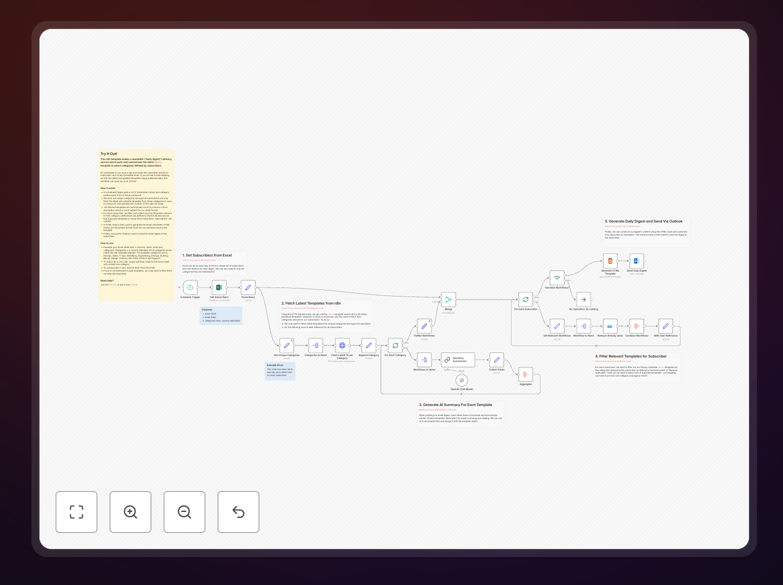
Daily newsletter automation workflow diagram

What This Workflow Does

This automated workflow solves the challenge of manually compiling and distributing daily newsletters by creating a fully automated digest service. It pulls the latest n8n template updates from selected categories, processes them with AI summarization, and delivers polished email newsletters through Outlook.

The system eliminates hours of manual research and content compilation while ensuring subscribers receive consistent, valuable updates. By leveraging Excel for content management and Outlook for distribution, it integrates seamlessly with existing Microsoft 365 business ecosystems.

How It Works

1. Content Aggregation

The workflow begins by automatically collecting the latest n8n template updates from predefined categories. This ensures your newsletter always features fresh, relevant content without manual searching.

2. AI Processing

Each collected template is processed through AI summarization to create digestible highlights. The system maintains consistent tone and formatting while extracting key information for your audience.

3. Excel Organization

Summarized content is structured in Excel spreadsheets, allowing for easy categorization, tagging, and content management. This creates a searchable archive of all newsletter content.

4. Outlook Delivery

Polished newsletters are automatically composed and distributed through Outlook to your subscriber list. The system handles scheduling, formatting, and tracking of email delivery.

Who This Is For

This automation is ideal for n8n community managers, tech newsletter publishers, and internal comms teams who need to regularly share template updates. Marketing agencies managing multiple client newsletters will find particular value in the scalable automation.

Teams already using Microsoft 365 benefit from native integration with Excel and Outlook, while technical communities can use it to keep members informed about template developments.

What You'll Need

  1. n8n account with API access
  2. Microsoft 365 subscription (for Outlook/Excel)
  3. AI summarization service (OpenAI, Google AI, etc.)
  4. Subscriber list in Excel or Outlook contacts
  5. Defined newsletter categories and schedule

Quick Setup Guide

  1. Download and import the JSON template into your n8n instance
  2. Connect your n8n API credentials
  3. Configure your preferred categories for content aggregation
  4. Set up your AI summarization service credentials
  5. Map your Outlook and Excel connections
  6. Test with a small subscriber group before full deployment

Key Benefits

Saves 5-10 hours weekly by automating the entire newsletter compilation and distribution process. What previously required manual research, writing, and email assembly now runs autonomously.

Improves content consistency with AI-powered summarization that maintains uniform tone and formatting across all newsletter editions, enhancing brand professionalism.

Enables precise targeting through Excel-based content management, allowing you to segment and customize newsletters for different audience groups based on their interests.

Provides measurable insights by tracking open rates and engagement directly through Outlook's analytics, helping refine content strategy over time.

Scales effortlessly as your subscriber base grows, handling increased volume without additional manual work or resource requirements.

Frequently Asked Questions

Common questions about newsletter automation and AI content processing

AI enhances newsletters by consistently summarizing complex technical content into digestible highlights while maintaining accuracy. It analyzes source material to extract key concepts, benefits, and implementation details that matter most to readers.

For template newsletters, AI can standardize descriptions across different authors, highlight compatibility notes, and even suggest practical use cases. This creates more valuable content than manual summaries which often vary in quality and focus.

  • Maintains consistent tone and style
  • Extracts key technical details accurately
  • Adapts length based on content importance

Excel integration transforms newsletter management by creating a searchable content database. It allows categorization, tagging, and historical tracking of all newsletter items in a structured format.

Teams can analyze which topics generate most engagement, maintain content calendars, and quickly repurpose past items. Excel's filtering enables creating different newsletter versions for segmented audiences from the same content pool.

  • Centralized content repository
  • Advanced filtering for audience segmentation
  • Performance tracking over time

Optimal frequency balances freshness with audience capacity. For technical updates, weekly or bi-weekly often works best, while daily digests suit fast-moving communities. Monitor open rates and unsubscribe metrics to find your sweet spot.

Automation enables testing different frequencies easily. Try varying schedules for subscriber segments - daily for power users, weekly for casual members. The system can adjust delivery without changing the core workflow.

  • Start with weekly, adjust based on metrics
  • Segment by engagement level
  • Monitor fatigue signals carefully

Yes, automation enables sophisticated personalization at scale. The system can insert subscriber-specific content blocks, recommend templates based on past engagement, and even adjust summary depth for different reader types.

By integrating with CRM data, newsletters can reference recent user activity or highlight community contributions. Personalization boosts open rates by 20-30% while maintaining all automation benefits.

  • Dynamic content insertion based on tags
  • Behavior-based recommendations
  • Role-specific content variants

Outlook integration provides enterprise-grade email deliverability using your existing domain reputation. Unlike third-party services, emails come from your verified organizational account, avoiding spam filters.

The system leverages Microsoft's infrastructure for optimal routing while maintaining your branding. Detailed analytics show exactly who opened which content, enabling precise follow-up and content refinement.

  • Leverages existing domain reputation
  • Provides detailed engagement analytics
  • Maintains organizational branding

Focus on engagement depth beyond opens - template download rates, time spent reading, and follow-up actions. Track which categories generate most interest and how content types perform differently.

The automation can correlate newsletter items with subsequent community activity. For technical newsletters, the most valuable metric is often template adoption rates triggered by specific recommendations.

  • Template download rates per item
  • Time spent reading specific sections
  • Post-newsletter community activity

Absolutely. GrowwStacks specializes in tailored newsletter automation systems that match your specific content sources, audience segments, and business goals. We'll design workflows that integrate with your existing tech stack.

Our team can create custom solutions incorporating multiple data sources, advanced personalization rules, and unique distribution channels beyond email. We handle everything from AI model training to deliverability optimization.

  • Multi-source content aggregation
  • Advanced subscriber segmentation
  • Custom analytics dashboards

Need a Custom Newsletter Automation?

This free template is a starting point. Our team builds fully tailored automation systems for your specific needs.