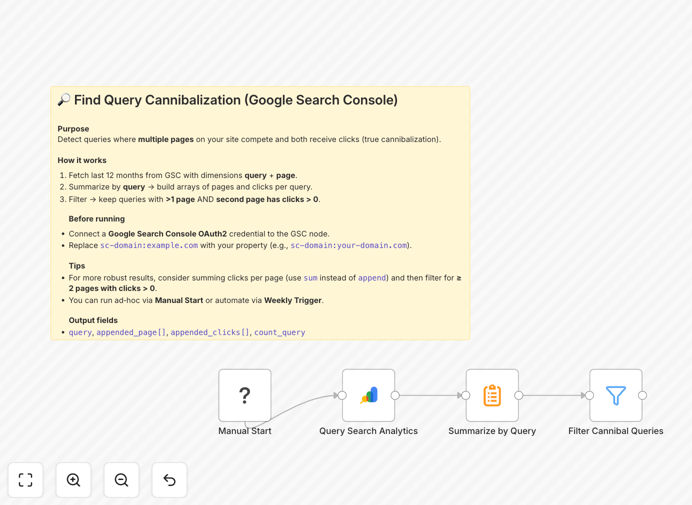
What This Workflow Does
Keyword cannibalization is a common SEO problem where multiple pages on your website compete for the same search queries. This confuses search engines, dilutes your ranking potential, and wastes crawl budget. Our n8n workflow automates the detection of these issues by analyzing your Google Search Console data.
The template identifies pages targeting identical keywords, surfaces competing URLs, and highlights opportunities to consolidate or differentiate content. This prevents internal competition and helps you strengthen your overall SEO strategy by ensuring each keyword has one clear target page.
How It Works
1. Connects to Google Search Console
The workflow authenticates with your Google Search Console account to access performance data for your property. It retrieves search queries, impressions, clicks, and the pages ranking for each query.
2. Analyzes keyword distribution
The automation processes your search data to identify keywords that appear across multiple pages. It calculates overlap percentages and ranks conflicts by severity based on search volume and performance metrics.
3. Flags competing pages
For each cannibalized keyword, the workflow lists all competing pages along with their individual performance metrics. This helps you determine which page to prioritize or whether to merge content.
4. Generates actionable report
The final output organizes findings into a clear report showing keyword conflicts, affected pages, and recommended actions. You can configure the workflow to deliver this via email or save it to Google Sheets.
Pro tip: Run this workflow monthly to catch new cannibalization issues early, especially after publishing new content or restructuring your site.
Who This Is For
This automation is ideal for SEO professionals, content managers, and marketing teams managing websites with extensive content libraries. It's particularly valuable for:
- SEO agencies managing multiple client websites
- E-commerce sites with large product catalogs
- Content publishers with thousands of articles
- Enterprise websites with decentralized content creation
What You'll Need
- An n8n instance (cloud or self-hosted)
- Google Search Console access with owner permissions
- The property you want to analyze added to GSC
- Basic familiarity with n8n workflows
Quick Setup Guide
- Download the JSON template file
- Import it into your n8n instance
- Configure the Google Search Console node with your credentials
- Set your desired date range for analysis
- Specify output preferences (email, spreadsheet, etc.)
- Test and activate the workflow
Key Benefits
Saves 5-10 hours monthly by automating what would otherwise be a manual spreadsheet analysis process across thousands of keywords.
Prevents ranking dilution by identifying conflicting pages before they impact your search performance.
Improves content strategy with data-driven insights about where to consolidate or differentiate page focus.
Scales SEO efforts by continuously monitoring for new cannibalization issues as your site grows.