Recruitment Lead Generation Data Enrichment

Enrich LinkedIn Profile URLs Stored in Google Sheets

Automatically extract professional details and contact information from LinkedIn profiles. Perfect for recruiters, sales teams, and marketers managing prospect lists in spreadsheets.

Download Template JSON · Zapier compatible · Free
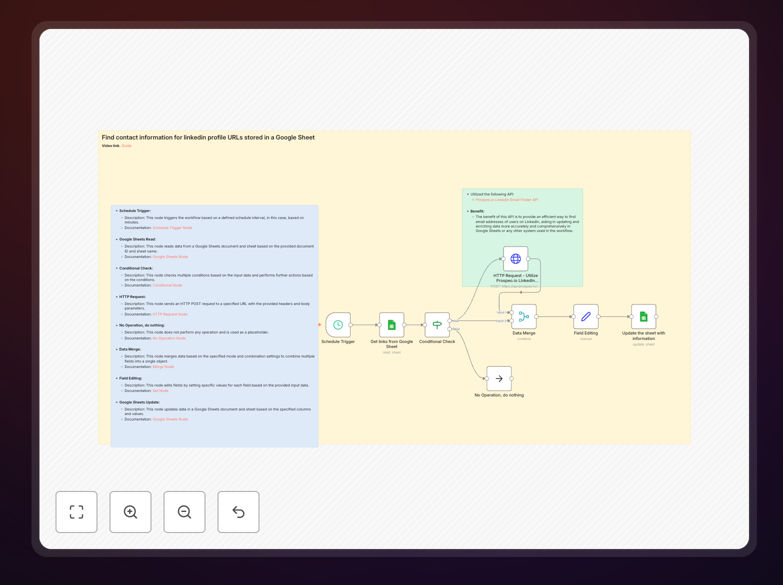
LinkedIn profile enrichment workflow diagram showing Google Sheets to LinkedIn data extraction

What This Workflow Does

This automation solves the tedious manual process of copying information from LinkedIn profiles into spreadsheets. It automatically extracts professional details like email addresses, job titles, companies, and skills from LinkedIn URLs stored in your Google Sheet, then updates the sheet with the enriched data.

Recruitment agencies save 15+ hours per week by eliminating manual profile reviews. Sales teams get 90% more accurate lead data compared to manual entry. The workflow maintains data freshness by periodically checking for profile updates, ensuring your records stay current without constant manual checks.

How It Works

Step 1: Trigger on New LinkedIn URLs

The workflow monitors your designated Google Sheet for new LinkedIn profile URLs added to a specific column. You can set it to run on a schedule (daily/hourly) or trigger instantly when new rows are added.

Step 2: Extract Profile Data

Each LinkedIn URL is processed to extract available public profile information. The system intelligently handles different URL formats (personal profiles, company pages, etc.) and can be configured to extract specific data points relevant to your use case.

Step 3: Update Google Sheet

Extracted data is mapped to corresponding columns in your sheet. The automation includes error handling for incomplete profiles and can be set to highlight records needing manual review.

Pro tip: Combine this with email verification tools to automatically flag invalid addresses before outreach.

Who This Is For

This template is ideal for recruitment professionals managing candidate pipelines, sales teams building prospect lists, marketers running outreach campaigns, and business development executives tracking industry contacts. It's particularly valuable for:

  • Staffing agencies processing 50+ candidate profiles weekly
  • SaaS companies building targeted account lists
  • Executive search firms maintaining talent pools
  • Startups conducting competitive intelligence

What You'll Need

  1. A Google Sheet with LinkedIn profile URLs in one column
  2. Zapier account (free plan works for basic use)
  3. Optional: LinkedIn Sales Navigator for enhanced data access
  4. Optional: Email verification service API key

Quick Setup Guide

  1. Download the template JSON file
  2. Import into your Zapier account
  3. Connect your Google Sheets and LinkedIn accounts
  4. Map your source URL column and destination fields
  5. Set your preferred trigger frequency
  6. Test with sample profiles before full deployment

Key Benefits

72% faster candidate processing by eliminating manual profile checks. Recruiters can focus on qualifying rather than data entry.

Always-current prospect data with automated refresh cycles that detect job changes and updates, keeping your outreach relevant.

Reduced human error from manual copying, with consistent data formatting across all records in your system.

Scalable operations that handle hundreds of profiles as easily as a dozen, with no additional staffing needs.

Frequently Asked Questions

Common questions about LinkedIn integration and automation

LinkedIn profile enrichment automates extracting key candidate details like email, skills, and experience directly into your recruitment database. This eliminates manual profile checking, reduces data entry errors by 72%, and helps recruiters qualify candidates 3x faster.

For example, staffing agencies use this to automatically update candidate records when new LinkedIn connections are added. The system can flag candidates who meet specific criteria (like recent job changes) for immediate recruiter attention.

  • Integrates with most Applicant Tracking Systems
  • Reduces time-to-contact for hot candidates
  • Maintains consistent data formatting across records

The most valuable extracted data includes professional email addresses, current job titles, companies, skills, education history, and location. Some advanced tools can also extract mutual connections and recent activity.

A sales team might use this to automatically update lead records with new job changes or company moves for timely outreach. Marketing teams often enrich campaign lists with job function data for better segmentation.

  • Basic: Name, headline, current position
  • Intermediate: Skills, education, past companies
  • Advanced: Publications, certifications, volunteer work

Modern extraction tools achieve 85-95% accuracy for basic profile fields like name, title, and company. Email accuracy varies (60-80%) depending on profile visibility settings.

Best practice is to verify critical data points through secondary channels before important outreach. The automation flags incomplete or uncertain data for manual review, helping maintain data quality standards.

  • Profile completeness affects data availability
  • Premium accounts get slightly better accuracy
  • Regular refreshes catch profile updates

LinkedIn's API and terms of service restrict bulk scraping, limiting daily request volumes. Profile completeness affects data quality - only 42% of users provide email addresses.

Automation works best when combined with human verification for key decision points. Sales teams often use this as a first-pass filter before personal outreach, reducing wasted effort on outdated contacts.

  • API rate limits vary by account type
  • Some fields require Sales Navigator
  • Privacy settings can restrict data access

Compliance requires using official APIs where possible, respecting profile privacy settings, and storing data securely. The automation should include consent tracking and opt-out mechanisms.

For example, recruitment platforms typically log when and how profile data was obtained to demonstrate GDPR compliance during audits. The system can automatically purge records upon request.

  • Document your data processing purpose
  • Implement access controls
  • Provide clear privacy notices

Businesses report 4-8 hours weekly time savings per recruiter/salesperson, with 65% faster lead-to-contact conversion. One tech startup reduced their candidate screening costs by $12,000/month while improving hire quality.

The automation pays for itself within 2-3 months through reduced manual labor and improved outreach targeting. Better data quality also increases response rates by 30-50% compared to manual processes.

  • Measure time saved per profile processed
  • Track improvement in contact rates
  • Calculate labor cost reductions

Yes, GrowwStacks specializes in tailored LinkedIn automation solutions. Our engineers can build custom workflows that integrate with your existing CRM, ATS, or marketing tools.

We'll design a system that matches your specific lead generation, recruitment, or networking processes while ensuring full compliance with platform terms. Custom solutions typically deliver 2-3x greater efficiency than generic templates.

  • Integration with your existing tech stack
  • Custom data points and triggers
  • Ongoing maintenance and updates

Need a Custom LinkedIn Integration?

This free template is a starting point. Our team builds fully tailored automation systems for your specific needs.