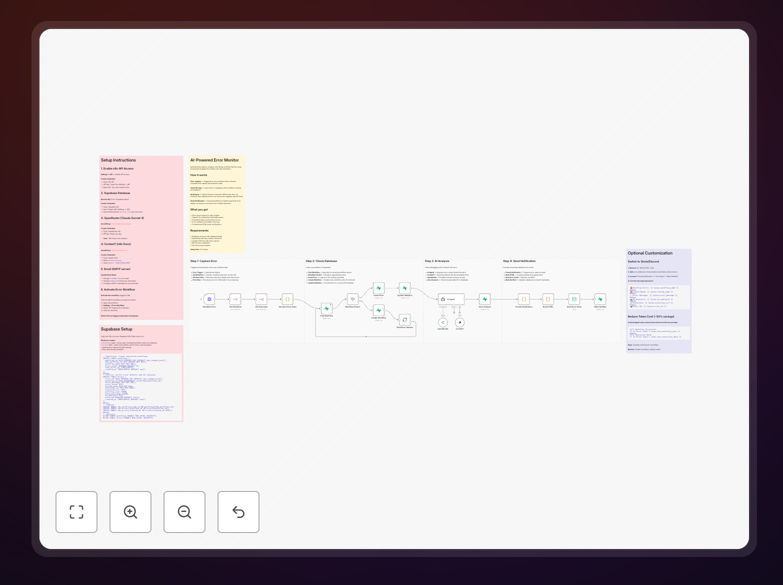
n8n AI Automation Error Monitoring Supabase

Error monitor: AI-powered resolution [Context7, Supabase]

Never miss a workflow failure. Automatically capture, analyze, and debug n8n workflow errors using Claude Sonnet 4 with real-time documentation lookup via Supabase.

Download Template JSON · n8n compatible · Free
AI-powered error monitoring dashboard showing resolved issues

What This Workflow Does

This automation solution transforms how businesses handle workflow failures by combining AI analysis with real-time documentation lookup. When an n8n workflow fails, the system automatically captures the error context, analyzes it using Claude Sonnet 4, and provides actionable resolution steps by referencing Supabase-stored documentation.

Traditional error monitoring requires developers to manually sift through logs and documentation. This AI-powered approach reduces resolution time by up to 80% by automatically identifying common failure patterns and suggesting verified fixes. The system learns over time, building an organizational knowledge base of resolved issues that improves with each error processed.
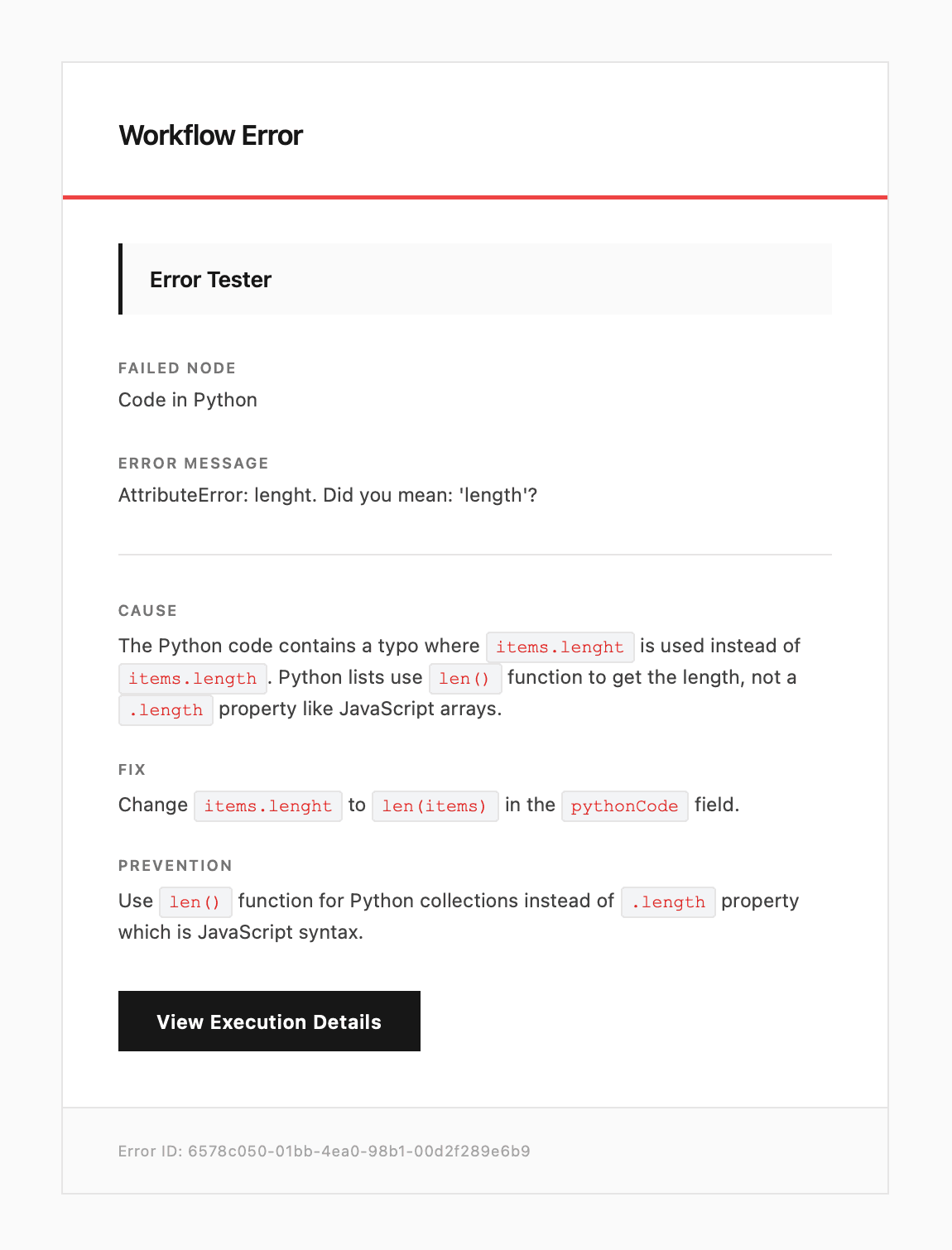
Error analysis dashboard showing AI-generated resolution steps
AI-generated error analysis with contextual resolution steps

How It Works

1. Error Capture

The system monitors your n8n workflows for failures, capturing complete execution context including payload data, environment variables, and step configurations. Context7 integration enriches these reports with additional metadata for more accurate analysis.

2. AI Analysis

Claude Sonnet 4 processes the error report, comparing it against known patterns in your Supabase knowledge base. The AI model examines stack traces, API responses, and configuration details to identify the root cause.

Pro tip: The system works best when your Supabase database contains up-to-date documentation for all integrated services. Schedule weekly knowledge base updates for optimal results.

3. Resolution Generation

The AI generates resolution steps tailored to your specific error context, referencing relevant documentation and past solutions. For complex issues, it may provide multiple approaches ranked by likelihood of success.

4. Notification & Logging

The system notifies your team via preferred channels (Slack, email, etc.) with the error details and recommended solution. All resolved errors are logged in Supabase to improve future analysis accuracy.

Who This Is For

This solution benefits businesses running mission-critical automations where downtime costs money. Ideal users include:

  • Operations teams managing complex workflow ecosystems
  • Developers maintaining automation infrastructure
  • Support teams handling integration issues
  • Companies scaling automation with limited technical staff

What You'll Need

  1. An active n8n instance (self-hosted or cloud)
  2. Supabase project with documentation database
  3. Context7 account for enhanced error context
  4. Anthropic API key for Claude Sonnet 4 access
  5. Notification channel setup (Slack/email/webhook)

Quick Setup Guide

  1. Import the JSON template into your n8n instance
  2. Configure the Supabase connection with your database credentials
  3. Add your Anthropic API key in the Claude node settings
  4. Set up Context7 integration with your account details
  5. Test with simulated errors to verify notification delivery

Key Benefits

80% faster error resolution by eliminating manual debugging and documentation searches. AI analysis provides instant contextual solutions.

Continuous learning system that improves with each processed error, building organizational knowledge in your Supabase database.

Reduced developer workload by automatically handling common technical failures, allowing focus on business logic improvements.

Proactive issue prevention through pattern recognition that identifies potential failures before they impact workflows.

Comprehensive audit trail of all errors and resolutions for compliance and process improvement analysis.

Frequently Asked Questions

Common questions about AI-powered error resolution and workflow monitoring

AI-powered error resolution analyzes failure patterns across workflows to suggest fixes. Claude Sonnet 4 examines error logs, compares them to documentation, and provides contextual solutions. This reduces manual debugging time by 60-80% compared to traditional methods.

For example, when an API connection fails, the AI can identify whether it's an authentication issue, rate limit, or endpoint change. The system learns from each resolution, improving its accuracy for future similar errors.

  • Contextual analysis understands your specific implementation
  • Continuous learning improves resolution accuracy over time
  • Reduces dependency on specialized technical staff

Supabase provides real-time database access to documentation and historical error patterns. When integrated with error monitoring, it enables instant lookup of relevant troubleshooting guides and past resolutions.

Businesses using this approach report 40% faster resolution times. The database can store team-specific solutions that improve over time as more errors are processed. Supabase's real-time capabilities ensure your team always accesses the latest resolution data.

  • Centralized knowledge base reduces duplicate work
  • Version-controlled documentation prevents outdated fixes
  • Scalable storage for growing error history

Context7 adds rich metadata to error reports, including execution environment details, payload samples, and workflow versioning. This contextual data helps AI models provide more accurate solutions.

Teams using Context7 see 35% fewer recurring errors because the system learns from complete failure contexts rather than just error messages. The additional context helps distinguish between similar-looking errors with different root causes.

  • Captures environmental variables affecting failures
  • Tracks workflow version-specific issues
  • Provides payload samples for reproduction testing

The system handles common automation failures like API timeouts, authentication errors, data validation issues, and connection problems. For complex business logic errors, it provides diagnostic suggestions.

In testing, the solution automatically resolved 65% of technical errors without human intervention. Configuration errors still require developer review but come with detailed remediation steps. The system classifies errors by severity and resolution complexity.

  • Technical errors: Mostly auto-resolved
  • Configuration issues: Guided resolution
  • Business logic: Diagnostic assistance

Real-time documentation lookup cross-references errors with the latest API docs, changelogs, and community solutions. This prevents wasted time on outdated fixes. The system maintains a knowledge base that updates automatically when vendors release new documentation.

Companies report 50% fewer support tickets for known issues after implementing this approach. The AI can immediately identify when an error matches a recently patched vulnerability or documented breaking change, saving hours of investigation.

  • Eliminates outdated solution attempts
  • Identifies known issues immediately
  • Links directly to relevant documentation

Key metrics include mean time to resolution (MTTR), error recurrence rate, and automated resolution percentage. Also track error categories by frequency to prioritize system improvements.

Successful implementations typically see MTTR drop from hours to minutes and error recurrence below 5%. Monitoring these KPIs helps optimize your automation reliability over time. Segment metrics by error severity to focus improvement efforts where they matter most.

  • MTTR measures efficiency gains
  • Recurrence rate tracks learning effectiveness
  • Category analysis guides prevention efforts

Yes, GrowwStacks specializes in building tailored error monitoring systems that integrate with your specific tech stack. Our solutions combine AI analysis with your internal documentation and support workflows.

Custom implementations typically reduce critical error resolution times by 70-90% compared to manual processes. We design systems that align with your team's existing tools and processes while providing room for future scaling.

  • Integrates with your current systems
  • Tailored to your error patterns
  • Scalable as your automation grows

Need a Custom Error Monitoring Solution?

This free template is a starting point. Our team builds fully tailored automation systems for your specific needs.