Jamf Slack CSV Auditing

Export Jamf policies to Slack as CSV for instant auditing

Automatically export policy configurations for easy compliance tracking and team visibility

Download Template JSON · Zapier compatible · Free
Jamf policies exported to Slack as CSV

What This Workflow Does

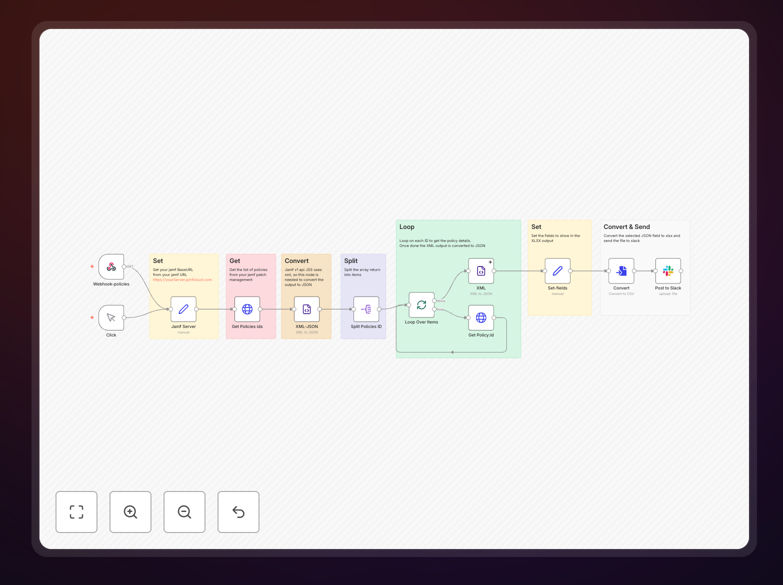
This automation solves the tedious manual process of auditing Jamf policies across your Apple device fleet. Instead of logging into Jamf Pro to check each policy individually, the workflow automatically exports all policy configurations (including triggers, scope, and frequency) as a clean CSV file delivered directly to your Slack channel.

IT teams use this to maintain compliance documentation, quickly verify policy changes, and identify configuration inconsistencies across device groups. The automated export creates an auditable trail without manual reporting, saving hours each month on compliance preparation and policy management.

How It Works

1. Jamf Policy Data Extraction

The workflow connects to your Jamf Pro instance via API and retrieves all policy configurations, including often-overlooked details like execution frequency and scope limitations.

2. CSV Formatting

Raw policy data gets transformed into a standardized CSV format with columns for policy name, triggers, scope, frequency, and last modified date—exactly what auditors need to verify compliance.

3. Slack Delivery

The formatted CSV uploads to your specified Slack channel with a timestamp and summary of changes since the last export, creating a searchable audit trail in your team's collaboration hub.

Pro tip: Schedule this workflow to run automatically before compliance meetings so reports are always current without last-minute scrambling.

Who This Is For

This workflow benefits IT administrators managing Jamf in regulated industries (healthcare, finance, education), MSPs supporting multiple clients, and any team needing better visibility into their Apple device policies. It's particularly valuable for:

  • Compliance officers preparing for audits
  • New IT staff onboarding to existing Jamf environments
  • Teams managing large or complex policy sets
  • Organizations with BYOD programs requiring policy transparency

What You'll Need

  1. Jamf Pro administrator credentials (API access)
  2. A Slack workspace with upload permissions
  3. Zapier account (free tier works)
  4. 5 minutes to configure the template

Quick Setup Guide

  1. Download the template and import to your Zapier account
  2. Connect your Jamf Pro instance using API credentials
  3. Specify your target Slack channel and preferred CSV fields
  4. Set your desired schedule (we recommend weekly)
  5. Test with a small policy group before full deployment

Key Benefits

Compliance-ready documentation: Automated CSV exports create timestamped records perfect for auditors, eliminating last-minute report scrambling.

Faster troubleshooting: When policies behave unexpectedly, teams can quickly reference the Slack archive instead of digging through Jamf.

Policy standardization: Seeing all configurations side-by-side highlights inconsistencies in naming, triggers, or scope that need alignment.

Team visibility: Non-Jamf admins (like security teams) gain policy awareness without needing direct access to your MDM console.

Historical tracking: Regular exports create a searchable timeline of policy changes for root cause analysis.

Frequently Asked Questions

Common questions about Jamf policy auditing and automation

Regular Jamf policy audits ensure compliance with security standards and prevent configuration drift. This automation exports all policy details (triggers, scope, frequency) to Slack for easy team review without needing direct Jamf access, saving hours of manual reporting each month.

For example, healthcare organizations can automatically document policy compliance for HIPAA audits, while education IT teams can verify student device restrictions meet acceptable use policies.

  • Catch unauthorized policy changes before they cause issues
  • Maintain consistent configurations across device groups
  • Reduce audit preparation time by 80% or more

CSV exports in Slack create an auditable trail of policy changes over time. Teams can track modifications, identify unauthorized changes faster, and maintain compliance documentation for security audits without manual record-keeping.

A financial services client reduced policy violation response time from 3 days to 2 hours by having immediate visibility into when and how policies changed through automated Slack exports.

  • Slack search makes historical policy data instantly accessible
  • Timestamped exports prove due diligence for compliance
  • Team notifications about critical policy changes

Most organizations benefit from weekly policy audits during implementation phases and monthly checks thereafter. Critical environments may require daily exports. This workflow can be scheduled to run automatically at your preferred frequency.

We've seen education clients run daily exports during back-to-school device deployments, then switch to weekly during stable periods, demonstrating how frequency should match your change management cycle.

  • High-change periods warrant more frequent audits
  • Match export frequency to your compliance requirements
  • Adjust schedules as your environment stabilizes

Yes, the CSV format makes it easy to compare policies across devices/groups. Teams can quickly identify inconsistencies in naming conventions, triggers, or scope that need alignment for better management.

An MSP client standardized 300+ policies across 15 school districts by exporting all configurations, then using the CSV to build a cross-client naming convention and trigger taxonomy.

  • Highlight inconsistent policy naming patterns
  • Identify duplicate or conflicting policies
  • Create baseline standards for new policies

Beyond Slack, policy exports can feed into IT documentation tools like Confluence, compliance platforms like Drata, or data warehouses for long-term analysis. The CSV format works with most business intelligence tools.

One enterprise routes Jamf policy data to their SIEM, creating alerts when high-risk policies change, while another imports the CSV into Power BI for executive dashboards on device management compliance.

  • Confluence for IT documentation
  • SIEMs for security monitoring
  • BI tools for compliance reporting

While Jamf provides basic reports, this workflow offers customized CSV outputs with only the fields you need, delivered directly to your team's collaboration platform without manual exports or logins.

The automation also adds value by highlighting changes since the last export—something Jamf's native reporting doesn't track. Teams get actionable insights, not just raw data dumps.

  • Custom fields instead of preset reports
  • Automatic delivery to collaboration tools
  • Change tracking between exports

Absolutely! GrowwStacks specializes in tailored Jamf automations that connect with your specific tools and processes. We can build custom workflows for policy management, compliance reporting, or device provisioning.

Our team has created specialized automations for healthcare device compliance, education app deployment workflows, and enterprise-scale patch management systems—all integrating Jamf with your existing tech stack.

  • Custom policy approval workflows
  • Integration with your ITSM tools
  • Specialized compliance reporting

Need a Custom Jamf Automation?

This free template is a starting point. Our team builds fully tailored automation systems for your specific needs.