What This Workflow Does
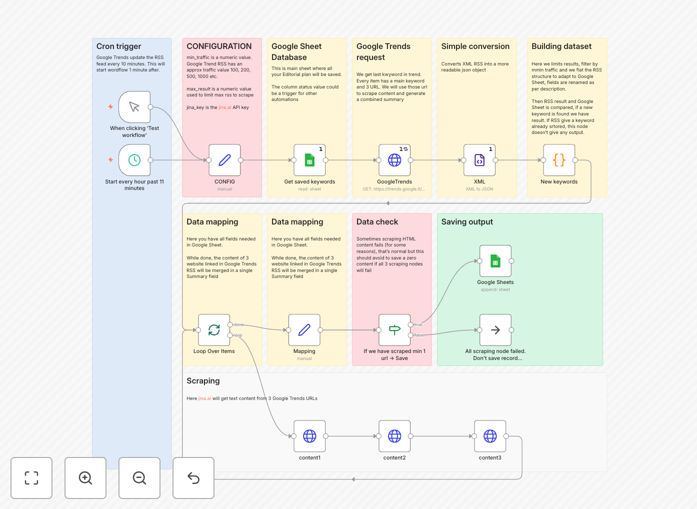
This automation solves the time-consuming process of manual content research by automatically extracting trending keywords from Google Trends and summarizing relevant articles directly into Google Sheets. Marketing teams waste countless hours monitoring search trends and reading articles to identify content opportunities - this workflow eliminates that inefficiency.
The system provides real-time insights into emerging topics before they peak in popularity, giving content creators a competitive advantage. By combining trend data with AI-powered article summaries, teams can quickly assess which topics warrant full content development versus those that are passing fads.
How It Works
1. Automated Google Trends Monitoring
The workflow begins by querying Google Trends RSS feeds for specified categories or search terms. It extracts rising queries along with their growth percentages and regional popularity data.
2. Article Discovery & Processing
For each trending keyword, the system searches for and retrieves relevant articles from news sources and blogs. It filters results based on domain authority and freshness.
3. AI-Powered Summarization
Using natural language processing, the workflow generates concise summaries highlighting key points, statistics, and conclusions from each article while preserving the original meaning.
4. Google Sheets Integration
All collected data - trends, articles, and summaries - automatically populate a structured Google Sheet with timestamped entries. The sheet includes filters and basic data visualization.
Pro tip: Combine this with your editorial calendar automation to automatically suggest content topics based on rising search trends.
Who This Is For
This workflow delivers the most value to content marketing teams, SEO specialists, and digital publishers who need to stay ahead of emerging trends. Blog managers at media companies can use it to identify breaking news angles before competitors.
E-commerce businesses benefit by spotting trending product-related searches to optimize their category pages and ad targeting. Agencies managing multiple clients appreciate the time savings from automated research across different industries.
What You'll Need
- n8n instance (cloud or self-hosted)
- Google Sheets account with edit permissions
- Google Trends RSS feed URLs for your target categories
- OpenAI API key for article summarization (optional but recommended)
Quick Setup Guide
- Download the JSON template file
- Import into your n8n instance
- Configure Google Sheets connection
- Set your target Google Trends categories
- Adjust summarization preferences if using OpenAI
- Test with a manual trigger
- Schedule automatic runs (daily/weekly)
Key Benefits
10-15 hours weekly saved by eliminating manual trend monitoring and article review. Content teams can reallocate this time to higher-value creative work.
Faster content ideation with real-time visibility into emerging trends before they become oversaturated. Be first to cover rising topics.
Improved content relevance through data-driven topic selection based on actual search behavior rather than guesswork.
Centralized research repository that's automatically updated and accessible to entire teams via Google Sheets.
Scalable process that handles increasing research volume without additional staff time.