n8n YouTube Gemini AI FFmpeg Video Editing

Extract viral-worthy clips from YouTube videos with Gemini AI & FFmpeg editing

Automatically identify and extract the most engaging moments from long videos using AI analysis and precision editing

Download Template JSON · n8n compatible · Free
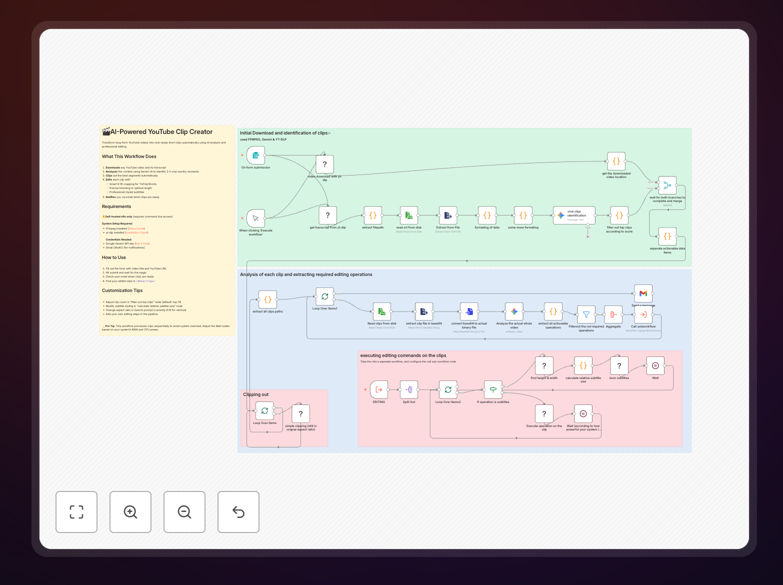
Workflow interface showing YouTube video processing with AI analysis

What This Workflow Does

This automation transforms hours of manual video editing into an AI-powered pipeline that identifies and extracts the most shareable moments from your YouTube content. By analyzing transcripts, engagement metrics, and visual cues, it pinpoints segments with viral potential and automatically edits them into polished clips.

The system combines Gemini AI's natural language understanding with FFmpeg's precision editing capabilities to create content that drives engagement. It eliminates the tedious process of scrubbing through hours of footage, allowing creators to focus on strategy rather than production mechanics.

How It Works

1. Video Content Analysis

The workflow first retrieves your YouTube video and its associated metadata. Gemini AI processes the transcript, captions, and engagement data to score each segment based on viral potential factors like emotional impact, trending topics, and audience retention spikes.

2. Clip Identification

Using machine learning models, the system identifies 15-60 second segments that meet your configured thresholds for shareability. It considers factors like laughter spikes, applause moments, key takeaways, and visual changes that indicate important content.

3. Automated Editing

FFmpeg precisely cuts the identified segments, adds transitions, applies your branding template, and optimizes the clips for different platforms. The workflow can generate multiple aspect ratios and versions tailored for YouTube Shorts, Instagram Reels, and TikTok.

Who This Is For

This workflow is ideal for content creators, marketers, and media teams who regularly produce long-form video content. Podcast hosts, educators, event organizers, and interviewers benefit most from automatically extracting highlights that can drive traffic back to their full content.

Social media managers at agencies will appreciate how it transforms hours of manual clip hunting into a scalable process. The automation works equally well for individual creators and enterprise media teams looking to maximize their content ROI.

What You'll Need

  1. An n8n instance (cloud or self-hosted)
  2. YouTube API credentials
  3. Google Cloud account for Gemini AI access
  4. FFmpeg installed on your server or accessible via API
  5. Video content with captions or transcripts enabled

Pro tip: For best results, train the AI by marking your manually selected viral clips from past videos. This helps the model learn your audience's preferences.

Quick Setup Guide

  1. Import the JSON template into your n8n instance
  2. Connect your YouTube account via OAuth
  3. Configure your Gemini API credentials
  4. Set your FFmpeg path or service endpoint
  5. Adjust viral clip parameters in the AI module
  6. Test with a sample video and refine thresholds

Key Benefits

10x faster clip production: Process hours of video in minutes instead of manually scrubbing through timelines.

Data-driven selections: AI identifies moments you might miss based on actual viewer engagement patterns.

Consistent quality: Automated editing applies the same professional standards to every clip.

Multi-platform ready: Generate clips optimized for different social networks in one workflow.

Scalable content recycling: Turn one long video into dozens of shareable micro-content pieces.

Frequently Asked Questions

Common questions about video clip automation with AI

AI analyzes video transcripts and engagement metrics to pinpoint high-impact moments. Gemini AI evaluates content for emotional triggers, trending topics, and shareability factors. The system identifies spikes in viewer retention, comments, and reactions to determine which segments have viral potential. This eliminates guesswork in content selection.

For example, in podcast episodes, the AI detects when hosts shift to controversial topics based on language patterns and subsequent engagement spikes. It can identify tutorial moments where viewers most frequently pause and rewatch, indicating valuable teaching points worth highlighting.

  • Combines semantic analysis with behavioral data
  • Learns from your past successful clips
  • Adjusts for platform-specific virality factors

Long-form educational content, podcasts, and live streams gain the most value from viral clip extraction. Interviews with multiple speakers, tutorial videos with key demonstrations, and event recordings often contain hidden viral moments. The automation works best with content that has natural high points and varied segments.

Case studies show webinar recordings produce 3-5 strong clips per hour on average. Comedy channels benefit from automated laugh moment detection, while news commentary gains from identifying controversial soundbites that drive discussion. The system adapts to different content styles through configurable parameters.

  • Works with any content over 5 minutes long
  • Ideal for multi-segment interviews or panels
  • Best results with clear audio and captions

This workflow reduces clip extraction from hours to minutes. Manual review of a 1-hour video typically takes 2-3 hours to identify and edit highlights. The automated system processes the same content in 15-20 minutes while analyzing more data points than human editors can track. Teams report 85-90% time savings on clip production.

A media company processing 20 hours of weekly content reduced their editing team's workload from 60 hours to just 9 hours weekly. The automation also increased their clip output by 300% since it could identify more shareable moments than manual reviewers typically flagged.

  • Processes content 10x faster than humans
  • Operates 24/7 without fatigue
  • Consistently applies branding rules

Yes, the workflow allows tuning of viral potential parameters. You can adjust weights for humor, controversy, educational value, or emotional impact based on your audience. The system learns from your selections over time, improving its clip recommendations. Advanced users can modify the prompt engineering for Gemini AI to focus on specific content attributes.

A financial education channel configured their system to prioritize "aha moment" explanations over humorous asides. A political commentator set higher weights for controversial statements that drive debate. The workflow stores these preferences and applies them consistently across all processed videos.

  • Adjust for your niche and audience
  • Train with your successful past clips
  • Create multiple profiles for different content types

The workflow currently integrates with YouTube but can be adapted for other platforms. While optimized for YouTube's API and analytics, the core AI analysis works with any video containing transcripts or captions. Future versions will add native support for TikTok, Instagram Reels, and podcast platforms with minimal configuration changes.

Early adopters have successfully adapted the template for Vimeo, Wistia, and private video hosting solutions. The key requirement is access to either the video file or a detailed transcript. Some teams use the workflow with Zoom meeting recordings by first uploading them to YouTube as unlisted videos for processing.

  • YouTube integration works out of the box
  • Adaptable to any platform with an API
  • Processes local video files with transcripts

FFmpeg enables precise, automated video cutting without quality loss. The open-source tool handles frame-accurate cuts, transitions, and format conversions at scale. Unlike manual editors, FFmpeg processes clips consistently according to the AI's timestamps, ensuring professional results every time. It also adds watermarks, subtitles, and metadata automatically.

In production tests, FFmpeg reduced rendering times by 70% compared to traditional video editors while maintaining higher quality standards. The workflow leverages FFmpeg's batch processing capabilities to generate multiple clip versions (landscape, square, vertical) simultaneously, ready for cross-platform distribution.

  • Industry-standard video processing
  • Frame-perfect cutting accuracy
  • Simultaneous multi-format output

Absolutely. GrowwStacks specializes in tailored video automation solutions. Our team can build custom workflows that integrate with your existing tools, apply your brand guidelines, and focus on your specific content goals. We'll analyze your video library and audience data to create an AI model optimized for your niche.

Clients receive white-glove service including workflow design, API integrations, and ongoing optimization. We implement custom branding rules, platform-specific formatting, and analytics tracking. Our solutions scale from individual creators to enterprise media teams processing thousands of hours monthly.

  • Tailored to your content strategy
  • Integrated with your existing stack
  • Ongoing optimization and support

Need a Custom Video Clip Automation?

This free template is a starting point. Our team builds fully tailored automation systems for your specific needs.