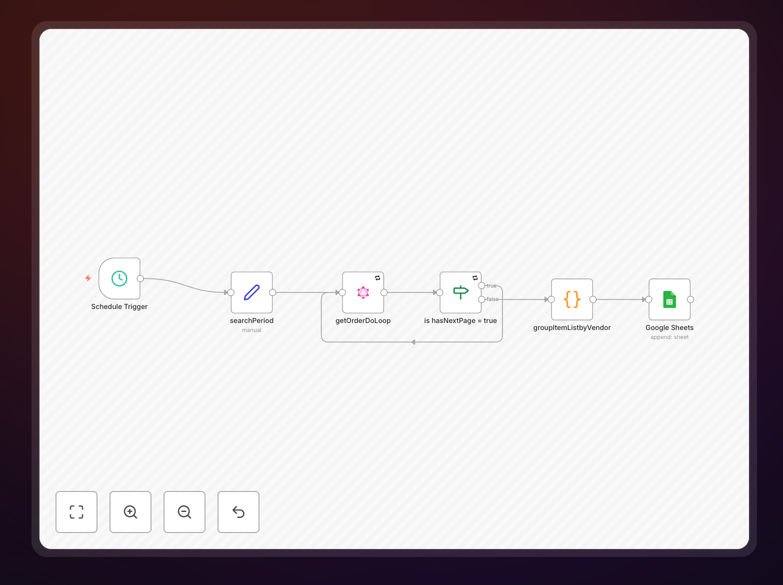
What This Workflow Does
Shopify's API imposes a 250-record limit per request, creating headaches for stores with thousands of orders. This n8n workflow automatically handles pagination to fetch your complete order history without manual intervention. It intelligently loops through API pages, combines results, and outputs a consolidated dataset ready for analysis or integration with other systems.
The solution eliminates hours of manual data exports while ensuring you capture every transaction. Whether you need order data for accounting reconciliation, customer analytics, or inventory planning, this automation provides reliable access to your complete sales history.
How It Works
1. Initial API Connection
The workflow establishes a secure connection to your Shopify store using OAuth authentication. It retrieves the first 250 orders while simultaneously checking the total count of available records.
2. Pagination Logic
When more than 250 orders exist, the workflow automatically calculates required iterations. It then systematically requests subsequent batches using Shopify's pagination parameters until all records are retrieved.
3. Data Consolidation
Each batch gets merged into a master dataset, maintaining chronological order. The workflow handles rate limits and temporary API failures with automatic retries to ensure data completeness.
4. Output Delivery
Final output formats the complete order history for your preferred destination—whether that's a spreadsheet, database, or another application through subsequent workflow steps.
Pro tip: Schedule this workflow to run nightly for automatic order archiving, reducing API calls during business hours.
Who This Is For
This template serves ecommerce teams that need reliable access to complete order data without technical hassle. Ideal users include:
- Ecommerce managers overseeing multiple Shopify stores
- Data analysts preparing sales reports and customer insights
- Accounting teams reconciling daily transactions
- Marketing teams segmenting customers by purchase history
- Operations teams tracking fulfillment metrics
What You'll Need
- An active Shopify store with order history
- Admin access to create private apps/API credentials
- n8n instance (cloud or self-hosted)
- Basic understanding of API authentication
Quick Setup Guide
- Download the JSON template file
- Import into your n8n workspace
- Configure Shopify API credentials in the HTTP Request node
- Set your desired date range filters
- Test with a small date range before full execution
- Schedule recurring runs if needed
Key Benefits
Save 5-10 hours monthly by eliminating manual order exports and pagination handling. The automation works while you focus on business growth.
Ensure data completeness with automatic pagination handling that never misses an order, even during API rate limits or temporary failures.
Enable better decision-making with comprehensive sales data available for analytics, forecasting, and operational improvements.
Reduce human error by automating what would otherwise be a tedious, error-prone manual process of combining multiple exports.
Future-proof your tech stack with a flexible foundation that can easily connect to other systems like BI tools, CRMs, or accounting software.