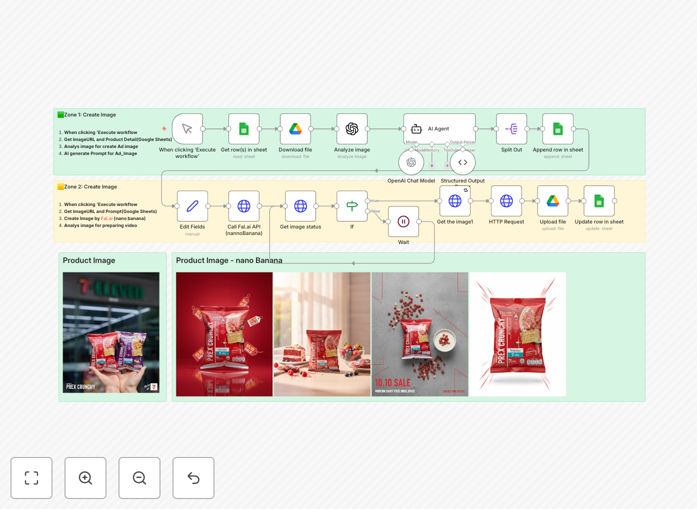
What This Workflow Does
This automation solves the time-consuming challenge of creating visual ad content for e-commerce and marketing teams. Instead of manually designing ads for each product or campaign, this workflow automatically transforms spreadsheet data into professional, UGC-style ad images using AI.
The system reads product information from Google Sheets, analyzes images with OpenAI Vision, generates creative prompts, and produces multiple ad variations through Fal.ai's image generation models. It then organizes the output back into your spreadsheet and Google Drive, creating a complete end-to-end creative pipeline.
For businesses running frequent campaigns or managing large product catalogs, this automation reduces ad creation time from days to minutes while enabling personalized, data-driven marketing at scale.
How It Works
1. Data Extraction & Analysis
The workflow starts by reading product rows from your Google Sheet, including product names, descriptions, image URLs, and campaign specifications. It downloads product images and uses OpenAI Vision to analyze visual elements, extracting colors, styles, and composition details.
2. Intelligent Prompt Engineering
OpenAI's language models then generate creative, context-aware prompts based on the product analysis and your brand guidelines. These prompts are tailored for different platforms (Instagram, TikTok, Facebook) and audience segments, ensuring optimal engagement.
3. AI Image Generation
The system sends these optimized prompts to Fal.ai's image generation models, creating multiple ad variations per product. It handles aspect ratio adjustments for different platforms and implements quality controls to ensure consistent output.
4. Output Management & Organization
Generated images are automatically uploaded to Google Drive with proper naming conventions and folder structures. The workflow updates your original spreadsheet with image URLs and status markers, creating a searchable database of all generated assets.
Who This Is For
This automation is ideal for e-commerce brands, digital marketing agencies, social media managers, and content creators who need to produce large volumes of visual content regularly. It's particularly valuable for:
- E-commerce stores with 100+ product SKUs, this workflow can generate 500+ unique ad images in under an hour.
Who This Is For
This automation is ideal for e-commerce brands, marketing agencies, social media managers, and DTC companies that need to produce high volumes of visual content. It's particularly valuable for teams running frequent promotions, seasonal campaigns, or managing large product catalogs across multiple platforms.
Marketing teams struggling with creative bottlenecks will find immediate value, as will businesses looking to implement data-driven personalization at scale. Even solo entrepreneurs can leverage this workflow to compete with larger brands' marketing output without proportional resource investment.
What You'll Need
- Google Sheets/Drive Access: OAuth2 credentials for accessing and updating your product spreadsheet and storing generated images.
- Fal.ai API Key: For accessing their image generation models (nano-banana and other options).
- OpenAI API Access: For both vision analysis and intelligent prompt generation capabilities.
- Product Spreadsheet: A Google Sheet with columns for product data, campaign specifications, and output tracking.
- n8n Instance: Either self-hosted or cloud-based to run the automation workflow.
Pro tip: Start with a small batch of 5-10 products to test different prompt styles and image generation parameters before scaling to your entire catalog. This helps optimize results and control costs.
Quick Setup Guide
1. Import the template: Download the JSON file and import it into your n8n instance using the workflow import feature.
2. Configure credentials: Set up Google Sheets/Drive (OAuth2), Fal.ai (Header Auth), and OpenAI credentials in n8n's credential management.
3. Prepare your spreadsheet: Create a Google Sheet with the required columns: product_id, product_name, product_image_url, product_description, campaign, brand_notes, constraints, num_variations, aspect_ratio, model_target, and status.
4. Test with sample data: Run the workflow with 2-3 sample products to verify all connections and image generation quality.
5. Scale and customize: Once verified, expand to your full product catalog and adjust prompts/styles to match your brand voice.
Key Benefits
Scale creative output 10x: Generate hundreds of ad variations in the time it takes to manually create one. What previously required days of design work now happens automatically while you focus on strategy.
Reduce creative costs by 80%: Eliminate expensive photoshoots, stock photo subscriptions, and freelance design costs. AI-generated images provide professional quality at a fraction of traditional production costs.
Enable data-driven personalization: Connect your product data directly to creative output, ensuring ads are always relevant, up-to-date, and tailored to specific audience segments or campaign objectives.
Accelerate campaign deployment: Launch new promotions, seasonal campaigns, or product launches in hours instead of weeks. Rapid iteration allows for more testing and optimization.
Maintain brand consistency: Implement standardized prompt templates and style guidelines that ensure all generated content aligns with your brand identity, even when produced at scale.