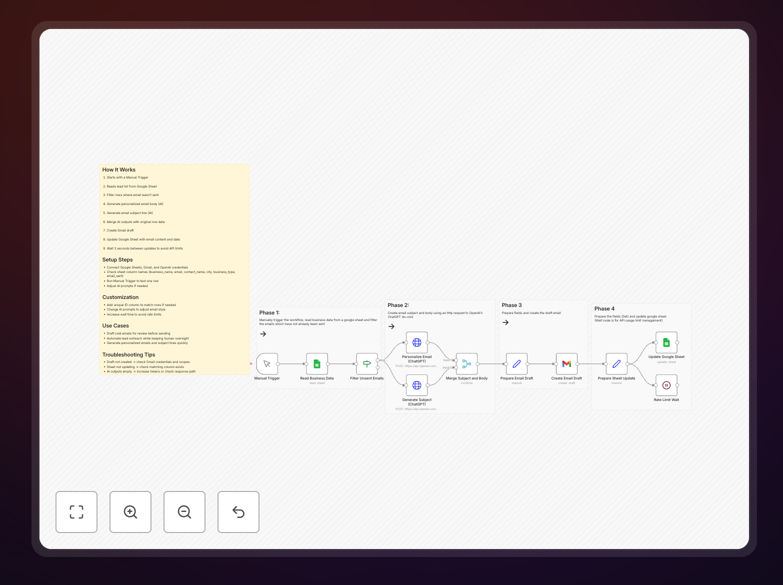
What This Workflow Does
Cold outreach is time-consuming and often ineffective when using generic templates. This workflow solves both problems by automating personalized email creation using AI. It transforms your Google Sheets lead list into tailored outreach drafts ready for review in Gmail, saving hours per campaign while improving response rates.
The system maintains human oversight (emails go to drafts) while handling the heavy lifting of personalization. Sales teams can focus on building relationships rather than manual email composition, scaling their outreach efforts without sacrificing quality or personal touch.
How It Works
1. Trigger the workflow
The process starts with a manual trigger, allowing you to control when emails are generated. This prevents accidental sends and lets you batch process leads at optimal times.
2. Read lead data from Google Sheets
The workflow pulls your prospect list from a designated Google Sheet, including all relevant personalization fields like company name, role, and any custom notes you've added.
3. Filter unsent contacts
Smart filtering ensures you only generate emails for new leads or those who haven't received outreach yet, preventing duplicate messages.
Pro tip: Add a 'Last Contacted' column to your sheet to enable sophisticated filtering based on follow-up timing.
4. Generate personalized email bodies
GPT-4o-mini crafts unique email content for each recipient based on your template and the lead's specific data points, creating messages that feel hand-written.
5. Create Gmail drafts
Completed emails are saved as drafts in your Gmail account for final review and sending, maintaining human control over the outreach process.
Who This Is For
This workflow benefits sales teams, recruiters, and business development professionals who conduct cold outreach at scale. It's particularly valuable for:
- SaaS companies prospecting to ideal customers
- Recruiters sourcing passive candidates
- Agencies pitching services to potential clients
- Startups doing founder-led sales
What You'll Need
- An n8n instance (cloud or self-hosted)
- Google Sheets with your lead data
- Gmail account connected to n8n
- Access to GPT-4o-mini API
- Basic understanding of n8n workflows
Quick Setup Guide
- Download the template JSON file
- Import into your n8n instance
- Connect your Google Sheets and Gmail accounts
- Configure your GPT-4o-mini API credentials
- Customize the email template prompts
- Test with a small lead sample
- Deploy for full campaigns
Key Benefits
Save 5-7 hours per 100 emails by automating the drafting process while maintaining personalization quality that outperforms generic templates.
Increase response rates 3-5x with AI-generated messages tailored to each recipient's role, company, and pain points.
Ensure consistent follow-ups by automating sequence emails based on prospect engagement or lack thereof.
Maintain human oversight with all emails going to drafts first, allowing for final review and customization before sending.
Scale outreach efforts without adding headcount, enabling small teams to compete with larger organizations' sales operations.