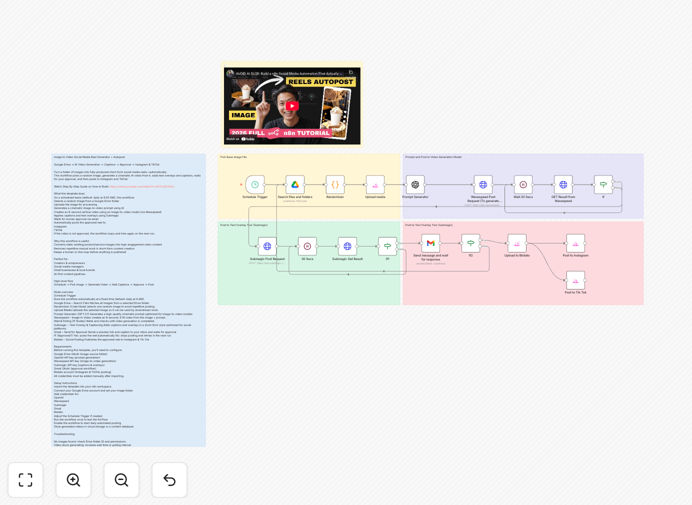
What This Workflow Does
This n8n workflow solves the time-consuming challenge of creating daily social media video content. It automates the entire process of transforming static images from your Google Drive into polished, AI-generated reels ready for Instagram and TikTok.
Instead of manually editing videos every day, this system runs on a schedule, selects a random image, generates a cinematic video using AI, adds captions and text overlays, sends you an email for approval, and automatically posts to your social channels. It maintains a human-in-the-loop for quality control while handling the repetitive production work.
The workflow is perfect for content creators, social media managers, and small businesses who want to maintain an active video presence without the daily time investment. It turns your image library into a consistent content pipeline that operates 24/7.
How It Works
The automation follows a logical sequence that mimics what a human content creator would do, but completely automated.
1. Scheduled Trigger & Image Selection
The workflow starts on a daily schedule (configurable to your preferred time). It connects to your specified Google Drive folder, lists all available images, and uses a randomizer to select one—ensuring variety in your content and preventing repetition.
2. AI Video Generation
The selected image is sent to Wavespeed (or similar AI video service) along with a dynamically generated cinematic prompt. The AI creates an 8-second vertical video optimized for social platforms, adding motion, transitions, and effects to bring your static image to life.
3. Caption & Overlay Creation
Once the video is ready, Submagic adds professional captions and text overlays. The system can use AI to generate relevant captions based on the image content or use predefined templates that match your brand voice and style guidelines.
4. Human Approval Workflow
Before anything goes live, you receive an email with a preview of the video and proposed caption. You simply click "Approve" or "Reject." If approved, the workflow continues to posting. If rejected, it can either try another image or wait for the next scheduled run.
5. Multi-Platform Publishing
Approved content is automatically posted to both Instagram and TikTok through Blotato. The workflow handles platform-specific formatting, hashtag insertion, and scheduling to ensure optimal engagement times.
Pro tip: Store different categories of images in separate Google Drive folders (products, testimonials, behind-the-scenes) and create multiple workflow instances—one for each content type. This gives you varied content streams automatically.
Who This Is For
This template is ideal for solopreneurs, content creators, social media managers, and small business owners who need to maintain consistent video content but lack the time for daily production. Marketing agencies managing multiple client accounts will find this particularly valuable for scaling content creation.
It's especially useful for e-commerce brands with product catalogs, photographers with extensive image libraries, coaches and educators with visual content, and local businesses showcasing their work. If you have a Google Drive folder with images and want to turn them into social media videos without daily manual work, this automation is for you.
What You'll Need
- n8n instance (cloud or self-hosted)
- Google Drive account with images in an organized folder
- OpenAI API key for generating video prompts
- Wavespeed API access or similar AI video generation service
- Submagic account for captioning and text overlays
- Gmail/Google Workspace for approval emails
- Blotato account connected to your Instagram and TikTok business profiles
Quick Setup Guide
Importing and configuring this workflow takes about 15-20 minutes if you have all your accounts ready.
- Import the template into your n8n workspace using the downloaded JSON file.
- Connect Google Drive and select the folder containing your images.
- Add API credentials for OpenAI, Wavespeed, Submagic, and Blotato in their respective nodes.
- Configure Gmail approval by connecting your email and setting the recipient address.
- Test with one image by manually triggering the workflow to ensure all connections work.
- Set your schedule to daily or weekly based on your content needs.
- Activate the workflow and let it run automatically.
Pro tip: Start with a test folder containing 5-10 images and run the workflow manually a few times before enabling the schedule. This helps you refine the AI prompts and caption templates without flooding your social channels during testing.
Key Benefits
Saves 5-10 hours weekly on video content creation. What normally takes 45-60 minutes per reel (selecting, editing, captioning, posting) becomes just minutes of approval time.
Maintains consistent posting even when you're busy or traveling. The automation runs 24/7, ensuring your social channels stay active with fresh content.
Leverages existing assets by turning your stored images into engaging video content. No need to constantly create new visuals—your image library becomes a renewable content source.
Quality control preserved through the human approval step. You maintain creative direction while automating the production work.
Scalable across platforms with easy extension to YouTube Shorts, Facebook Reels, or LinkedIn by adding a few more nodes to the posting section.