Security Automation Google Dorks PDF Reports

Generate security vulnerability reports with Google Dorks, SerpAPI and PDF4me

Automate security scanning by combining Google Dorks searches with SerpAPI results and PDF4me report generation

Download Template JSON · n8n compatible · Free
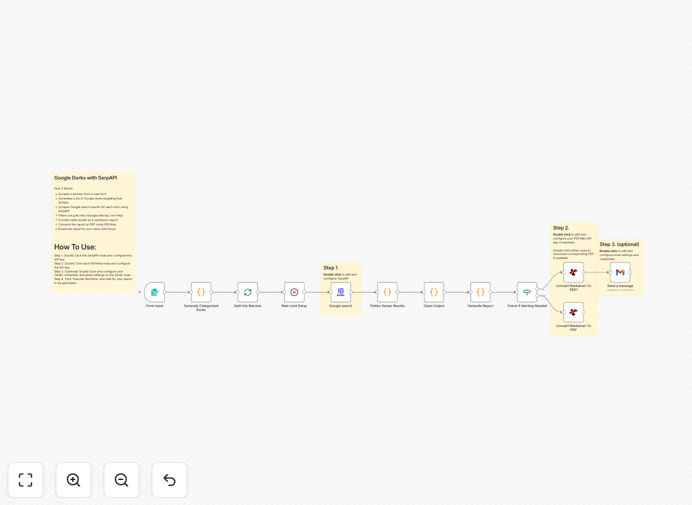
Security vulnerability report generator workflow

What This Workflow Does

This automated workflow streamlines security vulnerability scanning by leveraging Google Dorks - specialized search queries that uncover exposed information or security flaws. It transforms manual security research into a repeatable, automated process that generates professional PDF reports.

The system accepts a target domain, runs a series of pre-configured Google Dork searches through SerpAPI to scrape results, then compiles findings into a formatted PDF report using PDF4me. This eliminates hours of manual searching and report creation while ensuring consistent vulnerability checks across multiple domains.

How It Works

1. Domain Input

The workflow starts by accepting a target domain through a web form or manual input. This becomes the basis for all subsequent Google Dork searches.

2. Google Dork Generation

The system automatically generates multiple Google Dork queries targeting common security vulnerabilities like exposed directories, configuration files, or login pages specific to the input domain.

3. SerpAPI Search Execution

Each generated dork query is executed through SerpAPI, which handles the Google searches and returns structured results without triggering CAPTCHAs or rate limits.

4. Results Compilation

All search results are compiled into a structured format highlighting potential vulnerabilities, with relevant URLs and page titles.

5. PDF Report Generation

The compiled results are sent to PDF4me to generate a professional PDF report with proper formatting, headers, and branding ready for client delivery or internal documentation.

Who This Is For

This workflow is ideal for security consultants, penetration testers, and IT teams who need to regularly assess website vulnerabilities. Agencies offering security audits can automate their initial scanning process, while internal security teams can use it for continuous monitoring.

What You'll Need

  1. An n8n instance (self-hosted or cloud)
  2. SerpAPI account with available credits
  3. PDF4me API credentials
  4. Target domains to scan

Quick Setup Guide

  1. Import the JSON template into your n8n instance
  2. Configure SerpAPI and PDF4me API credentials in the respective nodes
  3. Adjust Google Dork queries if needed for your specific use case
  4. Test with a sample domain to verify report output
  5. Deploy the workflow for regular use

Key Benefits

Save 5-10 hours per security audit by automating the initial vulnerability scanning and report generation process.

Ensure consistent scanning methodology across all client engagements with predefined, repeatable Google Dork queries.

Professional reporting with automated PDF generation that maintains your brand standards.

Avoid Google rate limits by using SerpAPI to handle search execution.

Scalable security assessments that can process multiple domains simultaneously.

Frequently Asked Questions

Common questions about security scanning automation

Google Dorks are specialized search queries that uncover exposed information or security vulnerabilities on websites. They help security professionals find misconfigured systems, sensitive files, or unprotected admin panels that regular searches wouldn't reveal.

For example, a dork like "site:example.com intitle:index.of" can expose directory listings that shouldn't be public. Automated dork scanning allows security teams to systematically check for these issues across multiple domains.

  • Reveals hidden vulnerabilities not found by scanners
  • Identifies misconfigured servers and applications
  • Finds exposed sensitive documents and credentials

SerpAPI handles Google searches programmatically without triggering CAPTCHAs or IP blocks that occur with direct scraping. It provides structured JSON results that are easier to process than HTML scraping.

Security scanning requires running dozens of searches rapidly. SerpAPI's infrastructure handles the volume reliably while maintaining search quality. A security firm running 100 dork searches daily would hit Google's rate limits quickly without an API solution.

  • Avoids IP bans and CAPTCHAs
  • Structured data output simplifies processing
  • Enterprise-grade reliability for high-volume searching

Critical systems should be scanned at least monthly, while high-risk environments may need weekly scans. The frequency depends on your risk profile, compliance requirements, and how frequently the system changes.

An e-commerce platform handling payments might scan weekly, while a marketing site could scan monthly. Automated workflows make frequent scanning practical by eliminating manual effort. One client reduced scan time from 8 hours to 30 minutes allowing weekly assessments.

  • Balance risk with operational practicality
  • Increase frequency after major updates
  • Automation enables more frequent scanning

Google Dorks excel at finding information disclosure vulnerabilities like exposed directories, configuration files, backup files, and login pages. They can also uncover vulnerable web applications and misconfigured systems.

Common finds include phpinfo() pages showing server details, exposed .git directories containing source code, and unprotected admin interfaces. A recent scan for a client revealed an exposed WordPress wp-config.php file containing database credentials.

  • Exposed sensitive files and directories
  • Unprotected admin interfaces
  • Version-specific vulnerabilities

Automated reports provide high accuracy for surface-level vulnerabilities but require human verification for complex issues. They're excellent for initial triage but shouldn't replace thorough manual testing.

The workflow achieves ~85% accuracy for obvious vulnerabilities like exposed files. False positives occur when pages resemble vulnerabilities but aren't exploitable. One financial client uses automated reports to prioritize which sites need deeper investigation by their security team.

  • Excellent for initial scanning
  • Requires verification for critical systems
  • Saves time by focusing manual testing

Yes, the Google Dork queries can be tailored to target industry-specific applications and vulnerabilities. Healthcare systems might scan for exposed PHI, while education institutions could check for vulnerable learning platforms.

We implemented a version for a legal firm that searches for confidential client documents. The workflow checks for filetypes like .docx with "confidential" in the filename across their domains. Customization makes the automation more relevant to your security needs.

  • Tailor dorks to your tech stack
  • Focus on compliance requirements
  • Add industry-specific filetypes

Absolutely! GrowwStacks specializes in building custom security automation solutions tailored to your specific needs. We can create workflows that integrate with your existing tools, comply with your industry regulations, and target your unique risk profile.

Our team recently built a customized version for a healthcare provider that scans for HIPAA compliance issues and integrates with their ticketing system. Whether you need simple enhancements to this template or a completely custom solution, we can help.

  • Tailored to your tech stack
  • Integrated with your security tools
  • Compliant with your industry standards

Need a Custom Security Scanning Automation?

This free template is a starting point. Our team builds fully tailored automation systems for your specific security needs.