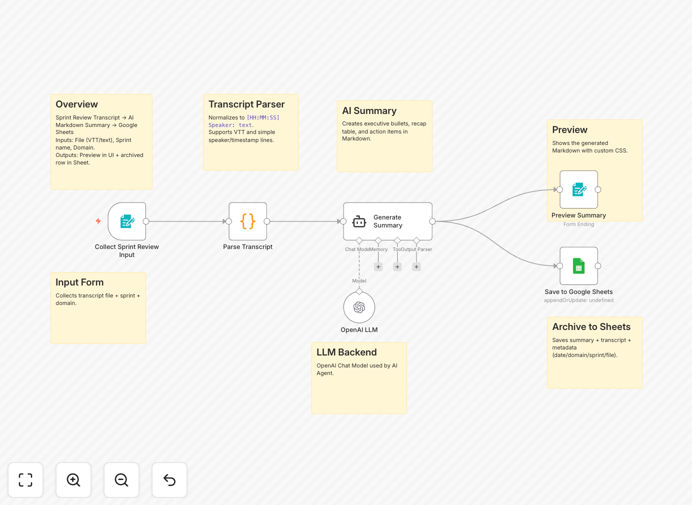
What This Workflow Does
This n8n template eliminates the tedious, manual process of documenting sprint reviews in Agile and Scrum frameworks. Instead of someone frantically taking notes during the demo or spending hours afterward writing summaries, this automation handles everything.
You simply upload the transcript or meeting notes from your sprint review session. The workflow uses AI to analyze the conversation, extract key decisions, highlight presented features, and identify action items with owners. The final, polished summary is then automatically logged to a Google Sheets spreadsheet for permanent record-keeping and easy sharing with stakeholders.
It turns unstructured meeting chatter into valuable, actionable project artifacts, ensuring nothing gets lost and every sprint's outcomes are clearly communicated.
How It Works
The workflow follows a logical, step-by-step process to transform raw input into structured insight.
1. Input Collection via Form
A user-friendly form serves as the entry point. Team members or the Scrum Master uploads the transcript file (VTT, plain text, etc.) and provides basic context like the sprint name and project domain. This makes the process accessible to everyone, not just technical users.
2. Transcript Parsing & Cleaning
A Code node takes the uploaded file and standardizes the format. It strips out timestamps, speaker labels, and other metadata to create clean, continuous text that the AI can effectively analyze. This step ensures consistency regardless of the source of your transcript.
3. AI-Powered Analysis & Summarization
The core intelligence: an AI Agent (powered by OpenAI) processes the cleaned text. It's prompted to look for specific Scrum elements: what was demoed, stakeholder feedback, decisions made, and most importantly, agreed-upon action items with responsible parties.
4. Structured Output Generation
The AI doesn't just spit out a paragraph. It generates a well-organized Markdown document with an executive summary, a table recapping the presentation flow, and a clear list of action items. This format is immediately useful for reports and stakeholder communications.
5. Archiving to Google Sheets
The final step automates record-keeping. The generated summary, along with the sprint name, date, and transcript filename, is appended as a new row in a designated Google Sheet. This creates a searchable, historical log of all your sprint reviews.
Who This Is For
This automation is designed for Agile teams and leaders who value efficiency and clear communication.
Scrum Masters & Agile Coaches: Reclaim hours spent on manual note-taking and reporting. Ensure consistent, high-quality documentation for every sprint without the burnout.
Product Owners & Product Managers: Maintain a clear, auditable trail of what was delivered, what feedback was received, and what was promised next. Perfect for reporting up to stakeholders or clients.
Development Team Leads: Keep the team aligned on outcomes and action items. The automated archive serves as a single source of truth for what was agreed upon in each review.
Remote & Distributed Teams: Especially valuable for teams where not everyone can attend live demos. The AI summary ensures everyone gets the same clear picture of outcomes and next steps.
What You'll Need
- An n8n instance: Either n8n.cloud or a self-hosted setup.
- OpenAI API Key: Required for the AI summarization step. You can get one from the OpenAI platform.
- Google Sheets Access: A Google account with Sheets access to create the destination spreadsheet and generate OAuth2 credentials for n8n.
- Transcript Files: Meeting notes or caption files from your sprint review sessions (supports .txt, .vtt, etc.).
Pro tip: Before you start, create your Google Sheet with these column headers: Date, Domain, Sprint Name, Content, Transcript File. This makes the setup seamless.
Quick Setup Guide
Get this automation running in your n8n workspace in under 10 minutes.
- Import the Template: Download the JSON file using the button above and import it into your n8n instance via the "Import from File" option.
- Configure Credentials:
- In the OpenAI node, add your API key.
- In the Google Sheets node, authenticate with your Google account and paste your target Spreadsheet ID.
- Test the Form: The workflow is triggered by a Form node. Open the provided form URL, upload a sample transcript, and fill in the sprint details.
- Activate & Run: Toggle the workflow to "Active" and submit the test form. Check the AI summary output in the execution preview and verify the new row appears in your Google Sheet.
- Share with Your Team: Distribute the form link to your Scrum team members so anyone can trigger the summarization after a review.
Key Benefits
Save 2-4 Hours Per Sprint: Eliminate the manual labor of listening back, taking notes, and formatting summaries. The AI does the heavy lifting in minutes.
Improve Stakeholder Communication: Deliver consistent, professional summaries to product owners, clients, and leadership immediately after the review, demonstrating professionalism and transparency.
Create a Valuable Knowledge Base: Every summary stored in Sheets becomes a searchable archive. Easily reference past decisions, track feedback trends, and prepare for retrospectives with concrete data.
Reduce Human Error & Bias: The AI extracts what was actually said, not what someone remembered or chose to highlight. This leads to more accurate and objective records of the meeting.
Scale Your Agile Practice: As your team grows or you manage multiple squads, this automation ensures documentation quality doesn't degrade. It standardizes the output across all teams and sprints.