LinkedIn Airtop Google Sheets Lead Scoring

Automate LinkedIn Company ICP Scoring

Prioritize high-value prospects by automatically scoring LinkedIn company profiles against your ideal customer profile. This workflow pulls company data into Google Sheets where Airtop applies your custom scoring rules to surface the best opportunities.

Download Template JSON · Zapier compatible · Free
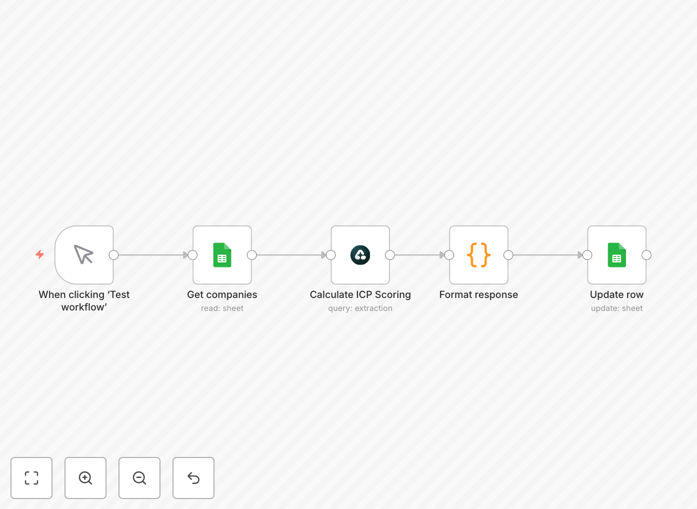
Screenshot of LinkedIn company scoring automation workflow in Airtop and Google Sheets

What This Workflow Does

This automation solves the challenge of manually evaluating hundreds of LinkedIn company profiles to identify your best potential customers. By automatically scoring companies against your ideal customer profile (ICP) criteria, your sales team can focus outreach on prospects with the highest conversion potential.

The workflow extracts key signals from LinkedIn company pages - including employee growth, tech stack mentions, funding status, and hiring trends - then applies your custom scoring model in Google Sheets via Airtop. Companies are ranked based on their fit, with color-coded visualizations highlighting your hottest leads.

How It Works

Step 1: LinkedIn Data Extraction

The workflow starts by pulling structured data from LinkedIn company profiles, including firmographics, growth metrics, and technology indicators that correlate with buying intent in your market.

Step 2: Google Sheets Integration

Company data flows into a centralized Google Sheet where your ICP scoring model lives. The sheet maintains historical data to track how companies' scores change over time.

Step 3: Airtop Scoring Engine

Airtop applies your weighted scoring rules to each company, calculating an overall ICP match score. You can adjust weights for different attributes (e.g., 2x points for using a competing product).

Step 4: Prioritization Dashboard

The final output is a prioritized list of companies with their complete scoring breakdown, enabling your team to tailor outreach based on each prospect's specific strengths as an ICP match.

Pro tip: Create separate scoring models for different product lines or customer segments. The workflow can run multiple scoring algorithms in parallel.

Who This Is For

This automation delivers the most value for B2B companies where:

  • Your ideal customers have identifiable characteristics on LinkedIn
  • You're evaluating hundreds of potential accounts
  • Different company attributes indicate varying levels of fit
  • Your team wastes time manually researching prospects

What You'll Need

  1. Airtop account (free tier available)
  2. Google Sheets (part of Google Workspace)
  3. LinkedIn Sales Navigator (recommended) or basic LinkedIn access
  4. Zapier account to connect the services

Quick Setup Guide

  1. Download the template JSON file
  2. Import into your Airtop account
  3. Connect your LinkedIn and Google Sheets accounts
  4. Customize the scoring weights in the Google Sheet
  5. Add your target company URLs or search criteria
  6. Run the workflow and review scored leads

Key Benefits

Focus on best-fit prospects first by automatically ranking companies based on your specific ICP criteria rather than gut feeling or superficial signals.

Reduce research time by 80% - what used to take hours of manual LinkedIn browsing now happens automatically with consistent scoring applied to every prospect.

Continuous prioritization as the workflow updates scores whenever new data appears on company profiles, ensuring your outreach list stays current.

Data-driven outreach with insights into why each company scored well, allowing personalized messaging that references their specific ICP match points.

Frequently Asked Questions

Common questions about LinkedIn company scoring and automation

ICP scoring evaluates how closely a LinkedIn company matches your ideal customer profile based on factors like industry, size, tech stack, and growth signals. This automation pulls LinkedIn company data into Google Sheets where you can apply custom scoring rules to prioritize outreach.

For example, a SaaS company might score prospects higher if they use a competing product, have recently raised funding, and are hiring for roles that would use their solution. The scoring model reflects what actually predicts conversion in your pipeline.

  • Creates objective prioritization beyond personal biases
  • Surfaces hidden patterns in your best customers
  • Adapts as your ICP evolves over time

Airtop provides a no-code interface to build scoring models that weight different company attributes. The workflow automatically updates scores as new LinkedIn data comes in, keeping your lead prioritization current without manual spreadsheet updates.

Instead of static Excel formulas, Airtop lets you create dynamic scoring rules that can incorporate conditional logic. For instance, you might double points for companies using a specific technology only if they also meet minimum employee count thresholds.

  • Visual rule builder for non-technical users
  • Real-time scoring updates
  • Historical tracking of score changes

Key scoring factors include employee count growth, funding rounds, tech stack mentions, job postings for relevant roles, and shared connections. The workflow captures these signals and normalizes them for consistent scoring across your pipeline.

For example, a company that grew from 50 to 150 employees in 12 months while posting jobs for data engineers would score highly for a data platform vendor. The system automatically identifies these high-intent signals that often precede purchases.

  • Prioritize signals with proven correlation to conversions
  • Combine multiple weak signals into strong indicators
  • Focus on change metrics rather than static attributes

Review scoring weights quarterly based on conversion data from your best customers. The automation makes it easy to test new scoring models by duplicating your Google Sheet and comparing results before updating production workflows.

We recommend analyzing won deals to identify which scoring factors actually predicted success versus those that seemed important but didn't correlate. This data-driven refinement improves targeting accuracy over time.

  • Align scoring with actual conversion patterns
  • Test changes safely before full rollout
  • Seasonal adjustments for industries with cyclical buying

Yes, the workflow can be extended to push scored leads into CRMs like HubSpot or Salesforce. High-scoring companies can trigger automated sequences while marginal fits route to nurture campaigns based on their specific gaps.

For instance, companies scoring above 80 might automatically create deals in your CRM with tailored playbooks, while those between 60-80 get added to an educational email track about solving their identified challenges.

  • Maintain CRM data quality with automated updates
  • Trigger different engagement paths by score tier
  • Sync back engagement data to refine scoring

Teams using automated scoring see 30-50% higher reply rates by focusing on best-fit prospects first. It also reduces time wasted on poor-fit leads, with most users reporting 5-10 hours saved per rep weekly on manual research and prioritization.

The biggest impact comes from concentrating effort where it's most likely to convert. One client increased their pipeline velocity by 40% simply by reallocating outreach from low-scoring to high-scoring accounts based on this automation's insights.

  • Higher conversion rates from better targeting
  • Reduced cost per acquired customer
  • Faster ramp for new sales hires

Absolutely! GrowwStacks specializes in building tailored LinkedIn automation workflows that connect to your existing tech stack. We'll design scoring models based on your unique ICP and implement automated data flows to keep your team focused on high-value prospects.

Our custom solutions can incorporate additional data sources beyond LinkedIn, create multi-touchpoint scoring models, and integrate with your specific sales tools. We handle everything from initial ICP analysis to ongoing optimization as your business evolves.

  • Custom scoring algorithms for your market
  • End-to-end implementation support
  • Ongoing performance tuning

Need a Custom LinkedIn Automation?

This free template is a starting point. Our team builds fully tailored automation systems for your specific needs.