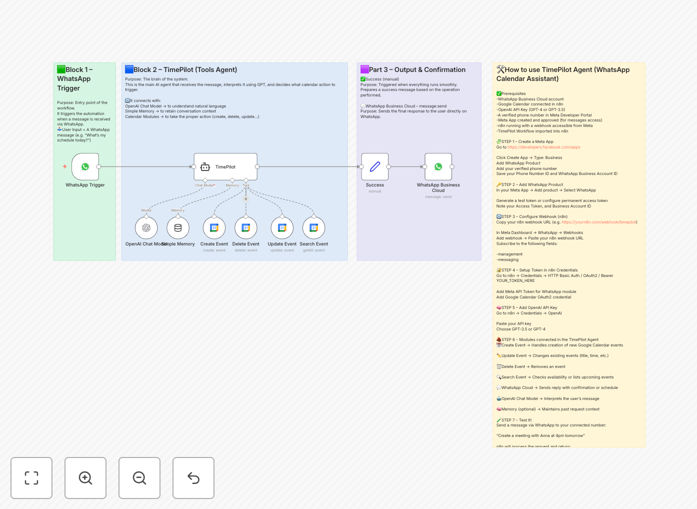
What This Workflow Does
This automation solves the constant scheduling back‑and‑forth that drains productivity. Instead of clients emailing to ask “Are you free Tuesday?” or team members coordinating via Slack, they simply send a WhatsApp message. The AI assistant understands their request, checks your Google Calendar, and performs the action—whether that’s creating a new event, moving an existing one, deleting a meeting, or sharing your availability.
The workflow acts as a 24/7 virtual scheduling assistant that speaks human language. A user might message “Can we reschedule our 2pm to tomorrow morning?” and the system will identify the original meeting, find an open slot tomorrow morning, update both calendars, and send a confirmation. This eliminates manual calendar management while providing a seamless, conversational experience for anyone needing to book your time.
How It Works
The process follows a clear, intelligent sequence that mimics how a human assistant would handle scheduling requests.
1. Message Reception & Analysis
When a WhatsApp message arrives, the workflow captures the sender’s number, message content, and timestamp. The text is sent to GPT‑4, which classifies the intent (create, update, delete, check availability) and extracts key entities: dates, times, event titles, attendees, and any specific instructions.
2. Calendar Interaction
Based on the classified intent, the workflow interacts with Google Calendar via its API. For creation, it checks for conflicts at the proposed time, creates the event with proper title/description/attendees, and sets reminders. For updates, it locates the existing event by time or title, modifies it, and notifies attendees. For availability checks, it scans your calendar and returns free slots in a readable format.
3. AI‑Powered Response Generation
GPT‑4 crafts a natural, friendly response confirming the action taken or asking for clarification if details are missing. The response is formatted for WhatsApp and sent back to the user, completing the conversation loop. The system maintains context within a session to handle follow‑up messages like “actually make it 30 minutes later.”
4. Error Handling & Logging
If the calendar API fails or the AI can’t parse the request, the workflow sends a graceful error message asking the user to rephrase, and logs the issue for review. All interactions are recorded for audit trails and to improve the AI’s understanding over time.
Who This Is For
This automation delivers the most value for service‑based businesses and busy professionals. Coaches, consultants, therapists, and freelancers can let clients book sessions directly via WhatsApp without exposing their calendar. Sales teams can schedule demos instantly when prospects are ready. Healthcare practices can manage appointment bookings. Executives can empower assistants or team members to manage their calendars conversationally.
It’s also ideal for internal operations. HR teams scheduling interviews, support managers organizing shift swaps, or project teams coordinating meetings across time zones—all benefit from reducing scheduling friction. If your business involves recurring calendar coordination with people outside your organization, this workflow will save significant time.
What You'll Need
- A running n8n instance (cloud or self‑hosted) with workflow permissions enabled.
- WhatsApp Business API access or a compatible WhatsApp cloud service configured with a webhook URL pointing to your n8n instance.
- Google Cloud Project with Calendar API enabled, and OAuth 2.0 credentials configured in n8n.
- OpenAI API key with GPT‑4 model access (or GPT‑3.5‑turbo as a fallback).
- The Google Calendar(s) you want to manage, with proper sharing permissions for the service account.
Pro tip: Start with a test calendar and a small group of users before rolling out to all clients. This lets you refine the AI’s understanding of your specific scheduling language and catch edge cases.
Quick Setup Guide
Import and configure this workflow in under 30 minutes with these steps:
- Download & Import: Click the Download Template button above, save the JSON file, and import it into your n8n instance via the Workflow menu.
- Configure WhatsApp Trigger: In the first node, set up your WhatsApp Business webhook credentials. Test that messages reach n8n by sending a test WhatsApp to your business number.
- Set Up Google Calendar Connection: Add your Google OAuth credentials in the Calendar nodes. Specify which calendar ID to use (usually “primary” for your main calendar).
- Add OpenAI API Key: Enter your OpenAI key in the GPT‑4 node. Adjust the system prompt if you want the AI to respond in a specific tone or include custom booking rules.
- Test Thoroughly: Send sample messages like “Schedule a meeting tomorrow at 3pm called Project Kickoff” and verify the event appears correctly in your calendar with proper reminders.
- Deploy & Monitor: Activate the workflow and monitor the execution logs for the first few days. Adjust any timezone settings or response templates based on real usage.
Key Benefits
Eliminate scheduling admin completely. This workflow handles the entire process from request to confirmation, saving 5–10 hours per week previously spent on calendar coordination. Your time is freed for revenue‑generating work instead of email tennis.
Improve client experience with instant, 24/7 scheduling. Clients can book time at their convenience, even outside business hours. The conversational interface feels natural and removes friction, increasing booking conversion and satisfaction.
Reduce missed meetings and scheduling errors. The AI double‑checks for conflicts, sends automatic confirmations, and can include video conference links and agendas directly in the calendar invite. Fewer mix‑ups mean higher attendance rates.
Scale scheduling without adding staff. As your client base grows, the automation handles increased volume effortlessly. One virtual assistant can manage scheduling for multiple team members or locations.
Gain insights from scheduling data. Logs of all interactions provide data on peak booking times, common request types, and client preferences, helping you optimize your service offerings and availability.