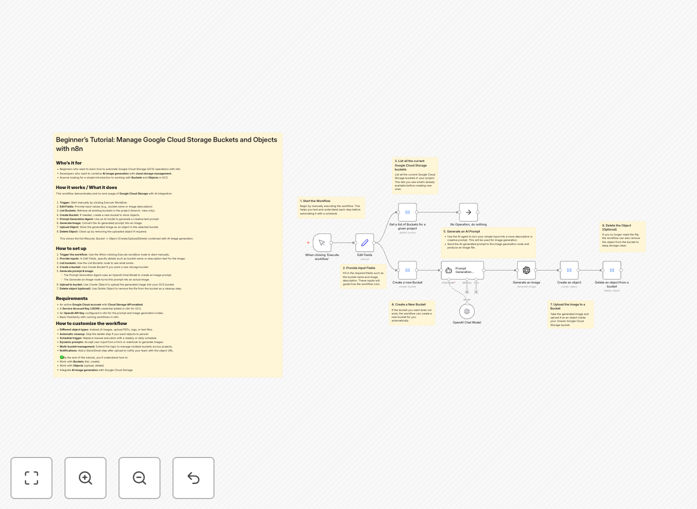
What This Workflow Does
This automation solves the challenge of creating and managing digital assets at scale. Traditional content creation requires manual design work, file naming conventions, and folder organization - processes that become unsustainable as businesses grow.
The workflow automatically generates branded images using GPT-4 Mini's AI capabilities, then organizes them in Google Cloud Storage with proper metadata, access controls, and lifecycle policies. It reduces the time between content ideation and deployment from hours to minutes.
How It Works
1. AI Image Generation
GPT-4 Mini processes natural language prompts to generate relevant images based on your content strategy. The model understands brand guidelines and creates visuals that match your existing asset library.
2. Automated File Organization
Generated images are automatically uploaded to designated Google Cloud Storage buckets with proper folder structures. The workflow applies consistent naming conventions and adds metadata tags for searchability.
3. Access Control Management
The system assigns appropriate IAM permissions to each asset based on predefined rules. Marketing teams get edit access while other departments receive view-only permissions automatically.
Pro tip: Use lifecycle rules to automatically archive older assets to cheaper storage classes, reducing cloud costs by up to 70%.
Who This Is For
This workflow benefits any team managing digital assets in Google Cloud Storage:
- Marketing teams creating campaign materials at scale
- E-commerce businesses needing product images for multiple SKUs
- Content creators maintaining organized media libraries
- Enterprise IT teams enforcing storage policies automatically
What You'll Need
- Google Cloud Storage account with bucket creation permissions
- n8n instance (cloud or self-hosted)
- GPT-4 Mini API access
- Basic understanding of Google Cloud IAM roles
Quick Setup Guide
- Download the JSON template file
- Import into your n8n instance
- Configure your Google Cloud Storage credentials
- Set up GPT-4 Mini API connection
- Define your asset naming conventions and folder structure
- Test with sample prompts before full deployment
Key Benefits
80% faster asset creation: Generate dozens of branded images in minutes rather than days.
Consistent organization: Eliminate messy folders and inconsistent file naming.
Reduced cloud costs: Automated lifecycle policies move older files to cheaper storage.
Better collaboration: Team members always access the latest approved versions.
Scalable solution: Handle 10 or 10,000 assets with the same workflow.