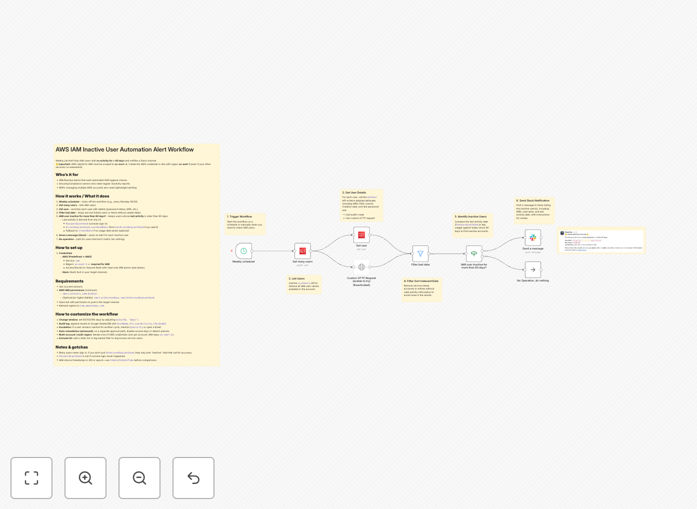
What This Workflow Does
This automation solves the critical security challenge of orphaned AWS IAM accounts that accumulate over time. When employees leave or change roles, their cloud access often remains active unnecessarily. These dormant accounts become security liabilities that compliance auditors frequently flag.
The workflow automatically scans your AWS environment weekly, identifying IAM users with no recorded activity for 90+ days. It then sends detailed Slack notifications to your security channel, including the username, last activity date, and recommended actions. This creates an auditable trail of access reviews while preventing permission sprawl.
How It Works
1. Scheduled AWS IAM User Scan
The workflow triggers on a weekly schedule (configurable) to query AWS Identity and Access Management. It retrieves all IAM users and their last activity timestamps through the AWS API.
2. Inactivity Threshold Filtering
Each user's last activity date is compared against the current date. The system flags accounts exceeding your configured inactivity threshold (default 90 days). This threshold is adjustable based on your security policies.
3. Slack Notification Generation
For each inactive account detected, the workflow formats a detailed Slack message. The notification includes the IAM username, ARN, last active date, and suggested remediation steps. Messages are posted to your designated Slack channel with appropriate warning emojis.
Pro tip: Customize the Slack message format to include direct links to your internal runbooks or AWS console actions for faster remediation.
Who This Is For
This workflow benefits cloud security teams, DevOps engineers, and IT administrators managing AWS environments. Companies subject to compliance frameworks like SOC2, ISO27001, or HIPAA will find it particularly valuable. The automation scales effortlessly from startups to enterprises with thousands of IAM users.
What You'll Need
- An AWS account with IAM access
- n8n instance or account
- Slack workspace with incoming webhook permissions
- AWS credentials with IAM read permissions
Quick Setup Guide
- Download the JSON workflow file
- Import into your n8n instance
- Configure AWS credentials in the IAM node
- Set your Slack webhook URL
- Adjust the inactivity threshold if needed
- Test with a small set of IAM users first
Key Benefits
Reduce security risks: Proactively eliminate dormant accounts that could be compromised, shrinking your attack surface.
Maintain compliance: Demonstrate regular access reviews for auditors with automated documentation.
Save admin time: Replace manual spreadsheet tracking with automated weekly reports.
Improve visibility: Get centralized Slack notifications instead of checking multiple AWS accounts.
Customizable thresholds: Easily adjust the inactivity period to match your security policies.