What This Workflow Does
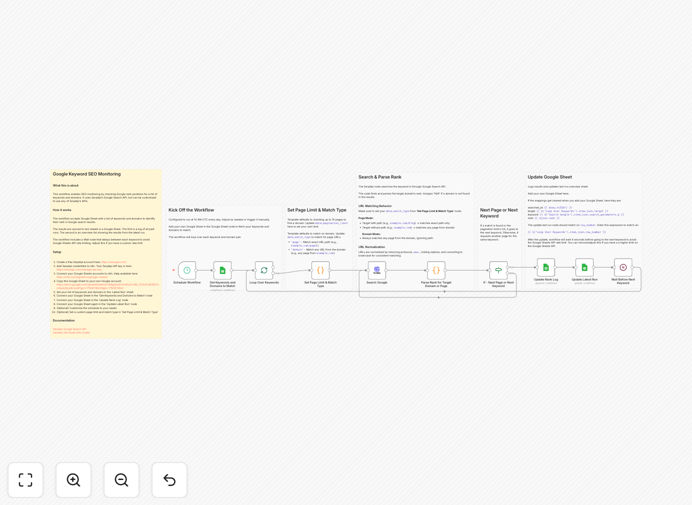
This automated workflow solves the time-consuming problem of manually tracking search engine rankings for your website and competitors. It connects SerpApi (a Google search results API) with Google Sheets to create a powerful SEO monitoring system that runs automatically on your schedule.
The workflow checks Google search rankings for your specified keywords and domains, then logs the positions in a Google Sheet with timestamps. This creates a historical record you can analyze to measure SEO progress, identify ranking drops, and track competitor movements.
How It Works
1. Keyword and Domain Setup
The workflow starts with your predefined list of keywords and domains to track in a Google Sheet. You can easily add or remove targets without modifying the workflow itself.
2. SerpAPI Rank Checking
For each keyword, the workflow queries SerpApi to get current Google search results. It scans the results to find your specified domains and records their positions.
3. Data Processing
The workflow processes the API response to extract ranking data, including position, URL, and search snippet. It can handle cases where your domain appears multiple times in the results.
4. Google Sheets Logging
All ranking data gets written back to your Google Sheet with timestamps, creating a searchable history. The sheet can include additional metrics like position changes from previous checks.
Who This Is For
This workflow is ideal for SEO professionals, marketing teams, and business owners who need to:
- Track keyword rankings without manual searches
- Monitor competitor positions in organic search
- Measure the impact of SEO changes over time
- Create reports showing SEO progress for clients
What You'll Need
- An n8n account (cloud or self-hosted)
- A SerpApi account with available API credits
- A Google Sheet with your keywords and domains to track
- Google Cloud credentials to access the Sheet
Quick Setup Guide
- Download the JSON workflow file
- Import it into your n8n instance
- Connect your SerpApi account in the API node
- Connect your Google Sheets account
- Set your keyword and domain lists in the Sheet
- Configure the schedule for automatic runs
Key Benefits
Save 5-10 hours per month by eliminating manual rank tracking and data entry. The workflow automates what would normally be a tedious weekly task.
Get more accurate data with consistent API checks that eliminate human error in manual searches. The workflow checks rankings the same way every time.
Spot trends faster with historical data automatically logged in your spreadsheet. Easily visualize ranking changes over time.
Monitor competitors efficiently by tracking multiple domains in the same workflow. See when competitors gain or lose positions for your keywords.