n8n Gemini AI Calendar Integration Weather API

Morning briefing podcast: generate daily summaries with Gemini AI, weather, and calendar

Automate your personalized morning routine with AI-generated audio briefings combining your schedule, forecasts, and news

Download Template JSON · n8n compatible · Free
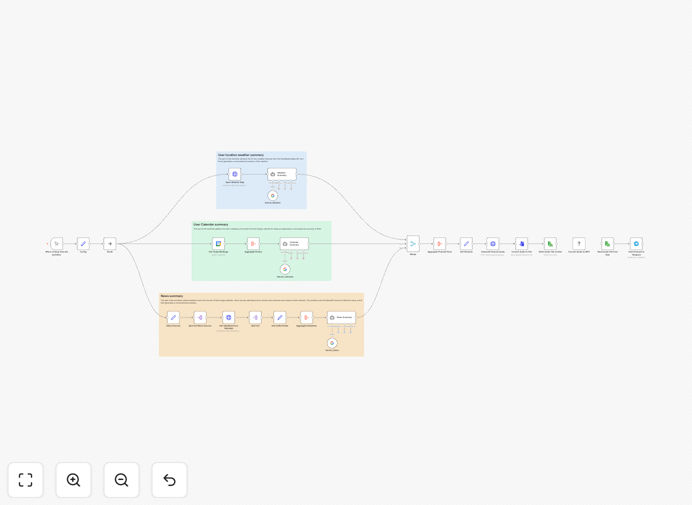
Morning briefing podcast workflow diagram

What This Workflow Does

Instead of wasting precious morning time checking multiple apps for calendar events, weather forecasts, and news updates, this automated workflow consolidates everything into a personalized audio briefing. It pulls data from your connected calendars, weather APIs, and news sources, then uses Gemini AI to generate a coherent summary in natural language.

The final output is an MP3 podcast delivered to your preferred device or app at your designated morning time. Executives, busy professionals, and remote teams use this to start their day informed without app-switching fatigue. The AI understands context between items - for example, noting if rain might affect your outdoor meeting location.

How It Works

1. Data Collection Phase

The workflow begins by pulling your calendar events for the day from Google Calendar or Outlook. Simultaneously, it fetches weather forecasts for your locations and scans configured news/RSS feeds for relevant updates.

2. AI Processing Stage

Gemini AI analyzes all collected data points, identifying connections between items. It prioritizes information based on your schedule and generates a script that flows naturally between topics, adding contextual insights where relevant.

3. Audio Generation

The text script gets converted to high-quality speech using text-to-speech services. The system can adjust speaking pace and add subtle pauses between sections for better listening comprehension.

4. Delivery & Distribution

The final MP3 file gets delivered via your preferred method - emailed as an attachment, uploaded to podcast apps, or sent to smart speakers. Optional transcripts can be included for reference.

Pro tip: Add a 5-minute buffer before your actual wake-up time to ensure the briefing is ready when you start your day.

Who This Is For

This workflow benefits busy professionals who want to optimize their morning routine. Executives use it to review their day's priorities hands-free during their commute. Remote teams implement shared briefings to stay aligned. Frequent travelers appreciate location-aware updates. Anyone who values starting their day informed without digital overwhelm will find this automation valuable.

What You'll Need

  1. An n8n instance (cloud or self-hosted)
  2. Google Calendar or Microsoft Outlook account
  3. Gemini API key (available through Google AI Studio)
  4. Weather API account (OpenWeatherMap, WeatherAPI, etc.)
  5. Optional: News API key or RSS feed URLs
  6. Text-to-speech service account (Amazon Polly, Google TTS, etc.)

Quick Setup Guide

  1. Download and import the JSON template into your n8n instance
  2. Configure your calendar connection in the first node
  3. Add your Gemini API key in the AI processing node
  4. Set up weather location(s) and API credentials
  5. Customize news sources if desired
  6. Test the workflow and adjust timing/voice preferences
  7. Schedule daily execution 30-60 minutes before your wake-up time

Key Benefits

Saves 15-30 minutes daily by eliminating manual checking of multiple apps each morning. The consolidated briefing delivers all essential information in one efficient format.

Improves morning productivity with context-aware insights. The AI highlights connections between weather, schedule, and news that you might miss when reviewing separately.

Reduces decision fatigue by presenting information in priority order based on your actual schedule. No more switching between apps trying to piece together your day.

Customizable for teams with shared briefings that include company-wide announcements alongside individual schedules. Great for remote and hybrid work environments.

Always up-to-date with real-time data pulls and regenerations if critical changes occur after the initial briefing generation.

Frequently Asked Questions

Common questions about AI morning briefings and automated summaries

AI-generated morning briefings save time by consolidating information from multiple sources into one digestible format. They provide personalized updates tailored to your schedule and interests while eliminating the need to check multiple apps.

Businesses use them to keep teams aligned with daily priorities and executives use them to start their day efficiently. The audio format allows consumption during other activities like commuting or exercising, making better use of morning time.

  • Reduces cognitive load from app switching
  • Provides consistent information structure daily
  • Can highlight unexpected connections between data points

Gemini AI analyzes multiple data sources to create coherent, natural-sounding summaries. It understands context between calendar events, weather impacts, and news relevance to your schedule.

Unlike basic text concatenation, Gemini can highlight connections between items and prioritize information based on your daily agenda. For example, it might note that rain forecast coincides with your outdoor team lunch and suggest alternatives.

  • Creates human-like flow between unrelated data points
  • Adjusts tone based on content (urgent vs routine)
  • Learns preferences over time for better personalization

Google Calendar and Microsoft Outlook are most commonly integrated due to their API reliability and detailed event data. The workflow extracts key details like meeting times, participants, locations, and descriptions.

For optimal results, structure calendar events with clear titles and agenda details in the description field. The system can parse virtual meeting links and dial-in numbers to include in the audio briefing. Shared calendars work well for team briefings.

  • Google Calendar offers excellent free API access
  • Outlook integration supports enterprise environments
  • Both allow granular permission controls

Yes, weather integrations typically pull location-specific forecasts from services like OpenWeatherMap or WeatherAPI. The system can highlight relevant weather impacts on your schedule, like suggesting an umbrella for outdoor meetings or adjusting commute times for precipitation.

Multi-location briefings are possible for frequent travelers. The AI can compare weather between home and destination when relevant to travel plans. Businesses with multiple offices use this to track conditions across sites.

  • Supports multiple fixed locations or dynamic detection
  • Can prioritize severe weather alerts
  • Integrates pollen counts for allergy sufferers

News sources should refresh daily, while weather typically updates every 6-12 hours. Calendar data pulls in real-time. Most businesses run the briefing generation 30-60 minutes before delivery to ensure freshness.

Critical updates can trigger immediate regenerations if needed. For example, if a calendar event gets canceled or severe weather alert appears, the system can regenerate the relevant sections. Some users schedule a secondary "check-in" briefing later in the morning.

  • Balance freshness with system load
  • Critical changes can force regeneration
  • Consider timezone differences for global teams

MP3 is the most compatible format across devices and platforms. The workflow typically generates high-quality (128-192kbps) mono audio since voice doesn't require stereo.

Some systems offer variable playback speeds or chapter markers for longer briefings. Podcast RSS feeds allow easy subscription in apps. For corporate use, consider adding brief intro/outro music beds for brand consistency.

  • MP3 balances quality and file size
  • Mono sufficient for voice content
  • RSS enables podcast app subscriptions

Yes, GrowwStacks specializes in tailored briefing systems that integrate with your specific tools and data sources. Our team can add custom data sources, adjust summary formats, implement team-specific briefings, and connect to internal systems.

We've built briefing systems for executives, field teams, and entire departments with role-specific content. Custom solutions might include compliance reminders, KPI highlights, or integration with internal knowledge bases beyond standard calendar/weather/news.

  • Custom data source integration
  • Role-based content filtering
  • Enterprise security compliance

Need a Custom Morning Briefing Integration?

This free template is a starting point. Our team builds fully tailored automation systems for your specific needs.