Zapier TMDB Google Calendar Telegram

Movie Release Calendar: Add TMDB Films to Google Calendar via Telegram Bot

Automatically track upcoming movie releases and add them to your calendar with one click

Download Template JSON · n8n compatible · Free
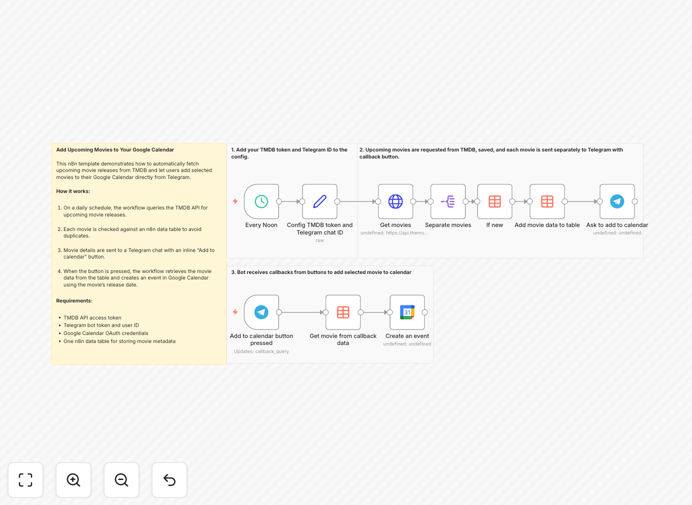
Screenshot of movie release calendar automation workflow

What This Workflow Does

This automation solves the problem of manually tracking movie release dates by connecting TMDB's comprehensive film database with your Google Calendar via Telegram. Instead of checking multiple sources for premiere dates, the workflow automatically:

1. Fetches upcoming releases from TMDB's API
2. Filters and organizes the data
3. Sends curated movie listings to your Telegram
4. Lets you add events to Google Calendar with one click

How It Works

Step 1: Scheduled Data Fetch

The workflow runs daily to query TMDB's API for upcoming movie releases based on your configured preferences.

Step 2: Data Processing

New releases are checked against a database to avoid duplicates, with relevant details extracted (title, release date, genre, etc.).

Step 3: Telegram Notification

Formatted movie cards are sent to your Telegram with an "Add to Calendar" button for each film.

Step 4: Calendar Integration

When you click the button, the workflow creates a Google Calendar event with all movie details automatically populated.

Pro tip: Configure the workflow to only include movies from your favorite genres or with certain popularity thresholds to avoid notification overload.

Who This Is For

This automation is perfect for:

  • Film enthusiasts who want to track premieres
  • Movie bloggers/content creators managing release schedules
  • Theater owners tracking upcoming screenings
  • Media professionals monitoring industry releases
  • Friends/family sharing movie night plans

What You'll Need

  1. TMDB API access (free tier available)
  2. Telegram bot token
  3. Google Calendar API credentials
  4. n8n instance (cloud or self-hosted)
  5. Basic understanding of API authentication

Quick Setup Guide

  1. Download the template JSON file
  2. Import into your n8n instance
  3. Configure TMDB API credentials
  4. Set up Telegram bot integration
  5. Connect Google Calendar OAuth
  6. Adjust filters for your movie preferences
  7. Activate the workflow

Key Benefits

Save 5+ hours monthly by eliminating manual checking of multiple sources for movie release dates.

Never miss a premiere with automated calendar events that sync across all your devices.

Customizable filters ensure you only get notified about movies that match your interests.

Mobile-friendly workflow through Telegram integration lets you manage everything from your phone.

Scalable solution that can be expanded for business use cases like theater management.

Frequently Asked Questions

Common questions about movie release automation and integration

Automation eliminates manual checking for movie release dates by automatically pulling data from TMDB and adding events to your calendar. This saves hours of research time and ensures you never miss a premiere.

Without automation, you'd need to regularly check multiple sources, manually enter dates, and update your calendar when changes occur. The workflow handles all this seamlessly in the background.

Telegram integration allows you to receive movie notifications and add them to your calendar with one click, creating a seamless mobile-first experience without needing to switch between apps.

The Telegram bot interface makes it easy to review movie options before adding them to your calendar, and you can access the functionality from anywhere using your phone.

TMDB maintains one of the most comprehensive movie databases with release dates that are typically updated as soon as studios announce changes. The API provides reliable data for automation purposes.

The workflow can be configured to verify dates against multiple sources or include user confirmation for critical events if needed.

Yes, you can filter movies by genre, popularity threshold, or specific criteria before they're added to your calendar. The workflow can be modified to only include films matching your preferences.

Common filters include minimum rating scores, specific genres, or exclusion of certain content types. You maintain full control over what appears in your calendar.

The automation can be configured to check for date changes and automatically update your calendar events, ensuring your schedule always reflects the most current information.

You'll receive a notification in Telegram when dates change, and the corresponding calendar event will be updated without any manual intervention required.

Absolutely. The workflow can be scaled for business use by adding multiple users, custom filters for industry screenings, or integration with ticketing systems for comprehensive release management.

Business versions often include additional features like team notifications, screening room scheduling, and integration with box office systems.

Yes, our team can build a tailored solution with custom filters, multi-user support, and integration with your existing systems. We'll design it to match your specific workflow requirements.

Custom solutions typically include consultation to understand your unique needs, white-label branding, and ongoing support to ensure the automation continues to meet your evolving business needs.

Need a Custom Movie Release Automation?

This free template is a starting point. Our team builds fully tailored automation systems for your specific business needs.